
What Is Web Hosting? Complete Beginner's Guide for 2026
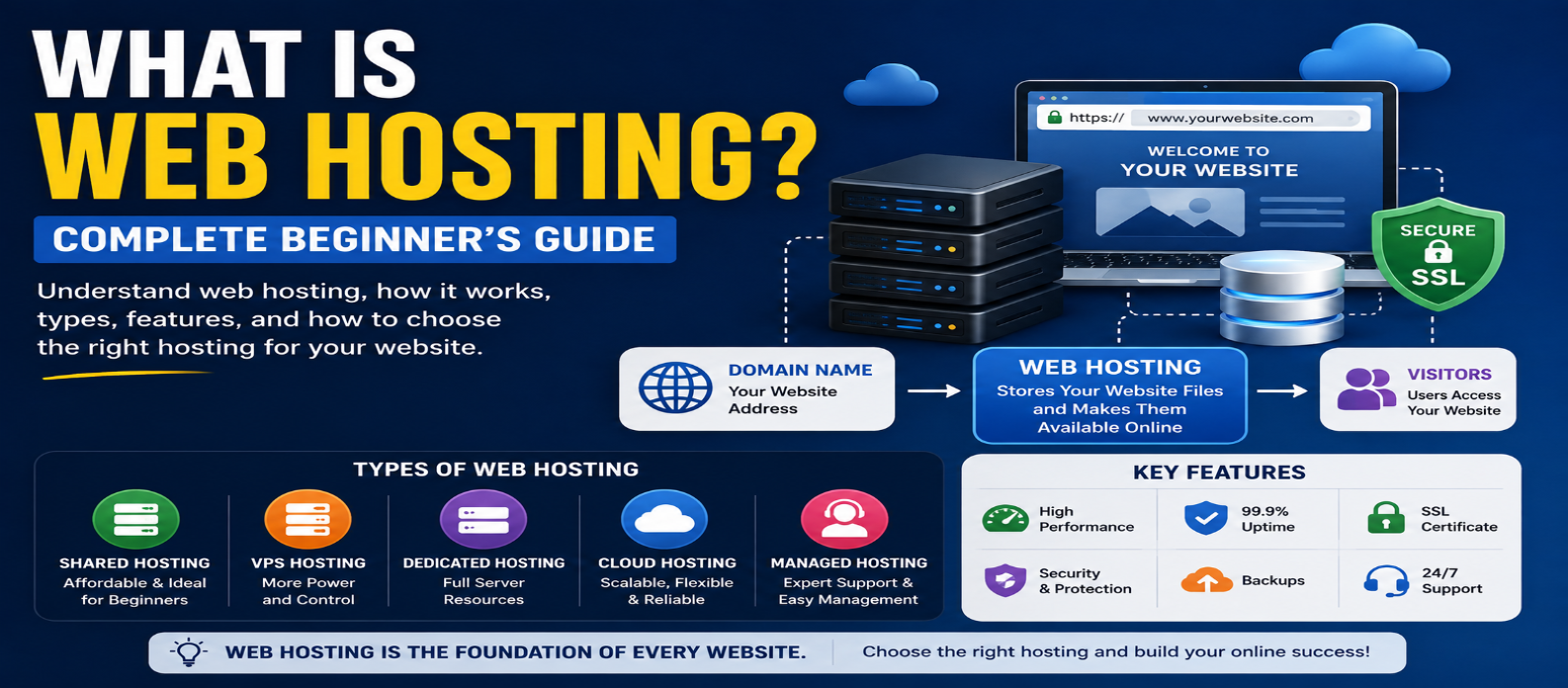
"Learn what web hosting is and how it works, including shared, VPS, dedicated, cloud and managed hosting, domains, DNS, servers, HTTPS, CDN, backups, security, performance, and how to choose the right hosting."
What Is Web Hosting? Complete Beginner's Guide for 2026
Every website needs somewhere to run.
You can create HTML pages, upload images, build a WordPress site, or develop a complete web application—but those files and services need infrastructure that can deliver the website to visitors over the internet.
That's the basic purpose of web hosting.
If you're planning your first website, understanding hosting will help you make better decisions about domains, servers, performance, security, and cost.
What Is Web Hosting?
Web hosting is a service that provides the computing resources and infrastructure needed to make a website or web application available online.
A simplified setup looks like:
Visitor
   ↓
Domain Name
   ↓
DNS
   ↓
Hosting Server
   ↓
Website
When someone requests your website, their browser connects to infrastructure serving your site.
The server processes the request and returns the required content.
That could include:
HTML
CSS
JavaScript
Images
Fonts
API responses
For dynamic websites, the server may also execute application code or retrieve information from a database.
Why Do Websites Need Hosting?
Suppose you create:
index.html
style.css
script.js
logo.png
on your computer.
You can open those files locally, but other internet users can't automatically access them.
The website needs to be deployed to infrastructure designed to serve it online.
Hosting typically provides some combination of:
- Storage
- Processing power
- Memory
- Network connectivity
- Server software
- Security features
- Management tools
Different hosting products provide different levels of control and responsibility.
Domain Name vs Web Hosting
Beginners often confuse these two.
A domain name is the name people use to reach your website:
example.comHosting provides the infrastructure that serves the website.
A useful simplified analogy is:
Domain = Address
Hosting = Property at that address
They work together but can be purchased from different companies.
You can register a domain with one provider and host your website with another.
How Does Web Hosting Work?
Imagine someone enters:
example.cominto a browser.
A simplified process is:
1. The browser needs to locate the website
2. DNS helps resolve the domain
3. The browser connects to the appropriate server
4. The server receives the request
5. The website or application processes it
6. The server sends a response
7. The browser renders the result
For a basic static website, the server may simply return files.
For a dynamic application, the process can involve:
Browser
   ↓
Web Server
   ↓
Application
   ↓
Database
   ↓
Application
   ↓
Browser
The exact architecture depends on the website.
What Is a Web Server?
The term server can refer to physical or virtual computing infrastructure, but it can also refer to software that handles requests.
Web-server software receives HTTP requests and returns responses.
For example, when a browser asks for:
/productsthe server might return an HTML page.
Or an application could generate the page dynamically using information stored in a database.
Modern hosting platforms may hide much of this complexity from the website owner.
Types of Web Hosting
Not every website needs the same infrastructure.
Here are the major categories beginners are likely to encounter.
1. Shared Hosting
Shared hosting places multiple customers on shared server infrastructure.
Conceptually:
Server
├── Website A
├── Website B
├── Website C
└── Website D
Because resources are shared, this is commonly an affordable entry point.
It can suit:
- Small websites
- Personal blogs
- Portfolios
- Basic business sites
The trade-off is less control and potentially fewer dedicated resources than more advanced hosting options.
2. VPS Hosting
VPS stands for Virtual Private Server.
Virtualization divides physical infrastructure into isolated virtual environments.
A VPS typically gives you greater control over:
- Server configuration
- Software installation
- Resource allocation
- Operating environment
This flexibility also means more responsibility.
Depending on whether the VPS is managed or unmanaged, you may need to handle updates, security, monitoring, and server configuration yourself.
3. Dedicated Hosting
With dedicated hosting, server resources are dedicated to one customer rather than shared in the same way as traditional shared hosting.
This can provide substantial control and predictable resource availability.
However, dedicated servers can be more expensive and may require greater technical expertise.
Most beginners don't need dedicated infrastructure for a new website.
4. Cloud Hosting
Cloud hosting uses distributed computing infrastructure rather than depending entirely on one traditional server setup.
Depending on the service, cloud platforms can provide:
- Flexible scaling
- On-demand resources
- Geographic deployment
- Automated infrastructure
- Usage-based pricing
"Cloud hosting" is a broad term, so features can differ significantly between providers.
5. Managed Hosting
Managed hosting means the provider handles more of the technical administration.
Depending on the service, management may include:
- Software updates
- Security configuration
- Backups
- Monitoring
- Performance optimization
Managed hosting can be useful when you want to focus on the website rather than server administration.
Always check exactly what "managed" includes because the term varies between providers.
6. Static and Serverless Hosting
Modern websites don't always need a traditional continuously managed server.
Static hosting can serve pre-built HTML, CSS, JavaScript, and other assets efficiently.
Serverless platforms can run backend functions when needed without requiring the developer to manage traditional server infrastructure directly.
These approaches can be excellent for modern applications, although their architecture differs from conventional shared hosting.
What Hosting Resources Matter?
Hosting plans often advertise technical specifications.
The most important ones depend on your website.
Storage
Space available for website files and other hosted data.
Bandwidth or Data Transfer
The amount of data transferred between your hosting infrastructure and users.
CPU
Processing resources available for executing workloads.
Memory
Working memory available to applications and services.
Database Resources
Dynamic websites may require databases with their own storage, connection, or performance limits.
Don't automatically buy the plan with the largest numbers.
Choose resources based on your application's actual needs.
What Is Uptime?
Uptime describes how consistently a service remains available.
If your hosting becomes unavailable, visitors may not be able to access your website.
Hosting reliability can depend on:
- Infrastructure
- Network design
- Hardware
- Software
- Maintenance
- Traffic
- Security incidents
- Application failures
When evaluating a hosting service, read its uptime commitment and service terms carefully rather than relying only on marketing language.
Hosting and Website Speed
Hosting can affect performance, but it's only one part of website speed.
A slow website may also be caused by:
Huge Images
Too Much JavaScript
Slow Database Queries
Unoptimized Code
Excessive Third-Party Scripts
Poor Caching
Changing hosting won't automatically fix inefficient website code.
Good performance usually requires both suitable infrastructure and an optimized website.
What Is a CDN?
A Content Delivery Network (CDN) can distribute cached content through servers in multiple geographic locations.
Instead of every visitor retrieving certain assets from one origin location, a CDN may serve cached content from infrastructure closer to the visitor.
This can improve delivery speed and reduce load on the origin server.
CDNs commonly handle assets such as:
- Images
- CSS
- JavaScript
- Fonts
- Videos
- Static files
Some also provide security and traffic-management features.
Hosting, SSL, and HTTPS
A website should normally be served using:
https://HTTPS uses TLS to protect data transmitted between browsers and servers.
The server needs an appropriate certificate for the hostname.
Many modern hosting services automate certificate issuance and renewal.
However, remember:
Domain Registration ≠ Hosting ≠ TLS Certificate
They work together but perform different jobs.
Backups Matter
Hosting infrastructure can fail, accounts can be compromised, software can break, and website owners can accidentally delete important data.
That's why backups matter.
A useful backup strategy should consider:
- Website files
- Databases
- Configuration
- Backup frequency
- Retention period
- Off-site copies
- Restoration process
A backup isn't very useful if you don't know whether it can actually be restored.
Web Hosting Security
Hosting security is shared between the provider and website owner.
Depending on your setup, important practices may include:
- Strong account passwords
- Multi-factor authentication
- Software updates
- Secure file permissions
- HTTPS
- Regular backups
- Malware monitoring
- Firewall protection
- Limited administrator access
With unmanaged infrastructure, more security responsibility falls on you.
Managed platforms may handle more of it.
How Much Hosting Do You Need?
A new portfolio or informational website may require very little infrastructure.
A high-traffic application with databases, uploads, background processing, and many simultaneous users may require considerably more.
Don't choose hosting solely based on imagined future traffic.
Start with infrastructure appropriate for your current requirements while ensuring there's a reasonable upgrade path.
How to Choose Web Hosting
Before choosing a plan, ask:
What am I hosting?
A static site, WordPress blog, store, API, or custom application can have different requirements.
Then evaluate:
Performance — Are the resources appropriate?
Reliability — What availability commitment is offered?
Security — What protections and responsibilities apply?
Backups — Are backups included, and can they be restored easily?
Support — What technical assistance is available?
Scalability — Can the plan grow?
Control — Do you need server-level access?
Price — What will renewal and additional services cost?
Don't select hosting only because it advertises "unlimited" features. Read what those claims actually mean.
Common Web Hosting Mistakes
Buying Too Much Too Early
Most new websites don't need powerful dedicated infrastructure.
Choosing Only by Price
Very cheap hosting isn't valuable if it can't reliably meet your requirements.
Ignoring Backups
Always understand how your website can be recovered.
Forgetting Renewal Pricing
Introductory and renewal prices may differ.
Assuming Hosting Fixes Every Speed Problem
Frontend and backend optimization still matter.
Ignoring Security Responsibilities
Know what the provider manages and what you must manage yourself.
A Simple Website Setup
For a typical beginner website:
DOMAIN
   ↓
DNS
   ↓
HOSTING
   ↓
WEBSITE FILES / APPLICATION
   ↓
HTTPS
   ↓
VISITORS
Optional services such as a CDN, database, email hosting, analytics, or external APIs can be added depending on the project.
Conclusion
Web hosting provides the infrastructure that makes a website or web application available online.
The important distinction is:
Domain → Gives the website a name
DNS → Helps visitors find its destination
Hosting → Runs or serves the website
HTTPS → Protects communication
When choosing hosting, don't focus only on storage or advertised traffic limits. Consider reliability, performance, security, backups, support, scalability, technical control, and long-term pricing.
You don't need the most expensive hosting plan to launch a good website. You need hosting that matches what your website actually requires and gives you a sensible path to grow.
Get a Free Access To 200+ Free Tools:
|
Home Page |
|
|
Calculator Tools |
|
|
Text & Converter Tools |
|
|
PDF & Image Tools |
|
|
Games & Developer Tools |
|
|
Resume Builder |