
What Is an IP Address? Complete Beginner's Guide for 2026
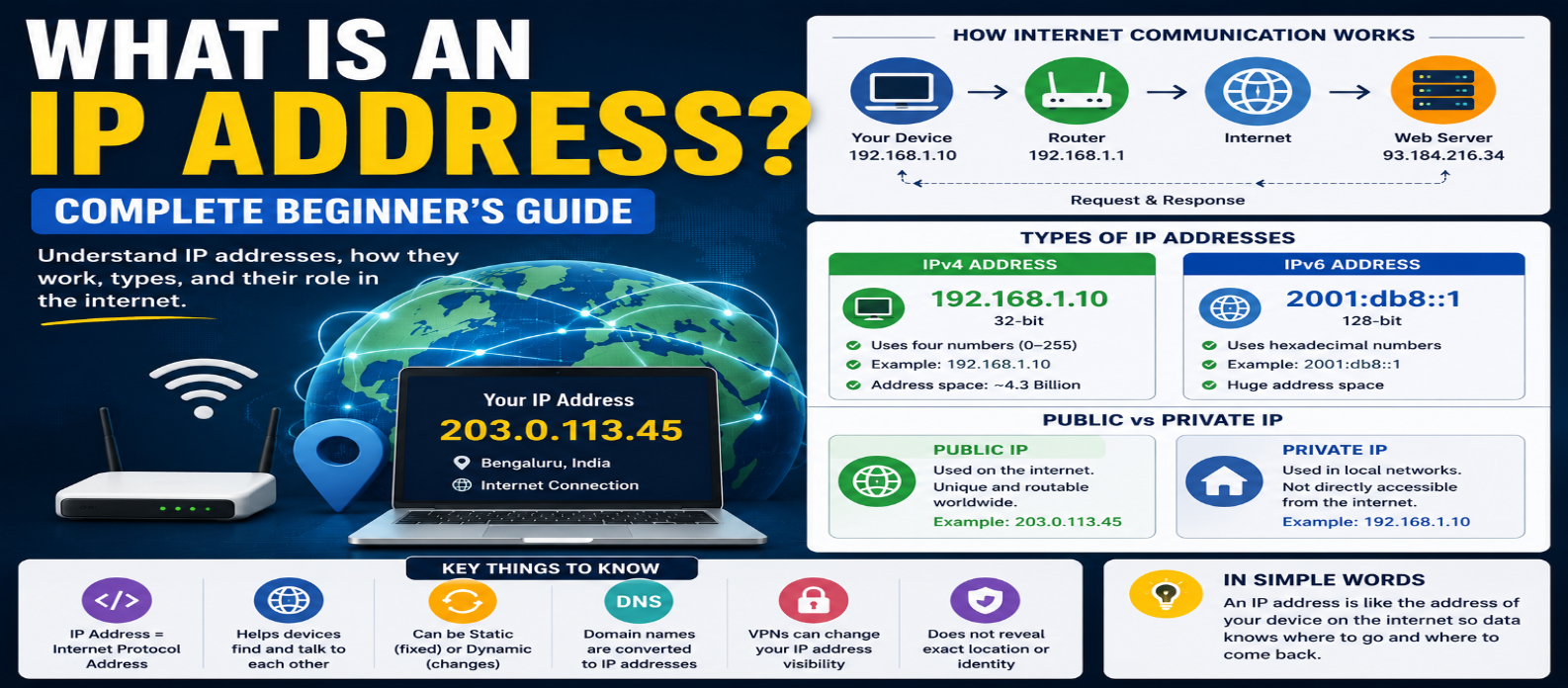
"Learn what an IP address is and how it works, including IPv4 vs IPv6, public and private IP addresses, static vs dynamic IPs, NAT, DHCP, DNS, localhost, VPNs, and IP location."
What Is an IP Address? Complete Beginner's Guide for 2026
Every time you open a website, stream a video, send a message, or connect a device to a network, information needs to know where it should go.
An IP address helps make that communication possible.
You may have seen addresses such as 192.168.1.10 or heard terms like public IP, private IP, IPv4, and IPv6. They can sound technical, but the basic concept is straightforward.
This guide explains IP addresses in practical terms without requiring networking experience.
What Is an IP Address?
IP stands for Internet Protocol.
An IP address is a numerical identifier assigned to a network interface using Internet Protocol. It helps networks identify source and destination points so data can be routed correctly.
A simplified example:
Your Device
    ↓
Network / Router
    ↓
Internet
    ↓
Web Server
When information travels across IP networks, addressing helps networking equipment determine where packets need to go.
Think of an IP address as part of the internet's addressing system—not as a permanent name for a person or device.
What Does an IP Address Look Like?
There are two major versions in use:
IPv4 and IPv6.
IPv4 Example
192.168.1.25IPv4 addresses contain four decimal numbers separated by periods.
Each number represents an 8-bit value from 0 to 255.
An IPv4 address contains 32 bits in total.
IPv6 Example
2001:db8:1234:5678::10IPv6 uses hexadecimal notation and is 128 bits long.
Its much larger address space was designed in part to address the limitations of the available IPv4 address space.
IPv4 vs IPv6
The most obvious difference is size.
| Feature | IPv4 | IPv6 |
|---|---|---|
| Address length | 32 bits | 128 bits |
| Example | 192.0.2.10 |
2001:db8::10 |
| Notation | Decimal | Hexadecimal |
| Address space | About 4.3 billion addresses | Vastly larger |
IPv6 doesn't simply mean "faster internet." Network performance depends on many factors.
Its major advantage is its enormous address space along with architectural improvements designed for modern networking.
Public vs Private IP Addresses
Not every IP address is directly used on the public internet.
Understanding the distinction between public and private IP addresses is especially useful for home networking.
Private IP Address
Your router may assign devices addresses such as:
192.168.1.2
192.168.1.3
192.168.1.4
These can be private IPv4 addresses used inside the local network.
Common private IPv4 ranges include:
10.0.0.0 – 10.255.255.255

172.16.0.0 – 172.31.255.255

192.168.0.0 – 192.168.255.255
These addresses aren't globally routed across the public internet.
Public IP Address
For typical internet access, your network communicates externally using addressing provided through your internet connection.
With IPv4, many home networks use Network Address Translation (NAT) so multiple private devices can share external connectivity through a public IPv4 address.
The exact setup varies by provider and network architecture.
How NAT Works
Imagine three devices at home:
Laptop  → 192.168.1.10
Phone   → 192.168.1.11
TV      → 192.168.1.12
They connect through a router:
Laptop ─┐
Phone  ─┼→ Router → Internet
TV     ─┘
For IPv4 internet access, the router can translate connections between internal private addresses and external addressing.
This is called Network Address Translation.
NAT is one reason many devices in a home can access the internet without each requiring its own dedicated public IPv4 address.
Static vs Dynamic IP Addresses
IP addresses can also be described as static or dynamic.
Dynamic IP
A dynamic address can change over time.
Networks commonly use DHCP (Dynamic Host Configuration Protocol) to automatically provide devices with network configuration, including IP addresses.
For most users, this happens automatically when a device joins a network.
Static IP
A static IP is deliberately configured or assigned so that it remains consistent for its intended use.
Static addressing can be useful for certain servers, network equipment, remote-access setups, or systems that need predictable addressing.
Most ordinary users don't need to manually configure static addresses.
What Is 127.0.0.1?
One IPv4 address beginners often encounter is:
127.0.0.1This is a loopback address, commonly associated with:
localhostIt refers back to the local computer rather than another machine on the internet.
Developers frequently use it when running applications locally:
http://127.0.0.1:3000The application can be tested on the same machine without making it a public internet service.
IPv6 has its own loopback address:
::1IP Address vs Domain Name
People prefer names such as:
example.comComputers ultimately need network addressing to communicate.
This is where DNS (Domain Name System) becomes important.
A simplified process looks like:
example.com
     ↓
DNS Lookup
     ↓
IP Address
     ↓
Connect to Server
DNS translates domain names into information that helps clients locate the appropriate servers.
A domain name and an IP address therefore aren't the same thing.
Domain name → Human-friendly identifier
IP address → Network addressing information
Can One Website Have Multiple IP Addresses?
Yes.
A large website may operate across many servers and locations.
DNS can return different addresses depending on factors such as network configuration, availability, infrastructure, or geographic routing strategies.
The reverse is also possible: one IP address can be associated with multiple websites or services.
Therefore, you shouldn't assume:
One Website = One Permanent IPModern hosting infrastructure is often much more flexible.
Can an IP Address Reveal Your Exact Location?
Usually, not by itself.
IP geolocation databases may estimate information such as:
- Country
- Region
- City or general area
- Internet service provider
But an IP address isn't the same thing as GPS coordinates or a street address.
Location estimates can be inaccurate because of ISP infrastructure, mobile networks, VPNs, corporate networks, proxies, and other routing arrangements.
So seeing an IP address doesn't automatically reveal someone's precise physical location.
Does an IP Address Identify a Person?
An IP address identifies network addressing, not inherently a specific human being.
Multiple people or devices can share a public IPv4 address.
Addresses can also change.
Mobile users may move between networks, and internet providers may dynamically assign addresses.
In some circumstances, service providers or organizations may be able to associate network records with accounts or subscribers, but the IP address alone shouldn't be treated as guaranteed personal identification.
What Happens When You Visit a Website?
The real process contains many networking details, but a simplified version is:
1. You enter a domain name
2. DNS helps resolve where to connect
3. Your device establishes network communication
4. Packets travel through routers
5. The destination server receives the request
6. The server sends data back
7. Your browser processes the response
IP addressing is involved in getting network packets between source and destination systems.
Can Two Devices Have the Same IP Address?
The answer depends on context.
Two separate private networks can both have:
192.168.1.10without conflicting because those private addresses exist within different local network scopes.
Within the same network segment, however, conflicting address assignments can cause connectivity problems.
Public internet addressing requires globally routable addresses to be managed appropriately so traffic reaches the correct network.
Does a VPN Change Your IP Address?
When internet traffic is routed through a VPN server, websites commonly see the public IP address associated with the VPN connection rather than the user's ordinary internet-facing address.
Conceptually:
Device
   ↓
Encrypted VPN Connection
   ↓
VPN Server
   ↓
Website
A VPN can change the network address visible to destination services, but it doesn't automatically make someone completely anonymous.
Websites and services can use many other signals, such as accounts, cookies, and browser information.
Common IP Address Misconceptions
"An IP Address Shows an Exact Home Address"
Not generally. IP-based location is often approximate.
"Every Device Has Its Own Unique Public IPv4 Address"
Many networks share public IPv4 connectivity using NAT.
"My IP Address Never Changes"
Dynamic addressing can change.
"IPv6 Is Just a Longer IPv4 Address"
IPv6 uses a much larger address space and includes broader protocol-design differences.
"Changing an IP Makes Me Anonymous"
Online identification can involve much more than IP addresses.
What Beginners Should Remember
You don't need to memorize every networking rule.
Start with these concepts:
IP Address → Helps identify network endpoints
IPv4 → 32-bit addressing
IPv6 → 128-bit addressing
Private IP → Used within private networks
Public IP → Used for internet-facing communication
DNS → Helps translate names into network destinations
NAT → Can let private IPv4 devices share public connectivity
DHCP → Automatically provides network configuration
Once these ideas are clear, more advanced topics such as subnetting, routing, ports, firewalls, DNS, and network security become easier to understand.
Conclusion
An IP address is a fundamental part of how devices communicate across IP networks.
It helps networking systems identify where data originates and where it needs to go.
For beginners, the most important distinction is that an IP address is network addressing information. It isn't automatically a permanent device identity, a person's identity, or an exact physical location.
Understanding IPv4, IPv6, public and private addresses, NAT, DHCP, and DNS gives you a strong foundation for learning how the internet actually connects devices and services.
Get a Free Access To 200+ Free Tools:
|
Home Page |
|
|
Calculator Tools |
|
|
Text & Converter Tools |
|
|
PDF & Image Tools |
|
|
Games & Developer Tools |
|
|
Resume Builder |