
What Is a Server? Complete Beginner's Guide for 2026
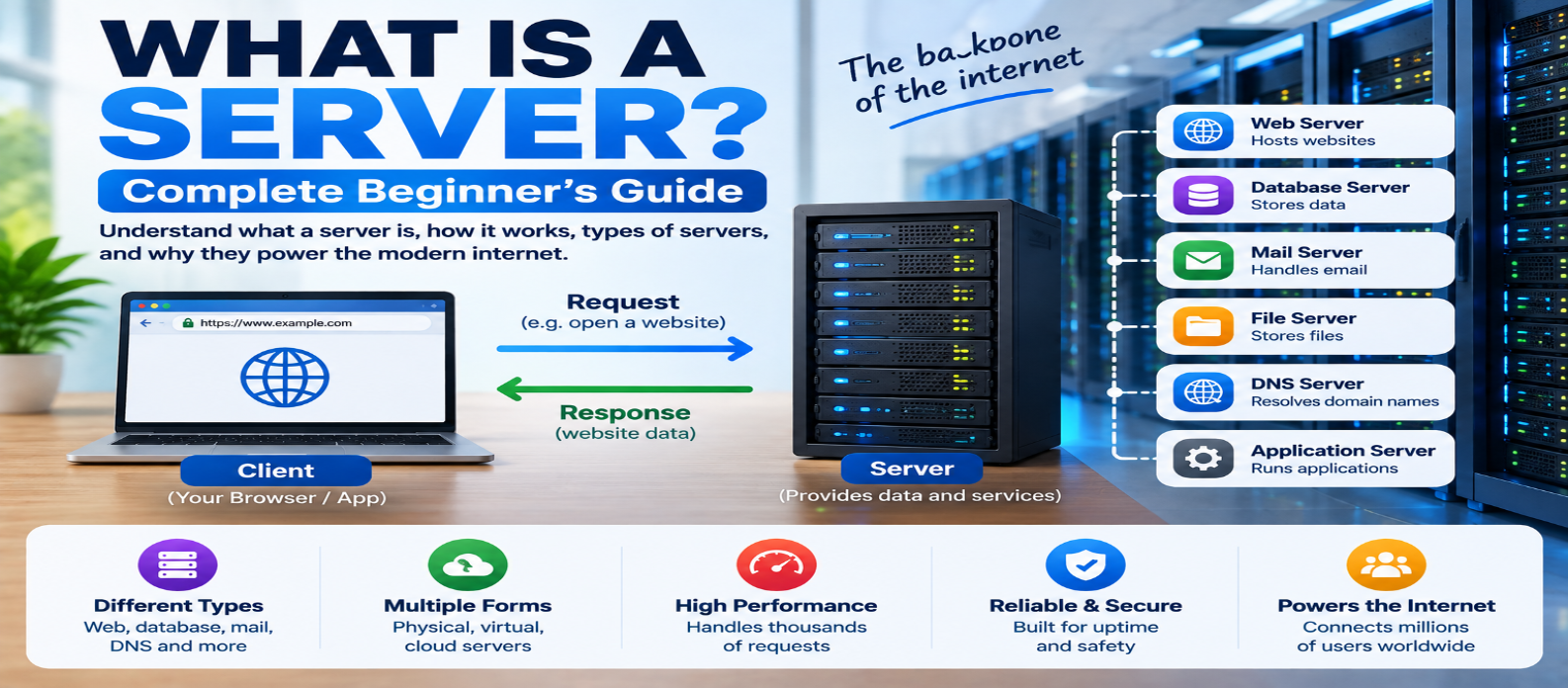
"Learn what a server is and how servers work, including the client-server model, web and database servers, physical vs virtual servers, VPS, cloud servers, hosting, IP addresses, ports, data centers, scaling, and security."
What Is a Server? Complete Beginner's Guide
Every time you open a website, send an email, stream a video, use cloud storage, or play an online game, there's a good chance you're communicating with one or more servers.
The word sounds technical, but the basic idea is simple:
A server is a system that provides resources, data, or services to other systems—called clients—over a network.
A server can be a powerful physical machine, a virtual machine, a software process, or part of a larger cloud platform.
Let's see how it actually works.
What Is a Server?
In computing, a server provides a service that other computers or applications can request.
For example:
Client                    Server
Browser  ── Request ──→  Website
         ← Response ──
Your browser acts as a client when it requests a web page.
The web server receives that request and returns the appropriate response.
This basic pattern is known as the client-server model.
What Is a Client?
A client is software or a device that requests something from a server.
Common clients include:
- Web browsers
- Mobile applications
- Email applications
- Desktop software
- Other servers
Suppose you visit:
https://example.comYour browser requests the page, and the website's infrastructure responds.
Conceptually:
Browser
   ↓ Request
Server
   ↓ Response
Browser displays page
One server can potentially handle requests from many clients.
Is a Server Just a Computer?
Sometimes—but not always.
The word server can refer to both hardware and software.
Server Hardware
A physical computer designed to run services reliably.
It may include:
- Powerful processors
- Large amounts of memory
- Fast storage
- High-speed networking
- Redundant power supplies
Server Software
A program that listens for requests and provides a service.
For example, web-server software can run on an ordinary computer.
Your laptop could technically become a server if you run software that accepts requests from other devices.
So a server isn't defined only by how powerful the computer is. Its role matters.
How Does a Web Server Work?
Imagine someone requests:
https://example.com/aboutA simplified process is:
1. Browser finds server
        ↓
2. Connection established
        ↓
3. HTTP request sent
        ↓
4. Server receives request
        ↓
5. Server finds/processes content
        ↓
6. HTTP response returned
        ↓
7. Browser displays page
For a static website, the server might simply return an existing HTML file.
A dynamic website may require application code, databases, APIs, authentication, and other services before generating the response.
Common Types of Servers
"Server" is a broad category. Different servers provide different services.
Web Server
Handles web requests and serves website resources.
Browser → Web Server → HTML/CSS/JSApplication Server
Runs application logic.
For example, it might process an order, validate a login, or calculate a result.
Database Server
Stores and manages structured application data.
Examples of stored information include:
Users
Products
Orders
Articles
Inventory
File Server
Stores files and makes them available to authorized users or systems.
Mail Server
Helps send, receive, and manage email.
DNS Server
Provides Domain Name System services, helping resolve domain-related information.
Game Server
Maintains multiplayer game state and coordinates communication between players.
These roles can run on separate machines or share infrastructure depending on the system design.
What Are IP Addresses and Ports?
For a client to communicate with a server, it needs to reach the correct network destination and service.
An IP address identifies a network destination.
A port helps identify the service or application receiving transport traffic.
For example:
HTTPS → Port 443
HTTP  → Port 80
A useful simplified analogy is:
IP Address = Building address
Port       = Specific door
One server can therefore run multiple network services using different ports.
Where Are Servers Located?
Servers can operate almost anywhere with appropriate power, networking, and infrastructure.
Common locations include:
- Data centers
- Offices
- Homes
- Universities
- Cloud infrastructure
- Edge locations
Most major online services use professional data centers designed for reliable operation.
What Is a Data Center?
A data center is a facility containing computing and networking infrastructure.
Instead of one computer sitting on a desk, imagine rows of equipment racks containing servers and networking systems.
Data centers commonly provide:
- Electrical power
- Backup power
- Cooling
- Physical security
- High-capacity networking
- Fire protection
- Monitoring
Large online services may operate across multiple data centers and geographic regions.
This reduces dependence on one physical location.
Physical Server vs Virtual Server
Traditionally, applications could run directly on dedicated physical machines.
Virtualization allows one physical machine to host multiple isolated virtual machines.
Conceptually:
Physical Server
     ↓
Hypervisor
 ┌────┼────┐
 VM 1 VM 2 VM 3
Each virtual machine can behave much like an independent computer with its own operating system and applications.
This makes computing resources easier to allocate and manage.
What Is a Cloud Server?
A cloud server usually refers to computing resources provided through cloud infrastructure.
Instead of purchasing and maintaining a physical machine yourself, you can provision computing capacity from a cloud platform.
Conceptually:
Cloud Infrastructure
        ↓
Virtual Compute
        ↓
Your Application
        ↓
Internet Users
Cloud environments can make it easier to create, resize, replace, and distribute computing resources.
But "cloud" doesn't mean the server exists somewhere without hardware.
Cloud services ultimately run on physical machines in real data centers.
Server vs Web Hosting
These terms are related but different.
A server is the computing system or software providing services.
Web hosting is a service that provides infrastructure and resources for making a website available online.
Hosting may use:
Shared Servers
Virtual Servers
Dedicated Servers
Cloud Infrastructure
When you buy hosting, you're essentially paying for access to computing, storage, networking, management, or related services needed to operate your website.
What Is a Dedicated Server?
A dedicated server provides physical server resources dedicated to one customer or workload rather than sharing the same operating environment with unrelated customers.
It can offer more control and predictable resource access, but usually requires more management and costs more than basic shared hosting.
Dedicated servers aren't automatically necessary for every website.
What Is a VPS?
VPS stands for Virtual Private Server.
A physical machine can host multiple virtual server environments:
Physical Machine
      ↓
 ┌────┼────┐
VPS A VPS B VPS C
Each VPS receives allocated resources and operates with a degree of isolation.
A VPS generally provides more control than basic shared hosting without requiring an entire physical server.
What Happens When Thousands of Users Visit?
A single server has finite capacity.
As traffic grows, applications can scale in different ways.
Vertical Scaling
Increase resources on one machine:
More CPU
More RAM
Faster Storage
Horizontal Scaling
Add more servers:
          Load Balancer
        /      |       \
Server A   Server B   Server C
A load balancer distributes incoming traffic among available servers.
Large applications commonly combine multiple scaling techniques.
Does One Website Use Only One Server?
Not necessarily.
A modern website might use:
CDN
 ↓
Load Balancer
 ↓
Web Servers
 ↓
Application Servers
 ↓
Cache
 ↓
Database Servers
Images may come from one system while API responses come from another.
To the visitor, it still appears to be one website.
What Happens If a Server Goes Down?
If a required server becomes unavailable, users may experience:
- Website errors
- Failed logins
- Missing data
- Connection timeouts
- Interrupted services
Reliable systems reduce this risk through techniques such as:
Redundancy
Load balancing
Backups
Health checks
Failover
Multiple regions
The goal is to avoid making one machine the single point whose failure takes down the entire service.
Server Security Basics
Servers connected to networks need protection.
Important practices include:
- Installing security updates
- Restricting unnecessary ports
- Using strong authentication
- Encrypting network traffic
- Limiting user permissions
- Monitoring suspicious activity
- Maintaining reliable backups
- Protecting secrets and credentials
A powerful server with poor security is still a vulnerable server.
Server in One Diagram
CLIENT
Browser / App
      ↓
   REQUEST
      ↓
   INTERNET
      ↓
    SERVER
 ┌────┼─────┐
Web   App   Database
      ↓
   RESPONSE
      ↓
CLIENT RECEIVES DATA
This client-request/server-response relationship is the foundation of many internet services.
Conclusion
A server is a system that provides data, resources, or services to clients.
The easiest way to remember it is:
Client → Requests something
Server → Provides the service or response
Servers can be physical machines, virtual machines, cloud resources, or software processes. They can serve websites, store databases, manage email, provide files, run applications, resolve DNS information, and support countless other online services.
Once you understand servers, concepts such as web hosting, cloud computing, APIs, databases, IP addresses, ports, CDNs, and website architecture become much easier because servers are at the center of how these technologies work together.
Get a Free Access To 200+ Free Tools:
|
Home Page |
|
|
Calculator Tools |
|
|
Text & Converter Tools |
|
|
PDF & Image Tools |
|
|
Games & Developer Tools |
|
|
Resume Builder |