
What Is a Domain Name? Complete Guide for Beginners in 2026
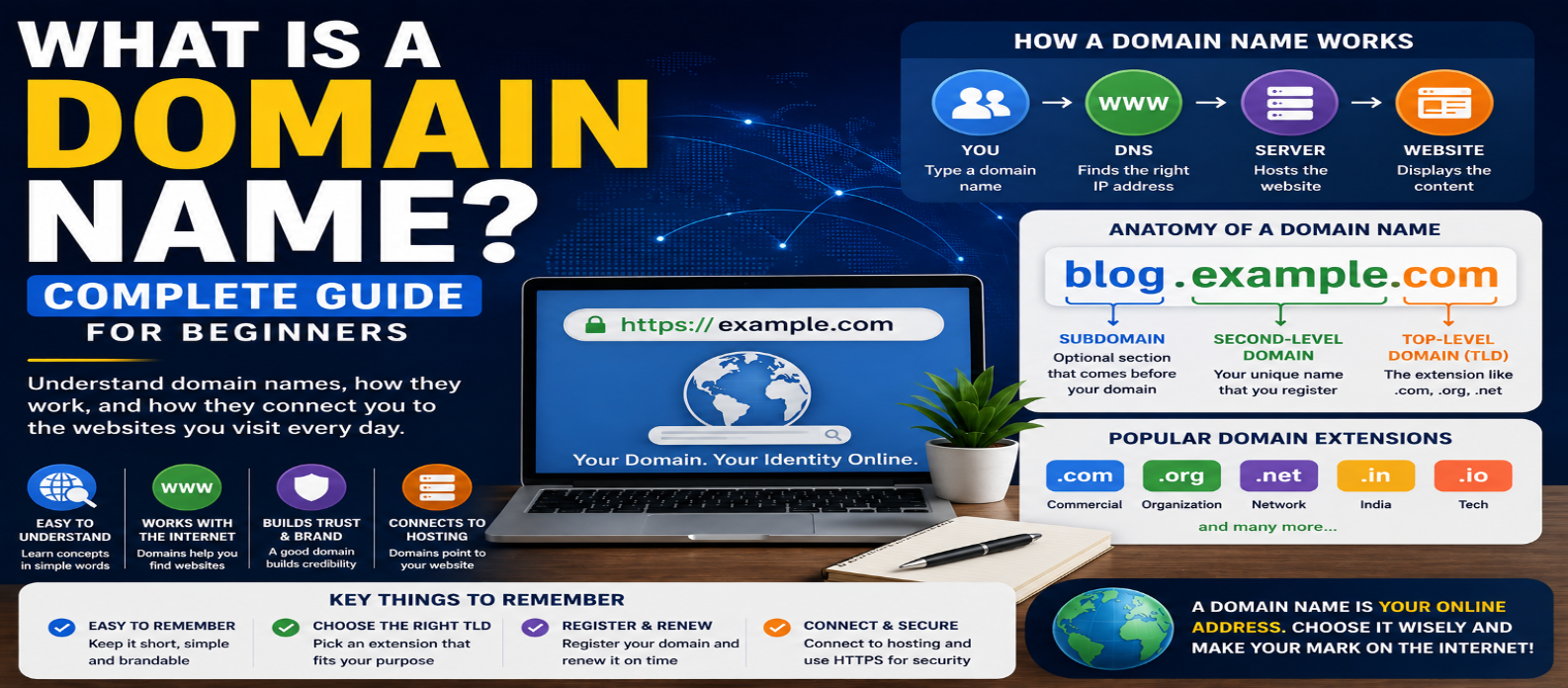
"Learn what a domain name is and how domains work, including DNS, TLDs, subdomains, URLs, IP addresses, domain registration, web hosting, HTTPS, expiration, and tips for choosing a good domain."
What Is a Domain Name? Complete Guide for Beginners in 2026
Every website needs a way for people to find it.
While computers communicate using network addresses, remembering a string of numbers isn't convenient for most users. Domain names provide recognizable names that people can type into a browser, such as example.com.
But a domain name isn't the website itself, and buying a domain doesn't automatically give you web hosting.
Understanding how domains, DNS, hosting, URLs, and IP addresses fit together gives you a much clearer picture of how websites work.
What Is a Domain Name?
A domain name is a human-readable name used to identify an internet resource, commonly a website.
For example:
example.comInstead of expecting visitors to remember network addresses, a domain provides a memorable name.
A simplified process looks like:
example.com
     ↓
DNS
     ↓
Server Address
     ↓
Website
The Domain Name System (DNS) helps browsers determine where to connect when someone requests a domain.
Understanding the Parts of a Domain Name
Consider:
blog.example.comIt can be divided into several parts.
Top-Level Domain
.comThe final portion is the top-level domain (TLD).
Other examples include:
.org
.net
.in
.dev
Second-Level Domain
In:
example.comexample is the second-level label directly before .com.
This is usually the distinctive name people think of when choosing a website domain.
Subdomain
In:
blog.example.comblog is a subdomain label.
Subdomains can organize different parts of a service:
blog.example.com
shop.example.com
support.example.com
They remain under the broader example.com domain.
Domain Name vs URL
A domain and URL aren't the same thing.
Consider:
https://example.com/blog/domain-guideHere:
https          → Scheme
example.com    → Domain
/blog/domain-guide → Path
The complete string is a URL (Uniform Resource Locator).
The domain is only one component of it.
A URL may also contain a port, query parameters, or a fragment.
For example:
https://example.com/search?q=javascriptThe domain is still:
example.comDomain Name vs IP Address
A domain name and an IP address serve different roles.
Example domain:
example.comExample IPv4 address:
192.0.2.10A domain is designed to provide a stable, human-friendly name.
An IP address is used for network addressing.
DNS connects these concepts by providing records that help applications locate the appropriate destination for a domain.
This also means a domain isn't necessarily permanently tied to one IP address.
The underlying hosting infrastructure can change while the public domain name remains the same.
How Does a Domain Name Work?
Suppose you enter:
example.cominto your browser.
A simplified sequence is:
1. Browser receives the domain name
2. DNS information is requested
3. DNS resolves the relevant hostname
4. The browser learns where to connect
5. A connection is established
6. The server processes the request
7. Website data is returned
The real process can involve caching, multiple DNS servers, redirects, content delivery networks, and other infrastructure, but this simplified flow captures the basic idea.
What Is DNS?
DNS stands for Domain Name System.
You can think of it as a distributed naming system for the internet.
DNS records can provide different types of information.
Common record types include:
A Record
Maps a hostname to an IPv4 address.
AAAA Record
Maps a hostname to an IPv6 address.
CNAME Record
Creates an alias from one hostname to another hostname.
MX Record
Specifies mail servers responsible for receiving email for a domain.
TXT Record
Stores text information and is commonly used for verification and email-related policies.
DNS does much more than simply "convert website names into IP addresses."
What Is a Domain Registrar?
You don't permanently purchase ownership of a domain in the same way you might buy physical property.
Instead, you register the right to use a domain name for a specified period, subject to registration rules and renewal.
A domain registrar is a company authorized to provide domain registration services for particular domain extensions.
During registration, you generally choose:
Domain Name
     +
TLD
     ↓
example.com
If the domain is available, it can usually be registered for an available registration period.
Domain Registration vs Web Hosting
This is one of the most common beginner confusions.
Domain Registration
Provides control over a domain name.
Web Hosting
Provides infrastructure where website files or applications can run.
Think of it conceptually as:
Domain = Address people use
Hosting = Infrastructure serving the website
You can obtain both services from the same provider, but they're separate concepts.
A domain can also be registered with one company while the website is hosted somewhere else.
DNS settings connect them.
What Happens After Buying a Domain?
Registering a domain alone doesn't automatically create a website.
A typical setup involves:
1. Register domain
2. Choose hosting or deploy an application
3. Configure DNS records
4. Connect the domain to the hosting service
5. Configure HTTPS
6. Publish the website
Once DNS and hosting are configured correctly, visitors can use the domain to reach the site.
What Is HTTPS?
You'll commonly see:
https://example.comHTTPS isn't part of the domain name.
It is the scheme used by the URL and represents HTTP communication protected using TLS.
For HTTPS to work correctly, the server needs an appropriate TLS certificate for the hostname being used.
Modern hosting services often automate much of this configuration, but domain ownership and HTTPS certificates remain different concepts.
What Are Domain Extensions?
The ending of a domain is called its top-level domain.
Examples:
.com
.org
.net
.in
.io
.dev
Some TLDs are generic, while country-code TLDs are associated with countries or territories.
For example:
.in → India
.uk → United Kingdom
.jp → Japan
Registration requirements and policies can vary between extensions.
Does the Domain Extension Affect SEO?
Choosing a TLD shouldn't be treated as a shortcut to higher rankings.
A strong website still depends on factors such as useful content, accessibility, technical quality, reputation, and meeting search intent.
Country-code domains can communicate a strong geographic association, which can be useful when a site specifically targets a country.
For most projects, choose an extension primarily based on audience, credibility, availability, and branding rather than expecting a particular extension to create automatic search visibility.
How to Choose a Good Domain Name
A useful domain should generally be:
Easy to Remember
Visitors should be able to recall it without difficulty.
Easy to Type
Avoid unnecessary complexity.
Relevant to the Brand
The name should make sense for the website or organization.
Easy to Say
A domain that's difficult to pronounce can be harder to share verbally.
Flexible Enough to Grow
An extremely narrow domain name may become limiting if the website expands into new topics or products.
Avoid Keyword-Stuffed Domains
A domain such as:
best-cheap-fast-web-tools-online-example.comis difficult to remember and doesn't automatically create better SEO.
A concise, recognizable brand is usually more useful than trying to insert every possible keyword into the domain name.
Your individual pages can target specific search topics through their actual content.
What Happens When a Domain Expires?
Domains need to be renewed.
If registration expires, the exact process depends on the registry, registrar, and domain extension. There may be expiration, renewal, redemption, or deletion stages.
Eventually, an unrenewed domain may become available for someone else to register.
For an important website:
- Keep contact information current
- Enable renewal reminders
- Consider automatic renewal
- Keep payment information updated
- Protect the registrar account
Losing control of an important domain can disrupt the website and email services connected to it.
Domain Privacy and WHOIS/RDAP
Domain registration requires certain registration information.
Public access to registration data has changed considerably over time, and what information is visible depends on the domain extension, registrar, registry, applicable policies, and privacy rules.
Domain registration data may be accessed through modern registration-data services such as RDAP.
Don't assume that every domain owner's personal information is publicly displayed.
Can You Move a Domain?
Usually, domains can be transferred between registrars when transfer requirements are satisfied.
Moving the domain registrar doesn't necessarily mean moving the website.
These are separate:
Domain Registrar
DNS Provider
Web Host
Email Provider
One company can provide all four, or each service can come from a different provider.
Understanding this separation makes domain management much easier.
Common Domain Name Mistakes
Thinking a Domain Includes Hosting
Registration and hosting are separate services.
Forgetting Renewal
An expired domain can eventually be lost.
Choosing an Overly Complicated Name
Shorter and clearer names are generally easier to remember and share.
Changing DNS Without Understanding Records
Incorrect DNS changes can make websites or email temporarily unavailable.
Assuming a Domain Is Permanently Attached to One Server
DNS can point the same domain to new infrastructure later.
Domain Names in Simple Terms
The easiest model to remember is:
DOMAIN NAME
Human-friendly name
        ↓
DNS
Finds the destination
        ↓
HOSTING / SERVER
Provides the website
        ↓
BROWSER
Displays the result
Each component has a different job.
Conclusion
A domain name gives people a memorable way to reach websites and other internet services.
It works alongside DNS, IP addressing, hosting, servers, HTTPS, and URLs rather than replacing them.
For beginners, remember these four distinctions:
Domain → Name
DNS → Resolves the name
IP Address → Network addressing
Hosting → Serves the website
Once you understand how these pieces connect, tasks such as launching a website, changing hosting providers, configuring DNS, creating subdomains, and troubleshooting domain problems become much easier.
Get a Free Access To 200+ Free Tools:
|
Home Page |
|
|
Calculator Tools |
|
|
Text & Converter Tools |
|
|
PDF & Image Tools |
|
|
Games & Developer Tools |
|
|
Resume Builder |