
What Happens When You Type a URL Into a Browser? Complete Guide for 2026
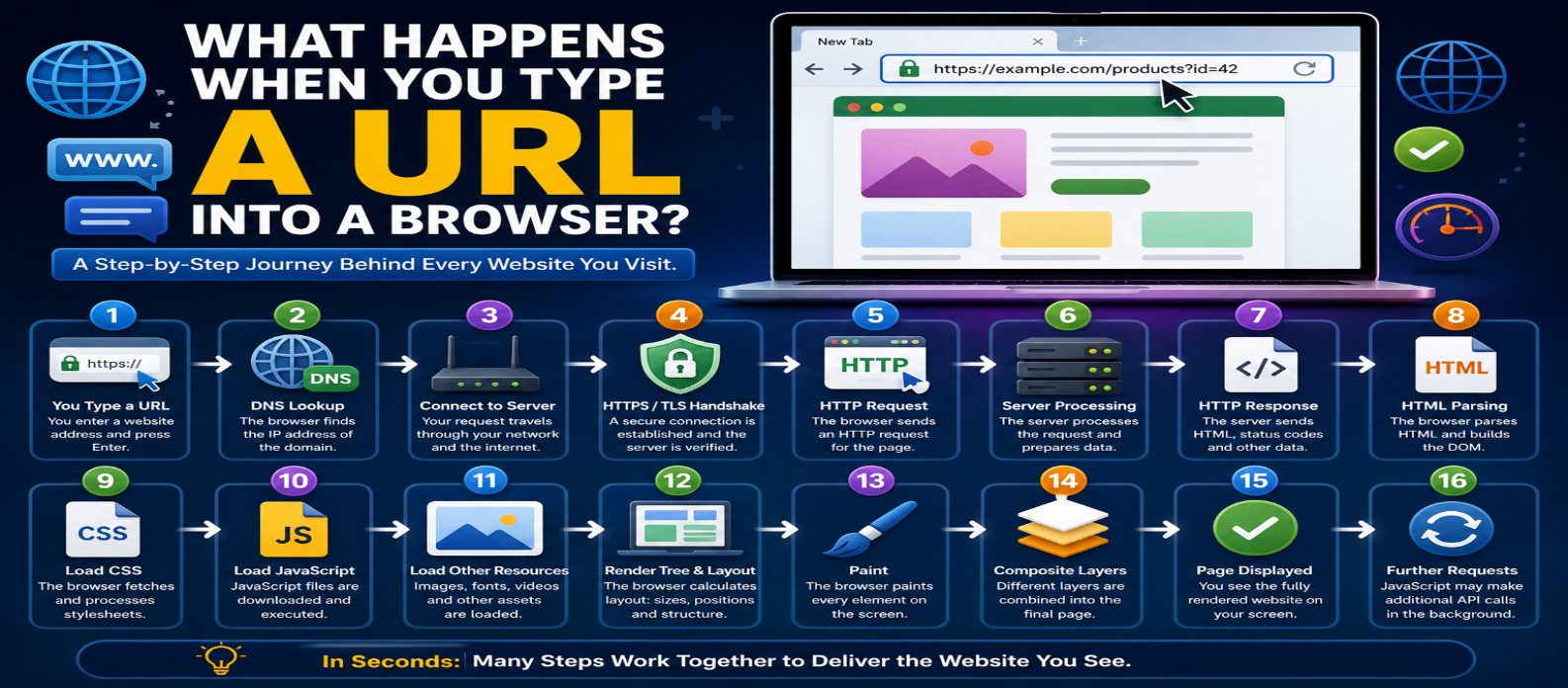
"Learn what happens after you type a URL into a browser, from DNS lookup and HTTPS connections to HTTP requests, server processing, HTML parsing, CSS, JavaScript, caching, and browser rendering."
What Happens When You Type a URL Into a Browser?
Typing a URL into a browser feels instant:
https://example.com/productsYou press Enter, wait briefly, and the page appears.
But during that short interval, your browser and several internet systems perform a sequence of tasks. The domain must be resolved, a server reached, a secure connection established, data requested, and the response transformed into pixels on your screen.
Here's what actually happens.
1. The Browser Understands the URL
First, the browser interprets the address.
Consider:
https://example.com/products?id=42It contains several parts:
https       → Scheme
example.com → Hostname
/products   → Path
?id=42      → Query string
The scheme tells the browser which protocol is expected. For a normal HTTPS website, the browser knows it needs secure HTTP communication.
If you enter ordinary words rather than a recognizable URL, the browser may treat them as a search query instead.
2. The Browser Checks What It Already Has
Before downloading everything again, the browser may be able to reuse previously stored information.
Depending on the page and configuration, this can involve:
- Browser cache
- DNS cache
- HTTP caching rules
- Service workers
For example, an image that hasn't changed may be reusable from cache instead of being downloaded again.
This is one reason a repeat visit can behave differently from a first visit.
3. DNS Resolves the Domain Name
The browser needs network addressing information for:
example.comThe Domain Name System (DNS) helps resolve that hostname.
A simplified process is:
example.com
     ↓
DNS Resolution
     ↓
IP Address
The answer may already exist in a local or resolver cache. Otherwise, the configured DNS resolver may perform additional lookups.
The result gives the client information needed to reach the appropriate destination.
4. Packets Travel Through Networks
Your request doesn't jump directly from your laptop to the website.
Traffic can pass through multiple network systems:
Your Device
    ↓
Wi-Fi / Local Network
    ↓
Router
    ↓
ISP
    ↓
Internet Networks
    ↓
Destination Infrastructure
Routers forward IP packets toward their destinations according to routing information.
The exact path isn't necessarily fixed forever. Internet routing can change as networks and conditions change.
5. A Transport Connection Is Established
The browser needs a transport mechanism for communication.
With HTTP/1.1 and HTTP/2, this commonly involves TCP.
TCP provides reliable, ordered delivery.
A TCP connection begins with a handshake commonly summarized as:
Client → SYN
Server → SYN-ACK
Client → ACK
HTTP/3 works differently. It uses QUIC, which operates over UDP and incorporates secure connection and transport features.
The important beginner concept is that the browser must establish appropriate communication with the server before normal page data can flow.
6. HTTPS Establishes Secure Communication
For:
https://example.comthe browser also establishes a secure connection.
Modern HTTPS uses TLS (Transport Layer Security).
During this process, the browser and server establish cryptographic parameters, and the server presents certificate information that the browser validates.
TLS provides three key protections:
Encryption — Makes intercepted traffic difficult to read.
Authentication — Helps confirm the server's identity.
Integrity — Helps detect modification of protected data.
Only after the secure channel is established can protected HTTP communication proceed.
7. The Browser Sends an HTTP Request
Now the browser can request the resource.
Conceptually:
GET /products?id=42 HTTP/1.1
Host: example.com
The actual request may contain many headers describing things such as:
- Accepted content formats
- Cookies
- Cache information
- Browser capabilities
- Language preferences
The server uses the request information to decide how to respond.
8. The Request Reaches Website Infrastructure
A request doesn't always reach one simple web server.
A modern website may use:
Browser
   ↓
CDN
   ↓
Load Balancer
   ↓
Web/Application Server
   ↓
Cache / Database / API
A CDN may be able to return cached content immediately.
Otherwise, the request can continue toward the origin infrastructure.
Large services may distribute requests among many servers rather than relying on a single machine.
9. The Backend Processes the Request
Suppose the requested URL is:
/products?id=42The backend might:
- Read product ID
42. - Validate the request.
- Check permissions if required.
- Query a cache or database.
- Apply application logic.
- Build the response.
For a static website, much of this processing may be unnecessary because the server can simply return an existing file.
10. The Server Sends an HTTP Response
The server responds with an HTTP status, headers, and usually a body.
For example:
HTTP/1.1 200 OK
Content-Type: text/html
followed by HTML.
Other possible responses include:
301 → Permanent redirect
304 → Cached representation can be reused
404 → Resource not found
500 → Server error
The browser reacts differently depending on the response.
A redirect, for example, can start another request to a different URL.
11. The Browser Starts Parsing HTML
The browser doesn't necessarily wait for the complete page and every resource before beginning work.
As HTML arrives, it can begin parsing it.
For example:
<h1>Products</h1>
<p>Browse our products.</p>
The browser turns the HTML structure into the Document Object Model (DOM).
Conceptually:
HTML
 ↓
DOM
 ↓
Page Structure
The DOM represents elements as objects that JavaScript can later inspect and modify.
12. The Browser Discovers More Resources
HTML usually isn't enough to create the finished page.
While parsing it, the browser may discover:
<link rel="stylesheet" href="/style.css">
<script src="/app.js"></script>
<img src="/product.jpg" alt="Product">
That means more resources are needed:
HTML
├── CSS
├── JavaScript
├── Images
├── Fonts
└── Other resources
The browser can request many resources concurrently, subject to protocol and browser behavior.
These additional requests may themselves involve caching, redirects, DNS resolution for other hostnames, and network connections.
13. CSS Is Processed
The browser parses CSS and creates an internal representation of applicable styles.
For example:
.product {
  display: grid;
  gap: 1rem;
}
The browser combines information about the DOM and styles to determine how elements should be displayed.
CSS can also trigger downloads of resources such as fonts and background images.
14. JavaScript Executes
JavaScript can change the page after or during loading.
For example:
const title =
  document.querySelector("h1");

title.textContent =
  "Featured Products";
JavaScript can:
- Modify the DOM
- Change styles
- Handle clicks
- Validate forms
- Request API data
- Create new elements
- Remove existing elements
Script loading strategy matters because some scripts can delay HTML parsing or rendering, while approaches such as defer, modules, and carefully placed scripts can reduce unnecessary blocking.
15. The Browser Creates the Visible Page
Eventually the browser has enough information to determine what should appear on screen.
A simplified rendering pipeline is:
HTML
 ↓
DOM
      +
CSS
 ↓
Style & Layout
 ↓
Paint
 ↓
Composite
 ↓
Pixels on Screen
Layout determines element sizes and positions.
Paint determines how visual parts should be drawn.
Compositing combines rendered layers into the final image displayed on screen.
The details are more sophisticated, but this model is enough for understanding the basic process.
16. Loading Can Continue After the Page Appears
A page appearing doesn't necessarily mean all network activity has finished.
JavaScript may later request:
Search Results
Notifications
Recommendations
Analytics
Advertisements
New Posts
User Information
Modern web applications often continue communicating with servers while users interact with them.
So page loading is frequently an ongoing process rather than one single download.
The Complete Journey in One View
TYPE URL
   ↓
PARSE URL
   ↓
CHECK CACHE
   ↓
DNS LOOKUP
   ↓
CONNECT TO SERVER
   ↓
TLS / HTTPS
   ↓
HTTP REQUEST
   ↓
SERVER PROCESSING
   ↓
HTTP RESPONSE
   ↓
PARSE HTML
   ↓
LOAD CSS + JS + IMAGES
   ↓
BUILD & RENDER PAGE
   ↓
USER SEES WEBSITE
This entire chain can happen remarkably quickly.
Why Understanding This Matters
This process isn't just networking trivia.
It helps developers diagnose problems.
If DNS fails, the browser may never locate the server.
If TLS fails, the secure connection may be blocked.
If the server is slow, the response takes longer.
If CSS is huge, rendering can be delayed.
If JavaScript performs too much work, the interface can become unresponsive.
If images are unnecessarily large, the page takes longer to finish loading.
Website performance is therefore the result of an entire chain—not one single "website speed" setting.
Conclusion
When you type a URL into a browser, many technologies cooperate before you see the finished page:
URL → DNS → IP Routing → Transport → TLS → HTTP → Server → HTML → CSS → JavaScript → Rendering
The browser's job goes far beyond downloading an HTML file. It resolves destinations, manages connections, handles security, communicates with servers, downloads dependencies, builds internal page structures, executes code, calculates layouts, and finally turns everything into visible pixels.
Understanding that journey gives you a foundation for learning web development, networking, browser performance, hosting, APIs, and website optimization because you can see exactly where each technology fits.
Get a Free Access To 200+ Free Tools:
|
Home Page |
|
|
Calculator Tools |
|
|
Text & Converter Tools |
|
|
PDF & Image Tools |
|
|
Games & Developer Tools |
|
|
Resume Builder |