
Website Performance Checklist for 2026: Complete Optimization Guide
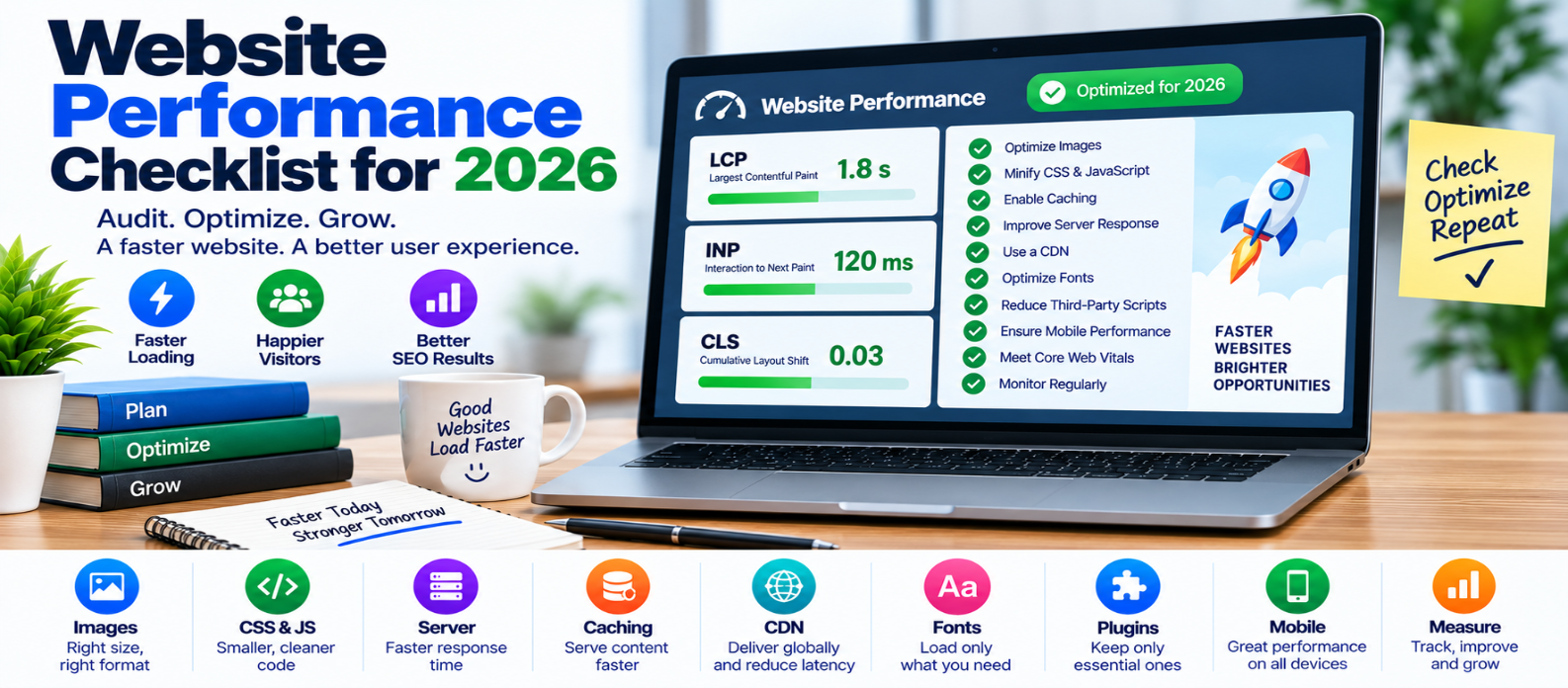
"Use this 2026 website performance checklist to audit Core Web Vitals, server speed, images, JavaScript, CSS, fonts, caching, network delivery, third-party scripts and mobile performance for a faster website."
Website Performance Checklist for 2026
Website performance isn't something you optimize once and forget.
A site that is fast today can gradually become slower after adding new images, plugins, JavaScript libraries, advertisements, analytics tools, fonts, or design features.
That's why a website performance checklist is useful. Instead of applying random optimization tricks, you can regularly inspect the areas that have the greatest effect on real visitors.
Use this 2026 checklist to find problems, prioritize fixes, and keep your website fast over time.
1. Measure Before You Change Anything
Start with a baseline.
Test several important page types rather than only your homepage:
Homepage
Blog Article
Landing Page
Product/Service Page
Search or Category Page
Record important measurements before optimization so you can compare them afterward.
Check both lab testing and real-user data when available.
Performance Checklist
-
Test important page templates
-
Test desktop and mobile
-
Record initial results
-
Identify the largest bottlenecks
-
Check real-user performance where available
2. Check Core Web Vitals
Core Web Vitals provide three useful views of user experience.
Largest Contentful Paint (LCP)
Measures loading performance.
A good target is:
LCP ≤ 2.5 secondsFind the actual LCP element and determine why it appears late.
Interaction to Next Paint (INP)
Measures responsiveness.
A good target is:
INP ≤ 200 millisecondsInvestigate long JavaScript tasks, expensive event handlers, and rendering delays when INP is poor.
Cumulative Layout Shift (CLS)
Measures visual stability.
A good target is:
CLS ≤ 0.1Reserve space for images, advertisements, embeds, and other dynamic elements.
Core Web Vitals Checklist
-
LCP ≤ 2.5 seconds
-
INP ≤ 200 ms
-
CLS ≤ 0.1
-
Test at the 75th percentile using field data when available
-
Investigate the cause, not only the score
3. Check Server Performance
A browser can't render the page until the server begins responding.
If the initial response is consistently slow, investigate:
- Application processing
- Database queries
- Server resources
- Redirects
- Backend APIs
- Cache configuration
For dynamic pages, appropriate server-side or page caching can reduce repeated work.
Server Checklist
-
Server response is reasonably fast
-
Expensive database queries are investigated
-
Appropriate pages are cached
-
Redirect chains are minimized
-
Infrastructure can handle expected traffic
4. Audit Every Important Image
Images frequently account for a large portion of page weight.
Don't send a 4000-pixel image when the layout displays it at 800 pixels.
Check:
- Dimensions
- Compression
- Format
- Responsive variants
- Loading behavior
For example:
<img
  src="photo-800.webp"
  srcset="
    photo-400.webp 400w,
    photo-800.webp 800w"
  width="800"
  height="600"
  loading="lazy"
  alt="Example">
Lazy loading is useful for offscreen images, but your main LCP image generally shouldn't be delayed unnecessarily.
Image Checklist
-
Images are correctly sized
-
Files are compressed
-
WebP/AVIF considered where appropriate
-
Responsive images are used where useful
-
Offscreen images are lazy-loaded
-
LCP image isn't unnecessarily lazy-loaded
-
Width and height are provided
-
Useful images have appropriate alt text
5. Audit JavaScript
JavaScript can affect downloading, CPU usage, rendering, and responsiveness.
Start by asking:
Does this page actually need every script it downloads?
Then investigate:
- Unused code
- Large bundles
- Long main-thread tasks
- Duplicate libraries
- Heavy event handlers
- Unnecessary client-side rendering
Use code splitting and dynamic imports where they provide meaningful savings.
Example:
const editor = await import("./editor.js");The editor can be loaded when needed rather than being included in every visitor's initial workload.
JavaScript Checklist
-
Unused JavaScript removed
-
Large bundles investigated
-
Optional features loaded on demand
-
Suitable scripts use
deferorasync -
Long tasks reduced
-
Slow interactions investigated
-
Third-party JavaScript audited
6. Audit CSS
CSS required for the initial page is important, but unused or poorly delivered CSS can delay rendering.
Check for:
- Large framework files
- Old component styles
- Duplicate CSS
- Plugin-generated styles
- Render-blocking resources
- Expensive visual effects
Production CSS should generally be minified and efficiently compressed during transfer.
CSS Checklist
-
Unused CSS investigated
-
Production CSS minified
-
Transfer compression enabled
-
Critical styles delivered efficiently
-
Unnecessary CSS dependencies removed
-
Animations avoid excessive layout work
-
Large visual effects tested on mobile
7. Review Web Fonts
A website rarely needs every weight of several font families.
Instead of:
Family A → 300, 400, 500, 600, 700, 800
Family B → 300, 400, 500, 600, 700
load only the styles actually used.
Font Checklist
-
Unused families removed
-
Unnecessary weights removed
-
Efficient font formats used
-
Appropriate
font-displayconfigured -
Only critical fonts preloaded
-
Font loading doesn't create major layout shifts
8. Verify Caching
Caching prevents browsers and servers from repeating unnecessary work.
Static resources such as CSS, JavaScript, fonts, and images can often use effective browser caching.
Versioned filenames help:
app.a81c2.js
styles.c729f.css
When the content changes, the URL changes.
Caching Checklist
-
Static assets use appropriate caching
-
Dynamic content isn't incorrectly cached
-
Versioned assets are used where appropriate
-
Server/page caching works correctly
-
Cached content updates when necessary
9. Check Network Delivery
Review how resources reach visitors.
HTTP compression can reduce the transfer size of suitable text resources such as:
HTML
CSS
JavaScript
JSON
SVG
A CDN may also reduce latency for geographically distributed visitors.
Network Checklist
-
Brotli or gzip enabled where appropriate
-
Modern HTTP protocols supported by infrastructure
-
CDN considered where it provides value
-
Unnecessary redirects removed
-
Critical resources discovered early
-
Excessive request chains investigated
10. Audit Third-Party Resources
Third-party code can become one of the largest performance costs because you don't fully control how it behaves.
Review:
- Advertising
- Analytics
- Chat widgets
- Social embeds
- Video players
- Marketing scripts
- Tracking systems
For each one, ask:
Do we need it?
      ↓
Does it need to load now?
      ↓
Can it load after interaction?
Third-Party Checklist
-
Unused integrations removed
-
Duplicate tracking eliminated
-
Noncritical scripts delayed
-
Heavy embeds replaced with lightweight previews where useful
-
Third-party CPU usage monitored
11. Test Mobile Performance
Desktop testing alone isn't enough.
Mobile visitors may have slower processors, less memory, variable connections, and smaller screens.
Test:
- Initial loading
- Navigation
- Forms
- Menus
- Scrolling
- Search
- Important interactive features
A website that feels instant on a development computer may behave very differently on a modest smartphone.
12. Check Performance After Every Major Change
Performance can regress after:
New Feature
New Plugin
New Theme
New Advertisement
New Analytics Script
New Font
New Image
New JavaScript Library
Make performance testing part of your publishing and development workflow.
2026 Website Performance Priority List
If your checklist reveals dozens of problems, don't fix them randomly.
Prioritize:
1. Critical user-facing problems
        ↓
2. Slow server response
        ↓
3. Poor Core Web Vitals
        ↓
4. Oversized images
        ↓
5. Excessive JavaScript
        ↓
6. Render-blocking resources
        ↓
7. Caching problems
        ↓
8. Fonts and third-party code
        ↓
9. Minor optimizations
A few high-impact fixes can matter more than dozens of tiny changes.
Final Website Performance Checklist
Before considering your performance audit complete, confirm:
-
Important pages load efficiently
-
LCP is healthy
-
INP is healthy
-
CLS is healthy
-
Server response is optimized
-
Images are properly delivered
-
CSS and JavaScript are controlled
-
Fonts are optimized
-
Caching works
-
Compression is enabled
-
Third-party scripts are justified
-
Mobile experience is tested
-
Real-user performance is monitored
-
Performance is rechecked after major changes
Conclusion
Website performance in 2026 isn't about achieving a perfect score in one testing tool.
It's about delivering a website that loads quickly, responds promptly, stays visually stable, and works well across real devices and connections.
Use a repeatable process:
MEASURE
   ↓
IDENTIFY
   ↓
PRIORITIZE
   ↓
OPTIMIZE
   ↓
VERIFY
   ↓
MONITOR
Instead of asking, "Have I applied every optimization?", ask:
"What is currently making the experience slower for real visitors?"
Find that problem first, fix it, verify the improvement, and repeat.
That's how website performance becomes an ongoing engineering practice rather than a one-time speed project.
Get a Free Access To 200+ Free Tools:
|
Home Page |
|
|
Calculator Tools |
|
|
Text & Converter Tools |
|
|
PDF & Image Tools |
|
|
Games & Developer Tools |
|
|
Resume Builder |