
SQL Injection Explained: Complete Guide to SQLi and Prevention
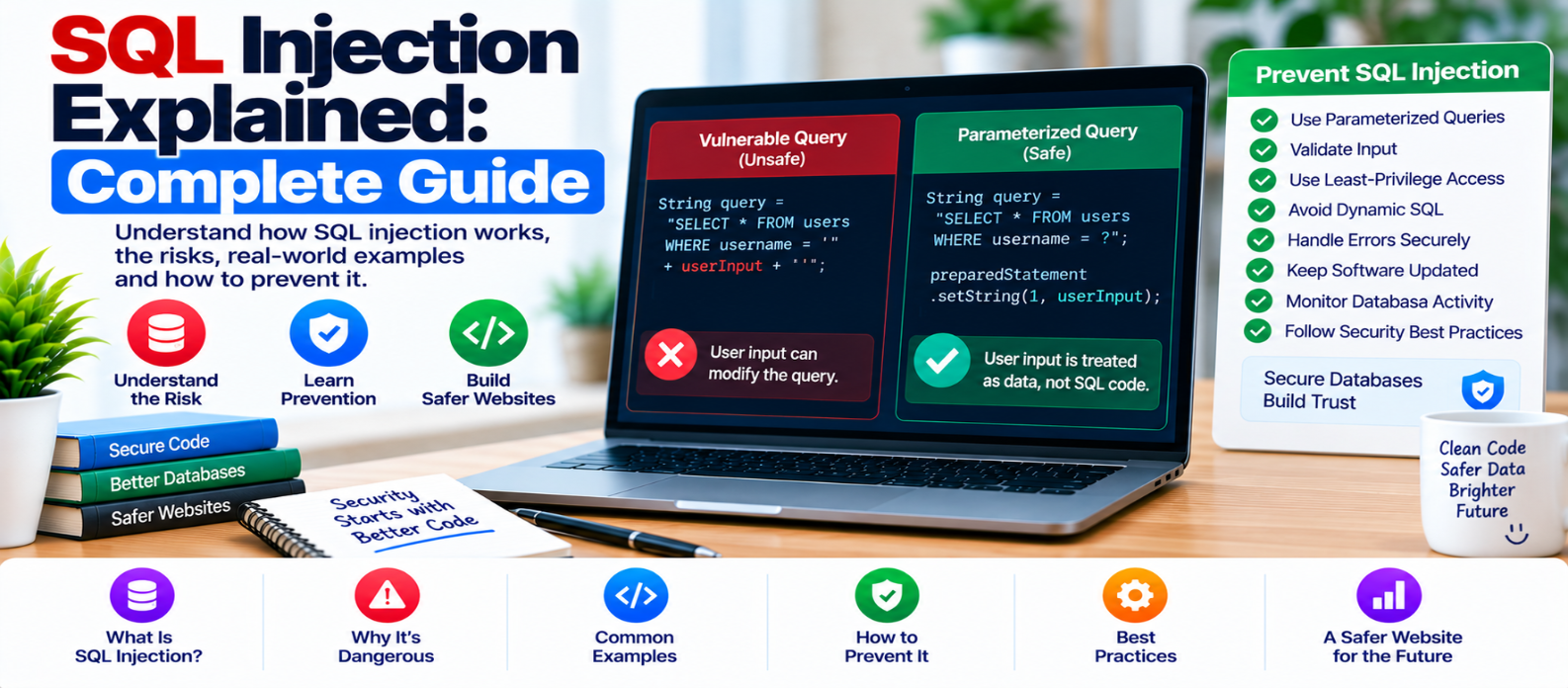
"Learn what SQL injection is, how SQLi vulnerabilities occur, why unsafe database queries are dangerous, and how parameterized queries, input validation, allowlists and least-privilege database access help prevent them."
SQL Injection Explained: Complete Guide
SQL injection, commonly shortened to SQLi, is a security vulnerability that can occur when an application handles untrusted data in a way that allows it to influence the structure of a database query.
At its core, SQL injection is a separation problem.
An application intends to send the database:
SQL instructions + user data
but unsafe code may allow user-controlled data to become part of those instructions.
Understanding that distinction is the key to preventing SQL injection.
What Is SQL?
SQL — Structured Query Language — is widely used by applications to work with relational databases.
A website might use SQL to:
- Find a user account
- Display products
- Store orders
- Search articles
- Update profiles
- Retrieve comments
For example, an application may conceptually ask:
SELECT id, title
FROM articles
WHERE category = ?
The ? represents data that will be supplied separately using a parameterized query.
That separation is important.
What Is SQL Injection?
SQL injection becomes possible when untrusted input is combined with SQL incorrectly.
Consider this unsafe programming pattern:
query =
"SELECT ... WHERE username = '"
+ userInput +
"'"
The application is building SQL by joining strings.
This creates a dangerous ambiguity:
Developer's SQL
      +
Untrusted Input
      ↓
One SQL Statement
If the database can interpret some user-controlled content as query syntax rather than purely as data, the application may be vulnerable.
Where Can SQL Injection Appear?
Developers should not assume that only login forms matter.
Database-backed input can come from:
- Search fields
- Login forms
- Registration forms
- URL parameters
- Filters
- Sorting controls
- API requests
- Cookies
- HTTP headers
- Administrative tools
- Imported data
The useful security rule is:
Treat external data as untrusted regardless of where it came from.
Why Is SQL Injection Dangerous?
The impact depends on the vulnerable query, database permissions, application architecture, and information stored.
A serious SQL injection vulnerability could potentially result in:
- Unauthorized data access
- Modification of records
- Deletion of information
- Authentication or authorization problems
- Exposure of sensitive information
- Application disruption
In some environments, broader consequences may be possible when the database account has excessive privileges or the surrounding system is poorly isolated.
This is why prevention should happen at both the application and database permission levels.
Parameterized Queries: The Primary Defense
The most important defense is to keep SQL code separate from untrusted values.
Instead of constructing a query like:
SQL + userInput + SQLuse a parameterized query:
SQL Statement
      +
Parameter Value
      ↓
Database treats parameter as data
For example, using Python's SQLite interface:
cursor.execute(
    "SELECT id, name FROM users WHERE email = ?",
    (email,)
)
Here, email is supplied as a parameter instead of being inserted into the SQL string through concatenation.
Different database libraries use different placeholder syntax, but the security principle is the same.
Don't Build Queries With String Concatenation
Avoid patterns such as:
"SELECT ... WHERE id = " + userInputor manually assembling queries using string formatting.
Even when input appears predictable, application behavior can change later.
Using parameterization consistently creates a safer development habit and reduces the number of places developers need to reason about SQL syntax.
Input Validation Still Matters
Parameterized queries don't make input validation unnecessary.
Suppose an application expects a product quantity.
A sensible rule might be:
Expected:
Integer between 1 and 20
The application should reject values that don't meet its business rules.
Validation improves correctness and reduces unexpected behavior.
But validation and parameterization solve different problems:
Validation asks:
"Is this value acceptable for this feature?"
Parameterization asks:
"Will this value remain data instead of becoming SQL syntax?"
Use both.
What About Dynamic Table Names and Sorting?
Query parameters generally represent values, not SQL identifiers or structural keywords.
Suppose visitors can sort products.
Don't directly insert arbitrary input into something like:
ORDER BY [USER INPUT]Instead, map user choices to a small allowlist:
allowed_sort = {
    "newest": "created_at",
    "price": "price",
    "name": "name"
}

column = allowed_sort.get(user_choice, "created_at")
The application chooses from known-safe SQL fragments rather than trusting arbitrary structural input.
Use Least-Privilege Database Accounts
Your website's database account shouldn't automatically have every possible database permission.
If an application only needs to read and update certain data, granting unrelated administrative privileges increases potential damage if something goes wrong.
Think:
Application
    ↓
Only Required Database Permissions
    ↓
Database
Least privilege doesn't fix SQL injection, but it can reduce the consequences of a vulnerability.
Be Careful With ORMs and Query Builders
Object-relational mappers and query builders often provide safer ways to construct database operations.
However, they aren't automatic immunity.
Developers can still introduce vulnerabilities through:
- Raw SQL features
- Unsafe string construction
- Incorrect dynamic queries
- Misused escape mechanisms
Use the library's parameter-binding features rather than bypassing them.
Stored Procedures Aren't Automatically Safe
A stored procedure can still be vulnerable if it dynamically constructs SQL from untrusted input.
The security question isn't simply:
"Are we using stored procedures?"
It is:
"Are untrusted values kept separate from executable SQL structure?"
The same principle applies.
Don't Expose Detailed Database Errors
Production error pages shouldn't reveal unnecessary details such as:
- Database structure
- Table names
- Internal queries
- File paths
- Stack traces
- Credentials
Detailed errors can help developers during controlled debugging, but public production responses should avoid leaking sensitive implementation information.
Keep useful diagnostic details in appropriately protected logs.
Monitoring and Testing Matter
Even well-designed applications change over time.
New filters, APIs, search features, reporting systems, and administrative tools may introduce new database queries.
Regularly review:
- Newly added database code
- Raw SQL usage
- Dynamic query construction
- Database permissions
- Unexpected database errors
- Dependency updates
Security testing should be part of development rather than something performed only after a website is finished.
SQL Injection Prevention Checklist
Before deploying database-backed features, verify:
-
Queries use parameterized values
-
SQL isn't built through untrusted string concatenation
-
Input follows expected formats and ranges
-
Dynamic identifiers use strict allowlists
-
Database accounts follow least privilege
-
ORM/query-builder escape hatches are reviewed
-
Stored procedures avoid unsafe dynamic SQL
-
Production errors don't expose database details
-
Secrets aren't stored in public code
-
Database libraries and frameworks are maintained
-
New database features receive security review
-
Important database activity is appropriately monitored
Conclusion
SQL injection is easiest to understand as a failure to maintain the boundary between instructions and data.
Unsafe design:
SQL + Untrusted Input → Mixed TogetherSafer design:
SQL Instructions
      +
Bound Parameters
      ↓
Clear Separation
Use parameterized queries consistently, validate input according to business rules, allowlist dynamic query structures, restrict database privileges, and review raw SQL carefully.
The objective isn't to recognize every possible malicious input.
It's to design database access so that untrusted data never gets the opportunity to become SQL instructions in the first place.
Get a Free Access To 200+ Free Tools:
|
Home Page |
|
|
Calculator Tools |
|
|
Text & Converter Tools |
|
|
PDF & Image Tools |
|
|
Games & Developer Tools |
|
|
Resume Builder |