
Sessions vs Cookies: What's the Difference? Complete Guide for 2026
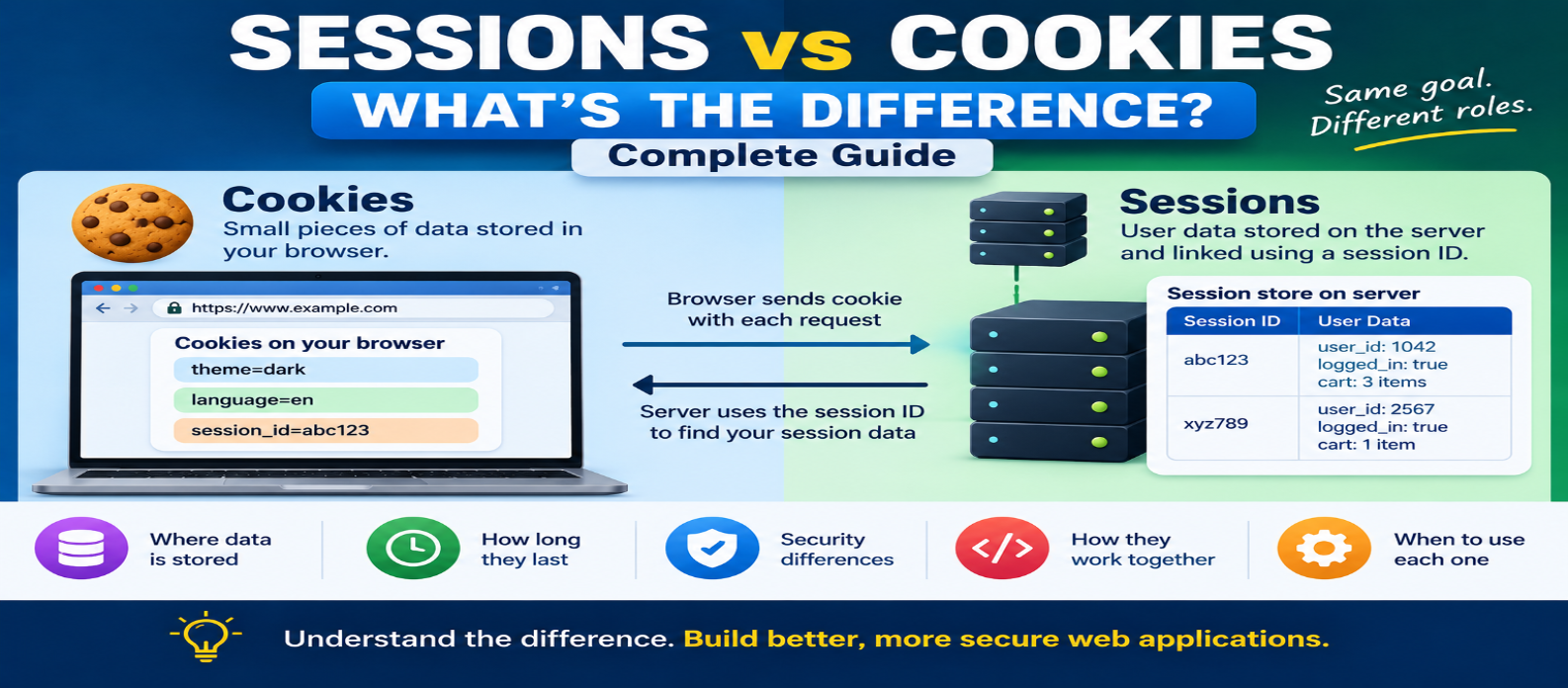
"Learn the difference between sessions and cookies, how they work together for logins, where data is stored, how session IDs work, security risks, expiration, scalability, and when developers should use each."
Sessions vs Cookies: What's the Difference?
When building a login system, shopping cart, or personalized website, you'll quickly encounter two terms: sessions and cookies.
They're closely related, but they're not the same thing.
A cookie is data stored by the browser and sent with matching HTTP requests according to cookie rules. A server-side session usually stores user-related state on the server, while the browser keeps a session identifier that tells the server which session belongs to that user.
Understanding this distinction is important for both web development and security.
Sessions vs Cookies: Quick Comparison
| Feature | Cookies | Server-Side Sessions |
|---|---|---|
| Main storage | Browser | Server/session store |
| Sent with requests | Matching cookies are | Usually only session ID |
| Typical use | Preferences, IDs, state | Login state, server-side data |
| Size | Relatively small | Depends on session storage |
| Security | Depends on data and configuration | Sensitive state can remain server-side |
| Expiration | Controlled by cookie settings | Controlled by server and related cookie |
| Server storage required | Not necessarily | Usually yes |
The important point is that sessions and cookies often work together rather than compete.
Why Do Websites Need Either?
HTTP doesn't automatically remember previous requests.
Imagine logging in and then opening your account page.
Without a mechanism for maintaining state, the server needs some way to determine that both requests belong to the same authenticated session.
Conceptually:
Request 1 → Login
Request 2 → Account
Request 3 → Orders
Sessions and cookies help applications maintain continuity across these separate requests.
What Is a Cookie?
A cookie is a small name-value pair that a website can ask the browser to store.
For example:
Set-Cookie: theme=darkOn a matching future request, the browser may send:
Cookie: theme=darkCookies can store information such as:
- Preferences
- Session identifiers
- Consent choices
- Shopping-related state
- Tracking identifiers
Cookies don't automatically mean server-side sessions are being used.
A website could store a simple preference entirely in a cookie.
What Is a Session?
The word session can have several meanings in web development, but it commonly refers to server-managed state associated with a particular user or browser interaction.
Suppose a user successfully logs in.
The server might create:
Session ID: x7K29pQ
User ID: 1042
Authenticated: Yes
Role: Customer
The actual session information remains in a server-side session store.
The browser receives only an identifier:
Set-Cookie: session_id=x7K29pQFuture requests can include that cookie:
Cookie: session_id=x7K29pQThe server then uses the identifier to retrieve the correct session.
How Cookies and Sessions Work Together
A typical login flow looks like this:
USER LOGS IN
     ↓
SERVER VERIFIES CREDENTIALS
     ↓
SERVER CREATES SESSION
     ↓
SESSION DATA STORED SERVER-SIDE
     ↓
SESSION ID SENT IN COOKIE
     ↓
BROWSER STORES COOKIE
     ↓
NEXT REQUEST SENDS SESSION ID
     ↓
SERVER FINDS SESSION
     ↓
USER REMAINS LOGGED IN
This is why saying "sessions vs cookies" can sometimes be misleading.
Many session systems depend on a cookie to carry the session identifier.
Where Is the Data Stored?
This is the easiest distinction to remember.
Cookie
Data is stored in the browser.
Browser
└── theme=dark
Server-Side Session
Application state is stored on the server or in a dedicated session store.
Server
└── x7K29pQ
    ├── user_id=1042
    ├── authenticated=true
    └── role=customer
The browser may only know:
session_id=x7K29pQThat keeps important application state away from direct client modification.
Can Users Modify Cookies?
Because cookies are stored client-side, developers should treat client-controlled values as untrusted input.
Suppose an application stores:
role=adminin an ordinary cookie and blindly trusts it.
A user modifying that value could create a serious authorization problem.
The server must never grant privileges simply because an untrusted client value claims them.
Security decisions should be verified using trustworthy server-side logic or properly protected cryptographic mechanisms.
Are Sessions More Secure Than Cookies?
It's not accurate to say that sessions are automatically secure while cookies are insecure.
A server-side session still commonly depends on a session cookie.
If an attacker steals a valid session identifier, they may be able to impersonate the session until it expires or is invalidated.
Important protections include:
Secure
HttpOnly
SameSite
Applications should also use HTTPS, generate unpredictable session identifiers, rotate identifiers when appropriate, and invalidate sessions correctly.
Security depends on the entire design.
What Is Session Hijacking?
Session hijacking occurs when an attacker obtains or otherwise takes control of a valid user's session.
For example:
User
 ↓
Valid Session ID
 ↓
Attacker obtains ID
 ↓
Attacker attempts to use session
This is why session identifiers should be treated like sensitive credentials.
They shouldn't contain easily predictable values such as:
session=1001
session=1002
session=1003
Secure systems use strong, unpredictable identifiers.
Session Cookie vs Persistent Cookie
A session cookie and a server-side session are different concepts.
A session cookie generally has no persistent expiration time and is intended for the current browser session.
A persistent cookie can survive browser restarts until its configured expiration.
Meanwhile, the server-side session may have its own expiration policy.
So:
Cookie Lifetime
      ≠
Server Session Lifetime
Both need to be managed properly.
What Happens When a Session Expires?
Suppose a server-side session expires after a period of inactivity.
The browser may still temporarily have:
session_id=x7K29pQBut when it sends that identifier, the server may no longer find a valid session.
The user is then treated as unauthenticated and may need to log in again.
This is why an old cookie doesn't necessarily mean an old session is still valid.
Where Are Sessions Stored?
Small applications might store sessions in server memory.
Larger applications may use:
- Databases
- Distributed caches
- Dedicated session stores
Imagine a website running on several application servers:
        Load Balancer
       /      |      \
Server A  Server B  Server C
       \      |      /
        Session Store
A shared session store allows different servers to access the same session information.
This can make scaling easier than keeping each session only in one server's local memory.
Cookies Without Sessions
Not every cookie needs a server-side session.
For example:
theme=dark
language=en
A website might safely use these values as preferences after validating them.
No session database is necessarily required.
Cookies are useful whenever a small amount of browser-associated state needs to persist and the security model allows it.
Sessions Without Cookies
Cookies are the most common way to transport browser session identifiers, but they're not the only possible mechanism.
Some systems may send authentication or session-related credentials through headers or other application-specific methods.
However, placing session identifiers directly into URLs is generally risky because URLs can appear in browser history, logs, analytics systems, and other locations.
For traditional browser-based applications, properly configured cookies are often a practical choice.
Cookies vs Sessions for a Shopping Cart
A simple guest cart could potentially store some information client-side.
A more complex store might use:
Browser
   ↓
Cart/Session ID Cookie
   ↓
Server
   ↓
Cart Database
The server-side approach can be useful when cart data includes pricing rules, inventory information, account associations, or other information that shouldn't be trusted solely from the client.
When Should You Use Cookies?
Cookies can be useful for:
- Session identifiers
- Language preferences
- Theme choices
- Consent settings
- Small browser-associated state
Avoid placing unnecessary sensitive information directly inside ordinary cookies.
When Should You Use Server-Side Sessions?
Sessions are useful when the server needs to maintain trusted state such as:
- Authentication status
- User identity references
- Authorization-related information
- Temporary workflow state
- Server-managed shopping data
The exact architecture depends on the application.
Modern systems may also use token-based authentication instead of traditional server-side sessions.
Common Mistakes
Storing Passwords in Cookies
Never store plaintext passwords in cookies.
Trusting Client-Side Values
Anything controlled by the browser should be validated.
Using Predictable Session IDs
Session identifiers should be cryptographically unpredictable.
Forgetting Session Expiration
Old sessions shouldn't remain valid indefinitely without a reason.
Not Using HTTPS
Session cookies should be protected during transport.
Assuming Logout Means Deleting Only the Cookie
A secure logout should also invalidate the relevant server-side session when applicable.
Sessions vs Cookies in One Diagram
COOKIE ONLY

Browser
   ↓
theme=dark
   ↓
Server reads value


SERVER SESSION

Browser
   ↓
session_id=x7K29pQ
   ↓
Server
   ↓
Session Store
   ↓
User Data / State
That's the fundamental difference.
Conclusion
Cookies and sessions solve related problems but operate differently.
Remember:
Cookie → Data stored by the browser
Server-side session → State stored on the server
Session cookie → Often carries the session identifier
Session ID → Connects the browser request to server-side state
For simple preferences, a cookie may be enough. For authentication and trusted application state, server-side sessions can keep sensitive state under server control while a carefully protected cookie carries only an unpredictable identifier.
The important question isn't simply "cookies or sessions?"
It's what data needs to be remembered, where should it be trusted, how long should it exist, and how should it be protected?
Get a Free Access To 200+ Free Tools:
|
Home Page |
|
|
Calculator Tools |
|
|
Text & Converter Tools |
|
|
PDF & Image Tools |
|
|
Games & Developer Tools |
|
|
Resume Builder |