
Largest Contentful Paint Explained: Complete LCP Guide for 2026
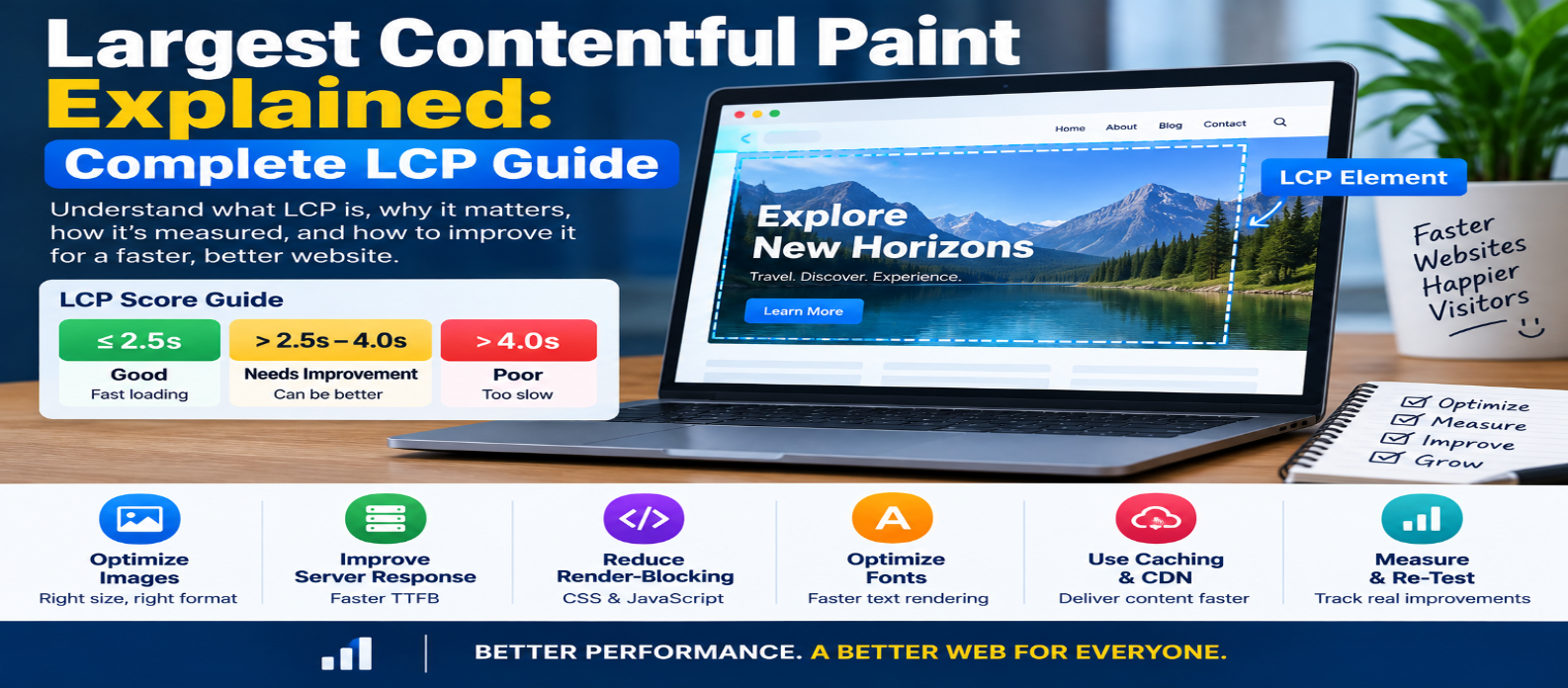
"Learn what Largest Contentful Paint (LCP) is, what a good LCP score means, how the LCP element is selected, why LCP becomes slow, and how to improve it using better images, servers, CSS, JavaScript, fonts, caching, and CDNs."
Largest Contentful Paint Explained: Complete LCP Guide
A page can technically start loading quickly while still feeling slow because the main content visitors are waiting for hasn't appeared.
That's exactly what Largest Contentful Paint (LCP) helps measure.
LCP is one of Google's Core Web Vitals and focuses on loading performance. Instead of measuring when every resource finishes downloading, it looks at when the largest qualifying content element visible within the viewport finishes rendering.
Understanding what controls that moment can help you make pages feel substantially faster.
What Is Largest Contentful Paint?
Largest Contentful Paint (LCP) measures how long it takes for the largest qualifying content element within the initial viewport to render, measured from when navigation begins.
Depending on the page, the LCP element might be:
- A hero image
- A large heading or text block
- A banner image
- A poster image for a video
- An image loaded through CSS
- Another qualifying image or text element
Imagine a page loading like this:
0.0s → Blank page
0.6s → Header appears
1.1s → Heading appears
2.0s → Hero image appears
If the hero image is the largest qualifying visible element, the LCP may occur around the time that image finishes rendering.
The goal is to make important above-the-fold content appear quickly.
What Is a Good LCP Score?
A commonly used Core Web Vitals guideline is:
Good               ≤ 2.5 seconds
Needs Improvement  > 2.5s to 4.0s
Poor               > 4.0 seconds
For evaluating real-user experience, the recommended target is generally to achieve 2.5 seconds or less at the 75th percentile of page loads.
That means you're not optimizing only for visitors with the fastest devices and connections.
Why Does LCP Matter?
Visitors don't care when an invisible technical event fires. They care when useful content appears.
Suppose two pages both begin responding quickly:
PAGE A
Header → 0.5s
Main Content → 1.8s

PAGE B
Header → 0.5s
Main Content → 5.2s
Page B may show something early, but the visitor still waits several seconds for the main content.
LCP helps identify that difference.
It's particularly useful for pages where a large hero image, heading, product image, or article introduction dominates the initial screen.
How Is the LCP Element Chosen?
The browser observes qualifying visible elements and tracks the largest candidate as the page loads.
For example:
Logo       → Small
Heading    → Medium
Hero Image → Large
The hero image might become the LCP candidate.
However, LCP isn't permanently tied to one element. As larger content appears during loading, the candidate can change.
User interaction can also stop further LCP candidate reporting.
How Do You Find Your LCP Element?
Before optimizing LCP, identify what the LCP element actually is.
Don't assume it's always the hero image.
Depending on the page, it could be:
<h1>Large Heading</h1>or:
<img src="hero.webp"
     alt="Product">
Browser performance tools and performance-testing tools can identify the LCP element and timing.
Once you know the element, investigate why it appears late.
That is much more effective than applying random speed optimizations.
The Four Main Parts of LCP
A useful way to diagnose LCP is to break its timing into four phases:
TTFB
  ↓
Resource Load Delay
  ↓
Resource Load Duration
  ↓
Element Render Delay
  ↓
LCP
Each phase points toward different problems.
1. Time to First Byte (TTFB)
Before the browser can render content, it needs the initial document.
Slow TTFB can come from:
- Slow server processing
- Expensive database queries
- Network latency
- Redirect chains
- Missing server-side caching
- Overloaded infrastructure
Possible fixes include improving backend performance, caching appropriate responses, reducing unnecessary redirects, and using infrastructure closer to users when useful.
A slow origin can delay everything that follows.
2. Resource Load Delay
Suppose the LCP element is a hero image.
The browser can't download it until it discovers that the resource exists.
Poor:
HTML
 ↓
JavaScript loads
 ↓
JavaScript executes
 ↓
Hero image discovered
 ↓
Image download begins
Better:
HTML
 ↓
Hero image discovered immediately
 ↓
Download begins
Important LCP resources should generally be discoverable early.
Avoid unnecessarily hiding the main image behind JavaScript or delayed requests.
3. Resource Load Duration
Once the browser starts downloading the LCP resource, the file itself may simply take too long.
A huge hero image is a common example.
Improve it by:
- Resizing images correctly
- Compressing images
- Choosing efficient formats
- Serving responsive image sizes
- Using a CDN when appropriate
For example, don't send a 4000-pixel image when the page only displays it around 1000 pixels wide.
The visitor pays for bytes they never visually need.
4. Element Render Delay
Sometimes the resource downloads quickly but still isn't displayed immediately.
Possible causes include:
- Render-blocking CSS
- JavaScript work
- Client-side rendering delays
- Hidden elements
- Font loading
- Expensive browser processing
This is why simply compressing an image doesn't guarantee a good LCP.
The browser must also be able to render it promptly.
How to Optimize an LCP Image
If an image is your LCP element, start here.
Don't Lazy-Load It
This can be a major mistake:
<img src="hero.webp"
     loading="lazy"
     alt="Hero">
Lazy loading is useful for offscreen images, but the main visible LCP image usually needs to load immediately.
Use Responsive Images
<img
  src="hero-800.webp"
  srcset="
    hero-480.webp 480w,
    hero-800.webp 800w,
    hero-1200.webp 1200w"
  sizes="100vw"
  alt="Hero">
This helps avoid sending unnecessarily large files to smaller devices.
Prioritize Important Images
For an image that truly needs high loading priority, browsers support:
<img src="hero.webp"
     fetchpriority="high"
     alt="Hero">
Use priority hints selectively. Marking everything high priority defeats the purpose.
Make It Discoverable in HTML
Whenever practical, put important images directly in the initial HTML rather than requiring JavaScript to discover them.
Can CSS Affect LCP?
Yes.
Stylesheets can influence when the browser can render the page.
Avoid:
- Huge unused stylesheets
- Unnecessary blocking CSS
- Excessive CSS imports
- Complex dependency chains
Don't remove necessary styling simply to improve a metric. Instead, reduce CSS that delays useful initial rendering without providing value.
Can JavaScript Affect LCP?
Absolutely.
Large JavaScript bundles can delay rendering, especially on slower mobile devices.
Common problems include:
Huge JS Bundle
     ↓
Download
     ↓
Parse
     ↓
Compile
     ↓
Execute
     ↓
Main Content Finally Renders
Possible improvements:
- Remove unused JavaScript
- Split bundles
- Defer noncritical scripts
- Delay third-party code
- Reduce client-side rendering work
- Server-render important initial content when appropriate
Your most important content shouldn't unnecessarily wait for a large JavaScript application to initialize.
Fonts and Text-Based LCP
Sometimes the LCP element is text.
Web fonts can influence when that text becomes visible.
Improve font delivery by:
- Loading only required families
- Reducing unnecessary font weights
- Using efficient formats
- Choosing an appropriate
font-display - Preloading only genuinely critical fonts
Don't preload every font on the site. Preloads compete for bandwidth with other important resources.
CDN and Caching
A CDN can improve LCP when geographic network latency or static-resource delivery is a bottleneck.
Caching can also reduce repeated server work and resource transfers.
A useful delivery chain might be:
Visitor
   ↓
Nearby CDN
   ↓
Cached Resource
But a CDN can't fix an oversized image or several seconds of JavaScript execution.
Optimize the actual bottleneck first.
LCP: Lab Data vs Real-User Data
A performance test provides useful controlled lab data.
But real visitors use:
Different Phones
Different Networks
Different Locations
Different Browsers
Different Cache States
Field data shows what actual users experience.
Use both.
Lab testing helps diagnose problems, while real-user data helps confirm whether visitors experience good performance at scale.
Common LCP Mistakes
Optimizing the Wrong Image
Find the actual LCP element first.
Lazy-Loading the LCP Image
Above-the-fold content should generally be available promptly.
Focusing Only on Image Compression
TTFB, discovery delay, CSS, and JavaScript may be the real problem.
Preloading Everything
Too many high-priority requests compete with each other.
Testing Only on Fast Desktop Connections
Mobile devices and slower networks can reveal problems hidden by powerful development machines.
A Practical LCP Workflow
Use this process:
MEASURE LCP
     ↓
IDENTIFY LCP ELEMENT
     ↓
BREAK DOWN THE DELAY
     ↓
TTFB?
DISCOVERY?
DOWNLOAD?
RENDERING?
     ↓
FIX BIGGEST BOTTLENECK
     ↓
MEASURE AGAIN
This is much more effective than randomly applying performance tricks.
Conclusion
Largest Contentful Paint measures how quickly the main visible content of a page becomes available to the user.
A good target is generally:
LCP ≤ 2.5 seconds
But improving LCP isn't about chasing the number alone.
Ask why the main content appears late.
The problem usually belongs to one or more of these areas:
Server → Slow initial response
Discovery → LCP resource found too late
Download → Resource too large or slow
Rendering → CSS, JavaScript, fonts, or browser work delays display
Identify the real LCP element, determine which phase consumes the most time, fix that bottleneck, and measure again.
That's how LCP optimization turns from guesswork into a repeatable performance process.
Get a Free Access To 200+ Free Tools:
|
Home Page |
|
|
Calculator Tools |
|
|
Text & Converter Tools |
|
|
PDF & Image Tools |
|
|
Games & Developer Tools |
|
|
Resume Builder |