
JSON Explained: Complete Guide for Beginners in 2026
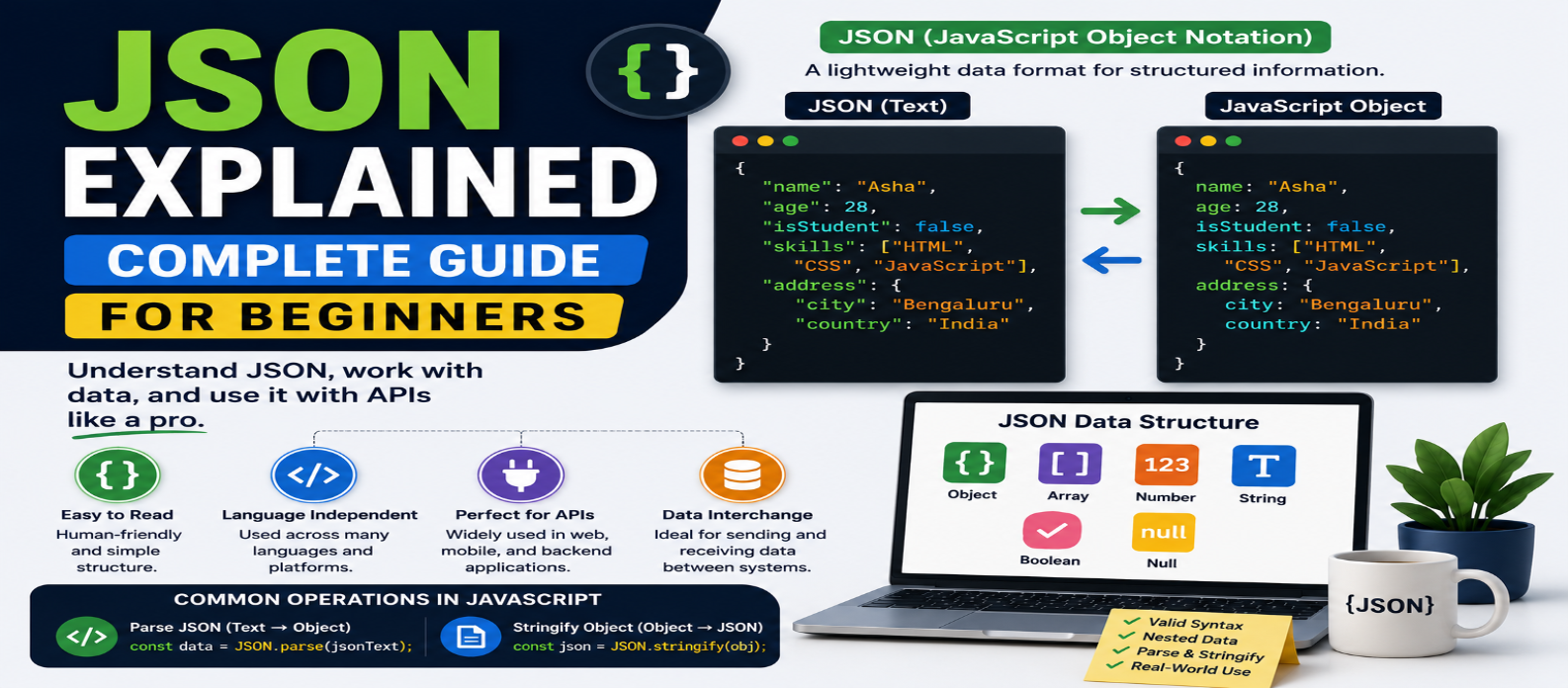
"Learn JSON from scratch with practical examples covering JSON syntax, data types, objects, arrays, nested data, JSON.parse(), JSON.stringify(), APIs, Fetch, error handling, and JSON vs JavaScript objects."
JSON Explained: Complete Guide for Beginners in 2026
When a website requests product information, a mobile app loads a user profile, or a frontend communicates with a server, the information often needs to travel in a structured format.
One of the most common formats used for this purpose is JSON.
JSON is compact, readable, and supported across many programming languages. If you're learning JavaScript, APIs, or web development, understanding JSON is essential because you'll encounter it constantly when exchanging and storing structured data.
What Is JSON?
JSON stands for JavaScript Object Notation.
It is a text-based data format used to represent structured information.
A simple JSON document looks like this:
{
  "name": "Asha",
  "age": 28,
  "active": true
}
This example contains three name-value pairs:
"name"   → "Asha"
"age"    → 28
"active" → true
Although JSON's syntax was inspired by JavaScript object notation, JSON is a data format, not a programming language.
Where Is JSON Used?
JSON appears throughout modern software development.
Common uses include:
- API responses
- Requests sent to servers
- Configuration data
- Application settings
- Data storage
- Web applications
- Mobile applications
- Communication between services
For example, an online store's server might send:
{
  "id": 101,
  "name": "Wireless Keyboard",
  "price": 2499,
  "available": true
}
The frontend can parse this data and display the product.
JSON Syntax Rules
JSON has stricter syntax than ordinary JavaScript object literals.
A valid JSON object looks like:
{
  "name": "Ravi",
  "city": "Mysuru"
}
Important rules include:
Property names use double quotes.
Correct:
{
  "name": "Ravi"
}
Invalid JSON:
{
  name: "Ravi"
}
Strings also use double quotes:
{
  "language": "JavaScript"
}
JSON doesn't allow trailing commas:
{
  "name": "Asha",
  "age": 28,
}
That final comma makes the text invalid JSON.
What Data Types Does JSON Support?
JSON supports a small set of value types.
String
{
  "name": "Keyboard"
}
Number
{
  "price": 2499
}
Boolean
{
  "available": true
}
Null
{
  "discount": null
}
Array
{
  "colors": ["Black", "White", "Blue"]
}
Object
{
  "manufacturer": {
    "name": "Example Company",
    "country": "India"
  }
}
These types can be combined to represent complex information.
JSON Arrays
A JSON document can contain arrays:
{
  "languages": [
    "HTML",
    "CSS",
    "JavaScript"
  ]
}
Arrays can also contain objects:
{
  "products": [
    {
      "id": 1,
      "name": "Keyboard"
    },
    {
      "id": 2,
      "name": "Mouse"
    }
  ]
}
This structure is extremely common in APIs.
A server may return a collection of users, products, posts, orders, or search results as an array of objects.
Nested JSON
JSON can represent hierarchical information by nesting objects and arrays.
{
  "user": {
    "name": "Asha",
    "address": {
      "city": "Bengaluru",
      "state": "Karnataka"
    }
  }
}
After parsing this JSON into a JavaScript value, you could access:
data.user.address.cityResult:
BengaluruReal-world API responses can contain several nested levels, so learning to inspect the structure carefully is an important skill.
JSON vs JavaScript Object
These two are often confused.
A JavaScript object can look like:
const user = {
  name: "Asha",
  age: 28,
  greet() {
    console.log("Hello");
  }
};
JSON representation:
{
  "name": "Asha",
  "age": 28
}
JSON cannot directly represent a JavaScript function such as greet().
JSON also has stricter rules for property names and strings.
The key distinction is:
JavaScript Object → Runtime JavaScript value
JSON → Text representation of structured data
They may look similar, but they aren't the same thing.
Converting JSON to JavaScript
Suppose you receive JSON text:
const jsonText =
  '{"name":"Asha","age":28}';
JavaScript can't treat this string as an object automatically.
Use:
const user = JSON.parse(jsonText);Now:
console.log(user.name);returns:
AshaJSON.parse() means:
JSON Text → JavaScript Value
Converting JavaScript to JSON
To convert a JavaScript value into JSON text, use:
const user = {
  name: "Ravi",
  age: 30
};

const jsonText =
  JSON.stringify(user);
The result is JSON text similar to:
{"name":"Ravi","age":30}Think:
JSON.parse() → JSON to JavaScript
JSON.stringify() → JavaScript to JSON
Remembering this pair solves much of the beginner confusion around JSON.
Pretty-Printing JSON
JSON.stringify() can also create formatted output:
const formatted =
  JSON.stringify(user, null, 2);

console.log(formatted);
This produces indentation that makes JSON easier for people to read.
Pretty formatting is useful for debugging, logs, development tools, and configuration files.
For network transfer, compact JSON is commonly preferred because unnecessary whitespace isn't required.
JSON and the Fetch API
A common workflow looks like:
async function loadProduct() {
  const response =
    await fetch("/api/product");

  if (!response.ok) {
    throw new Error(
      `HTTP ${response.status}`
    );
  }

  const product =
    await response.json();

  console.log(product.name);
}
response.json() reads the response body and parses its JSON representation into a JavaScript value.
This creates a familiar flow:
Server → JSON Response → Parse → JavaScript Data → Interface
Sending JSON to a Server
JavaScript applications also send JSON.
const product = {
  name: "Keyboard",
  price: 2499
};

await fetch("/api/products", {
  method: "POST",

  headers: {
    "Content-Type": "application/json"
  },

  body: JSON.stringify(product)
});
Here:
JSON.stringify(product) converts the JavaScript object into JSON text.
The Content-Type header tells the server what representation is being sent.
JSON Doesn't Support Every JavaScript Value
This is important when using JSON.stringify().
JSON doesn't directly represent features such as:
- Functions
undefinedSymbolBigIntin ordinary JSON serialization- JavaScript-specific object behavior
For example:
const data = {
  name: "Asha",
  action: undefined
};

console.log(JSON.stringify(data));
The undefined object property is omitted from the JSON output.
Don't assume that every JavaScript value can be converted to JSON and restored perfectly.
Dates in JSON
JSON doesn't have a dedicated date type.
A date may be represented as a string:
{
  "publishedAt": "2026-08-31T10:30:00Z"
}
After parsing JSON, this value remains a string unless your application explicitly converts it.
For example:
const date =
  new Date(data.publishedAt);
Applications need an agreed convention for representing dates.
Handling Invalid JSON
JSON.parse() throws an error when the input isn't valid JSON.
try {
  const data =
    JSON.parse(jsonText);

  console.log(data);
} catch (error) {
  console.error("Invalid JSON");
}
This matters when parsing data that may be malformed or come from an unreliable source.
A single missing quote or extra comma can make JSON invalid.
Common JSON Mistakes
Using Single Quotes
JSON strings require double quotes.
Adding Trailing Commas
Unlike many JavaScript contexts, JSON doesn't allow them.
Treating JSON Text Like an Object
Parse JSON text before accessing properties.
Assuming JSON Supports Functions
JSON represents data, not executable JavaScript behavior.
Forgetting to stringify() Request Data
When an API expects JSON text, convert the JavaScript value appropriately before sending it.
Trusting External JSON Automatically
Valid JSON only means the syntax is valid.
It doesn't mean the information has the properties, types, or values your application expects.
Validate important external data before relying on it.
Practical Example
Suppose a server returns:
{
  "store": "Tech Shop",
  "products": [
    {
      "name": "Keyboard",
      "price": 2499
    },
    {
      "name": "Mouse",
      "price": 999
    }
  ]
}
After parsing:
const firstProduct =
  data.products[0];

console.log(firstProduct.name);
You can combine object and array techniques:
const affordable =
  data.products.filter(
    product => product.price < 1500
  );
This shows why JSON, arrays, and objects are closely connected in everyday web development.
JSON Learning Roadmap
Learn JSON in this order:
Syntax → Data Types → Objects → Arrays → Nested Data → JSON.parse() → JSON.stringify() → Fetch Responses → Sending JSON → Validation & Error Handling
You don't need to memorize complicated rules.
Practice reading and creating small JSON documents until their structure becomes familiar.
Conclusion
JSON provides a simple way for applications to represent and exchange structured data.
The most important concepts are:
JSON = Text-Based Data Format
JSON.parse() = JSON Text → JavaScript
JSON.stringify() = JavaScript → JSON Text
Once you understand those fundamentals, working with APIs, frontend applications, backend services, configuration files, and structured data becomes much easier.
Pay attention to valid syntax, understand the difference between JSON and JavaScript objects, and never assume that externally received data is trustworthy simply because it parsed successfully.
Get a Free Access To 200+ Free Tools:
|
Home Page |
|
|
Calculator Tools |
|
|
Text & Converter Tools |
|
|
PDF & Image Tools |
|
|
Games & Developer Tools |
|
|
Resume Builder |