
JavaScript Objects Explained: Complete Guide for Beginners in 2026
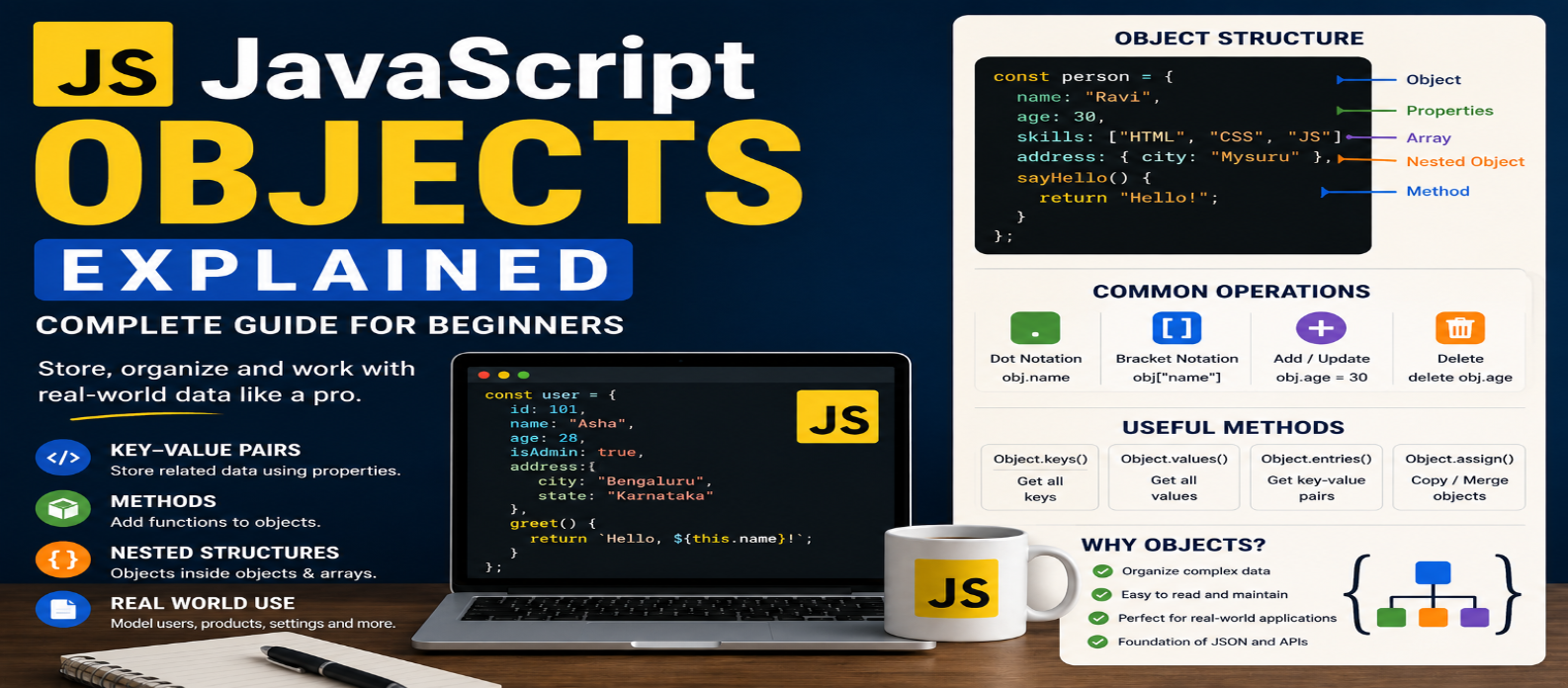
"Learn JavaScript objects from scratch with practical examples covering properties, methods, dot and bracket notation, nested objects, destructuring, spread syntax, optional chaining, iteration, JSON, and arrays of objects."
JavaScript Objects Explained: Complete Guide for Beginners in 2026
JavaScript applications constantly work with things that have multiple pieces of related information. A user has a name, email, and age. A product has a title, price, and stock status. A blog post has a heading, author, and publication date.
Creating separate variables for every detail quickly becomes difficult to manage.
JavaScript objects solve this by grouping related data into meaningful collections of properties.
Objects are fundamental to JavaScript. You'll encounter them in APIs, DOM programming, application settings, JSON data, arrays, frameworks, and almost every substantial JavaScript project.
What Is a JavaScript Object?
An object stores information as key-value pairs, commonly referred to as properties.
const user = {
  name: "Asha",
  age: 28,
  city: "Bengaluru"
};
Here:
name, age, and city are property keys.
"Asha", 28, and "Bengaluru" are their values.
Conceptually:
Object
├── name → "Asha"
├── age  → 28
└── city → "Bengaluru"
This is much easier to manage than three unrelated variables.
Accessing Object Properties
JavaScript provides two common approaches.
Dot Notation
console.log(user.name);Result:
AshaDot notation is concise and works well when you know the property name.
Bracket Notation
console.log(user["city"]);Bracket notation becomes particularly useful when the property name comes from a variable:
const property = "age";

console.log(user[property]);
Result:
28This distinction is important.
user.property searches for a property literally named property.
user[property] uses the value stored in the variable.
Adding and Updating Properties
Objects can be changed after creation.
Add a property:
user.email = "asha@example.com";Update one:
user.age = 29;Now the object contains the updated information.
Even if the object was declared with const, its properties can still usually be changed.
const product = {
  price: 1000
};

product.price = 1200;
const prevents reassignment of the product variable itself. It doesn't automatically make the object's contents immutable.
Removing a Property
The delete operator can remove a property:
delete user.city;Afterward, city is no longer an own property of that object.
Whether deletion is the best design choice depends on how your application represents missing information.
Sometimes assigning a meaningful alternative value is more appropriate.
Objects Can Contain Different Types of Data
Object values aren't limited to strings.
const product = {
  name: "Keyboard",
  price: 2500,
  available: true,
  colors: ["Black", "White"],
  details: {
    wireless: true,
    warrantyYears: 2
  }
};
An object can contain:
- Strings
- Numbers
- Booleans
- Arrays
- Other objects
- Functions
- Many other JavaScript values
This flexibility makes objects useful for modeling real application data.
Nested Objects
Objects can exist inside other objects.
const customer = {
  name: "Ravi",

  address: {
    city: "Mysuru",
    state: "Karnataka"
  }
};
Access nested information with:
console.log(customer.address.city);Result:
MysuruReal API responses frequently contain nested structures, so becoming comfortable navigating them is important.
What Are Object Methods?
When a function belongs to an object as a property, it's commonly called a method.
const calculator = {
  add(a, b) {
    return a + b;
  }
};

calculator.add(5, 3);
Result:
8Methods allow objects to contain both data and related behavior.
Another example:
const user = {
  firstName: "Asha",
  lastName: "Patil",

  getFullName() {
    return `${this.firstName} ${this.lastName}`;
  }
};
Here, this refers to the object according to how the method is called.
Understanding this fully requires more context, so beginners shouldn't assume it always means "the current object" in every JavaScript situation.
Checking Whether a Property Exists
You can use the in operator:
"name" in user;This checks the object and its prototype chain.
When you specifically need to check an object's own property, modern JavaScript provides:
Object.hasOwn(user, "name");This distinction can matter when processing objects from different sources.
Useful Object Methods
JavaScript provides several methods for working with object data.
Object.keys()
Returns an array of enumerable own property keys:
const product = {
  name: "Mouse",
  price: 1200,
  available: true
};

console.log(Object.keys(product));
Result:
["name", "price", "available"]Object.values()
Returns corresponding values:
Object.values(product);Object.entries()
Returns key-value pairs:
Object.entries(product);This is especially convenient for iteration.
Looping Through an Object
You can combine Object.entries() with for...of:
for (const [key, value] of Object.entries(product)) {
  console.log(`${key}: ${value}`);
}
This provides both the property name and value during each iteration.
For many cases, this is clearer than manually retrieving each property.
Object Destructuring
Destructuring lets you extract properties into variables.
Instead of:
const name = product.name;
const price = product.price;
use:
const { name, price } = product;You can also rename variables:
const {
  name: productName,
  price: productPrice
} = product;
And provide defaults:
const {
  discount = 0
} = product;
Destructuring is common in modern JavaScript because it makes working with structured data more concise.
Spread Syntax With Objects
The spread syntax can create a shallow copy:
const original = {
  name: "Keyboard",
  price: 2500
};

const copy = {
  ...original
};
You can create an updated object without changing the original:
const updated = {
  ...original,
  price: 2200
};
updated receives the copied properties and then overrides price.
This pattern is common when working with application state.
Understand Shallow Copies
A spread copy doesn't recursively duplicate nested objects.
const user = {
  name: "Ravi",
  address: {
    city: "Hubballi"
  }
};

const copy = { ...user };
user.address and copy.address still refer to the same nested object.
Therefore:
copy.address.city = "Dharwad";also affects the nested object visible through user.
This is an important source of bugs when beginners assume spread syntax creates a completely independent deep copy.
Optional Chaining
Sometimes nested information may not exist.
This can fail:
console.log(user.address.city);if address is missing.
Optional chaining provides a safer lookup:
console.log(user.address?.city);If address is null or undefined, the expression returns undefined instead of trying to access .city.
You can continue through multiple levels:
user.profile?.contact?.emailThis is especially useful when processing data where some fields are optional.
Nullish Coalescing for Default Values
Optional chaining is often paired with ??.
const city =
  user.address?.city ?? "Unknown";
The fallback "Unknown" is used when the value on the left is null or undefined.
Unlike ||, ?? doesn't replace meaningful falsy values such as 0 or an empty string unless they're actually nullish.
Arrays of Objects
One of the most important real-world patterns is an array containing objects:
const products = [
  {
    id: 1,
    name: "Keyboard",
    price: 2500
  },
  {
    id: 2,
    name: "Mouse",
    price: 1200
  }
];
Now array methods and objects work together:
const affordable = products.filter(
  product => product.price < 2000
);
Or find a specific product:
const product = products.find(
  product => product.id === 2
);
This pattern appears constantly in API responses, dashboards, stores, and data-driven interfaces.
Objects and JSON Are Not the Same Thing
JavaScript object:
const user = {
  name: "Asha",
  active: true
};
JSON is a text-based data format:
{
  "name": "Asha",
  "active": true
}
You can convert an object into JSON text:
JSON.stringify(user);And parse JSON text:
const data = JSON.parse(jsonText);They look similar, but a JavaScript object and JSON text are different things.
Common Object Mistakes
Using Dot Notation for Dynamic Keys
If the property name comes from a variable, use bracket notation:
user[propertyName]Assuming const Makes Objects Immutable
It prevents variable reassignment, not property changes.
Assuming Spread Creates a Deep Copy
Nested objects may still be shared.
Accessing Missing Nested Properties Directly
Use optional chaining when missing values are expected.
Creating Unclear Property Names
Prefer:
{
  productPrice: 2500
}
over vague names that make the object's meaning difficult to understand.
Practical Example: Product Data
const product = {
  id: 101,
  name: "Wireless Keyboard",
  price: 2500,
  available: true,

  specifications: {
    connection: "Bluetooth",
    rechargeable: true
  }
};
Extract information:
const { name, price } = product;Read nested information:
const connection =
  product.specifications?.connection;
Create a discounted version:
const discountedProduct = {
  ...product,
  price: 2250
};
The same fundamental techniques scale to much larger application data.
JavaScript Objects Learning Roadmap
Learn in this order:
Create Objects → Properties → Dot & Bracket Notation → Add/Update Values → Nested Objects → Methods → Object.keys() / values() / entries() → Destructuring → Spread Syntax → Optional Chaining → Arrays of Objects
Don't try to memorize every object-related feature immediately.
Practice modeling familiar things such as a user, product, book, order, or blog post.
Conclusion
JavaScript objects let you organize related information into meaningful structures.
Start with:
const product = {
  name: "Keyboard",
  price: 2500
};
Then learn how to read, modify, iterate, destructure, copy, and safely access object data.
The most important shift is learning to think in structured information:
User → Properties
Product → Properties
Order → Properties
Application → Collections of Objects
Once objects become familiar, working with JSON, APIs, application state, arrays of records, and modern JavaScript frameworks becomes much easier.
Get a Free Access To 200+ Free Tools:
|
Home Page |
|
|
Calculator Tools |
|
|
Text & Converter Tools |
|
|
PDF & Image Tools |
|
|
Games & Developer Tools |
|
|
Resume Builder |