
JavaScript Async Programming Explained: Complete Guide for 2026
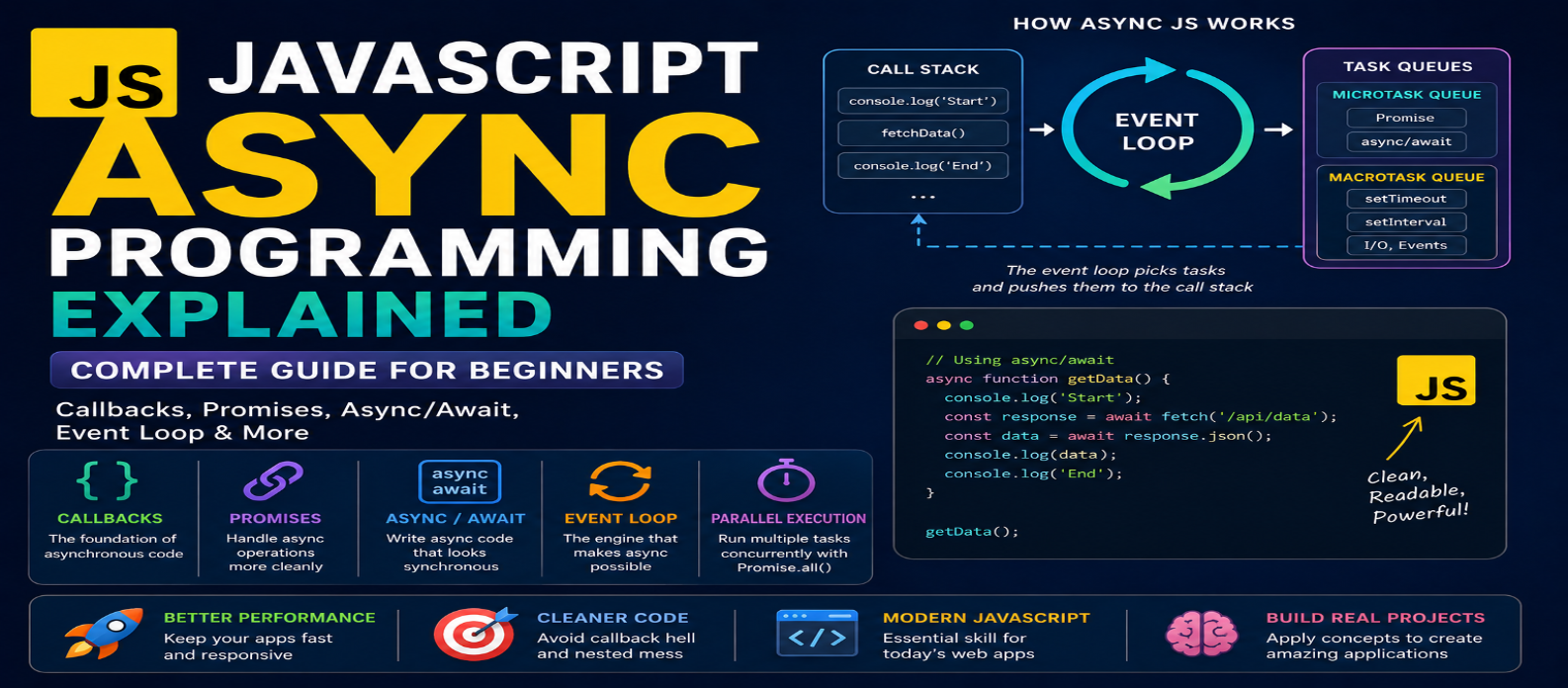
"Learn asynchronous JavaScript with practical examples covering callbacks, Promises, async/await, the event loop, error handling, Promise methods, and concurrent operations."
JavaScript Async Programming Explained: Complete Guide for 2026
JavaScript often needs to handle tasks that don't finish immediately. A website may fetch data from a server, wait for user input, read a file, run a timer, or communicate with an external API.
If JavaScript had to stop everything while waiting for each task, modern web applications would feel slow and unresponsive. Asynchronous programming allows JavaScript to start certain operations and continue doing other work while waiting for results.
This guide explains callbacks, Promises, async/await, the event loop, parallel operations, and error handling in a beginner-friendly way.
What Is Asynchronous JavaScript?
Asynchronous programming allows some operations to complete without blocking the normal flow of other work.
Consider:
console.log("Start");

setTimeout(() => {
  console.log("Timer finished");
}, 2000);

console.log("End");
The output is:
Start
End
Timer finished
JavaScript doesn't simply wait two seconds at setTimeout() before moving forward.
Instead, the timer is scheduled, synchronous code continues, and the callback becomes eligible to run later.
This is a basic example of asynchronous behavior.
Synchronous vs Asynchronous Code
Synchronous code generally executes one step after another:
Task A → Finish
Task B → Finish
Task C → Finish
Asynchronous operations allow waiting periods to be handled differently:
Start Task A
↓
Task A waits
↓
Continue other work
↓
Task A result becomes available
↓
Handle result
This is particularly important for network operations because a server response might take milliseconds or several seconds.
JavaScript Is Single-Threaded—So How Does Async Work?
JavaScript code on the main browser thread generally executes one task at a time.
However, the browser environment provides capabilities for operations such as:
- Timers
- Network requests
- User events
- Certain browser APIs
When asynchronous work becomes ready, callbacks can be queued for JavaScript to process.
The event loop helps coordinate when queued work can execute.
A simplified model is:
Call Stack → Browser/Runtime Work → Queues → Event Loop → Call Stack
The important beginner concept is:
Asynchronous JavaScript doesn't mean all JavaScript code automatically runs simultaneously.
Instead, the runtime coordinates asynchronous operations while JavaScript continues processing available work.
Callbacks: The Basic Async Pattern
A callback is a function passed somewhere to be executed later.
Example:
function greet(name, callback) {
  console.log(`Hello, ${name}`);
  callback();
}

greet("Developer", () => {
  console.log("Welcome!");
});
Callbacks are also common with events:
button.addEventListener("click", () => {
  console.log("Button clicked");
});
Callbacks themselves aren't bad. They remain fundamental to JavaScript.
Problems arise when many dependent asynchronous operations become deeply nested.
What Is Callback Hell?
Imagine several asynchronous operations depending on one another:
getUser(id, user => {
  getOrders(user, orders => {
    getPayment(orders, payment => {
      showResult(payment);
    });
  });
});
As nesting increases, code can become difficult to read, maintain, and handle errors within.
This pattern is sometimes called callback hell.
Promises provide a cleaner way to represent many asynchronous operations.
What Is a Promise?
A Promise represents the eventual completion or failure of an asynchronous operation.
A Promise has three states:
Pending → Fulfilled
or
Pending → Rejected
Example:
const promise = new Promise((resolve, reject) => {
  const success = true;

  if (success) {
    resolve("Operation completed");
  } else {
    reject(new Error("Operation failed"));
  }
});
You can consume the result with:
promise
  .then(result => {
    console.log(result);
  })
  .catch(error => {
    console.error(error);
  });
.then() handles fulfillment.
.catch() handles rejection.
.finally() can run after settlement regardless of success or failure.
Promise Chaining
Promises become especially useful when operations depend on previous results.
Instead of deeply nested callbacks:
getUser()
  .then(user => getOrders(user))
  .then(orders => calculateTotal(orders))
  .then(total => displayTotal(total))
  .catch(error => handleError(error));
Each step returns information to the next step.
This creates a more readable sequence while providing centralized error handling.
async and await
async/await provides another way to work with Promises.
Instead of:
fetch("/api/users")
  .then(response => response.json())
  .then(data => console.log(data));
you can write:
async function loadUsers() {
  const response = await fetch("/api/users");
  const data = await response.json();

  console.log(data);
}
The code looks sequential even though the underlying operation is asynchronous.
What Does async Do?
Adding async to a function means the function always returns a Promise.
async function getMessage() {
  return "Hello";
}
Conceptually, calling it produces a Promise fulfilled with "Hello".
What Does await Do?
await waits for a Promise to settle within an async context before continuing that function's execution.
const data = await getData();It doesn't mean the entire browser freezes while waiting.
Other work can continue while the asynchronous operation progresses.
Handling Errors With try...catch
A common async/await pattern is:
async function loadProducts() {
  try {
    const response = await fetch("/api/products");

    if (!response.ok) {
      throw new Error(`HTTP ${response.status}`);
    }

    const products = await response.json();

    console.log(products);
  } catch (error) {
    console.error("Unable to load products:", error);
  }
}
This handles rejected Promises and explicitly thrown errors.
Remember that fetch() doesn't reject merely because a server returns an HTTP error such as 404 or 500, so checking response.ok is important.
Sequential vs Concurrent Operations
Suppose you need two independent pieces of information.
This code waits for one before starting the next:
const users = await getUsers();
const products = await getProducts();
If neither depends on the other, you may start both first:
const usersPromise = getUsers();
const productsPromise = getProducts();

const users = await usersPromise;
const products = await productsPromise;
Or more conveniently:
const [users, products] = await Promise.all([
  getUsers(),
  getProducts()
]);
Promise.all() can reduce unnecessary waiting when operations are independent.
However, it rejects if any included Promise rejects.
Useful Promise Methods
JavaScript provides several tools for coordinating Promises.
Promise.all()
Wait for all Promises to fulfill, or reject when one rejects.
Promise.allSettled()
Wait for every Promise to settle, preserving both successes and failures.
Promise.race()
Settle according to the first Promise that settles.
Promise.any()
Fulfill when the first Promise fulfills; reject if all of them reject.
Choose based on the behavior your application actually needs rather than defaulting to Promise.all() everywhere.
Understanding the Event Loop
Consider:
console.log("A");

setTimeout(() => {
  console.log("B");
}, 0);

console.log("C");
The output is:
A
C
B
A zero-millisecond timer doesn't mean:
Run immediately.
It means the callback can be scheduled after the timer requirements are met. It still has to wait until JavaScript can process the appropriate queued task.
Promises introduce another important queue behavior:
console.log("A");

setTimeout(() => console.log("B"), 0);

Promise.resolve().then(() => {
  console.log("C");
});

console.log("D");
This produces:
A
D
C
B
Promise reactions are processed through the microtask queue, which is handled before the next timer task in this situation.
You don't need to memorize every event-loop detail immediately, but understanding this explains many surprising JavaScript execution orders.
Common Async JavaScript Mistakes
Forgetting await
const data = response.json();data is a Promise rather than the parsed result if you don't await it.
Use:
const data = await response.json();Using await Unnecessarily in Sequence
Independent operations don't always need to wait for one another. Consider concurrent execution when appropriate.
Ignoring Rejections
Async operations can fail. Handle errors intentionally.
Mixing Patterns Without a Reason
Callbacks, Promise chains, and async/await are all valid, but unnecessarily mixing styles can make code harder to follow.
Blocking the Main Thread
Asynchronous programming doesn't make CPU-heavy synchronous JavaScript non-blocking.
A huge calculation can still freeze the interface.
Practical Example: Loading Dashboard Data
Suppose a dashboard needs a profile and notifications.
async function loadDashboard() {
  try {
    const [profile, notifications] =
      await Promise.all([
        getProfile(),
        getNotifications()
      ]);

    renderProfile(profile);
    renderNotifications(notifications);

  } catch (error) {
    showError("Unable to load dashboard");
  }
}
Because the two requests are independent, they can begin together.
This illustrates an important principle:
Don't just make asynchronous code work—structure it so unnecessary waiting is avoided.
Async Programming Learning Roadmap
A beginner can learn in this order:
Callbacks
↓
Promises
↓
.then() and .catch()
↓
async/await
↓
try...catch
↓
Fetch API
↓
Promise.all()
↓
Event Loop Basics
↓
Cancellation and Advanced Patterns
Build small projects while learning rather than studying everything theoretically.
Conclusion
Asynchronous programming allows JavaScript applications to handle operations that take time without unnecessarily stopping other work.
The progression is easier to understand as:
Callbacks → Promises → async/await → Concurrent Promise Handling
For everyday development, focus first on writing clear async/await code, handling failures properly, and understanding when independent operations can run concurrently.
Then learn how the event loop and queues explain what happens underneath.
Once asynchronous JavaScript becomes familiar, working with APIs, Fetch, databases, timers, user interactions, and modern web applications becomes significantly easier.
Get a Free Access To 200+ Free Tools:
|
Home |
https://webtoolscorner.com/ |
|
Calculators Tools |
https://webtoolscorner.com/category/calculators |
|
Text & Convertor Tools |
https://webtoolscorner.com/category/text-tools |
|
PDF & Image Tools |
https://webtoolscorner.com/category/pdf-tools |
|
Games & Developer Tools |
https://webtoolscorner.com/category/games-and-developer-tools |
|
Resume Builder |
https://webtoolscorner.com/resume |