
HTTP vs HTTPS: What's the Difference? Complete Guide for 2026
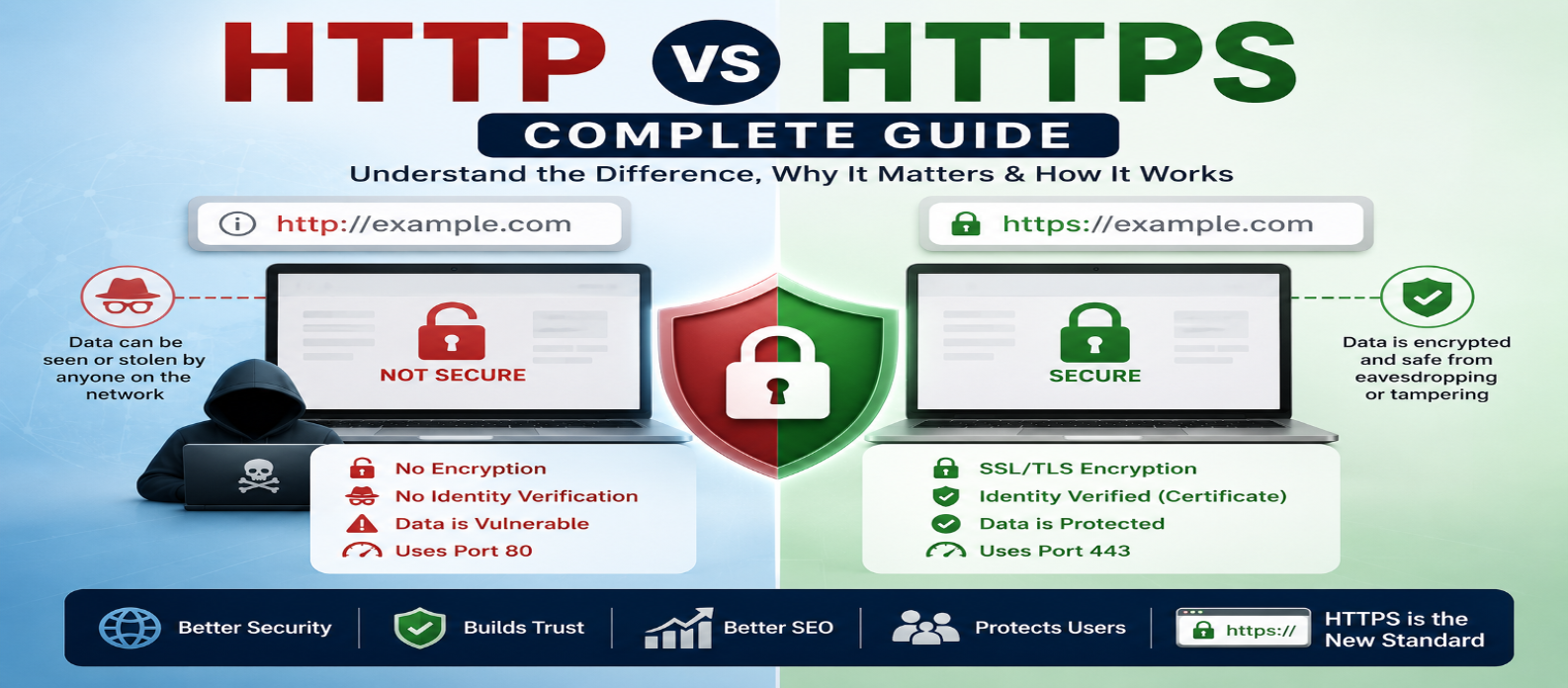
"Learn the difference between HTTP and HTTPS, how TLS encryption and certificates work, why HTTPS matters for security and SEO, and how to redirect HTTP, prevent mixed content, and secure a website correctly."
HTTP vs HTTPS: What's the Difference? Complete Guide for 2026
Look at a modern website's address bar and you'll usually see an address beginning with:
https://Years ago, seeing:
http://was much more common.
The extra S represents an important difference. HTTPS protects HTTP communication using TLS encryption, helping prevent other parties on the network from easily reading or modifying data while it travels between your browser and the website.
But encryption isn't the only difference.
Understanding HTTP vs HTTPS also helps explain certificates, browser security warnings, redirects, website trust, and several important web-development practices.
What Is HTTP?
HTTP stands for Hypertext Transfer Protocol.
It's an application-layer protocol used for communication between clients and servers on the web.
A simplified HTTP interaction looks like:
Browser
   ↓
HTTP Request
   ↓
Server
   ↓
HTTP Response
   ↓
Browser
For example, a browser might request:
GET /products HTTP/1.1
Host: example.com
The server then returns a response containing a status code, headers, and potentially a body.
HTTP defines how these messages are structured and exchanged.
What Is HTTPS?
HTTPS means HTTP communication protected using TLS (Transport Layer Security).
Conceptually:
HTTP + TLS = HTTPSInstead of transmitting application data over an unprotected HTTP connection, HTTPS establishes a secure TLS connection first.
Then HTTP messages travel through that protected connection.
A URL looks like:
https://example.comHTTPS provides three important security properties:
Encryption → Authentication → Integrity
Let's examine each one.
1. Encryption
Encryption makes transmitted information difficult for unauthorized observers to read.
Without transport encryption, network traffic may be exposed to parties capable of observing the connection.
With HTTPS, data traveling between the browser and server is encrypted after the secure connection is established.
This matters when transmitting:
- Passwords
- Personal information
- Search queries
- Form submissions
- Payment-related information
- Session data
But HTTPS shouldn't be reserved only for pages containing sensitive forms.
Modern websites should generally use HTTPS throughout the entire site.
2. Authentication
Encryption isn't useful if you establish an encrypted connection with an impostor.
HTTPS therefore also uses digital certificates to help clients authenticate the server they're connecting to.
When visiting:
https://example.comthe browser validates information associated with the site's TLS certificate.
This helps establish that the secure connection corresponds to the requested hostname.
HTTPS doesn't prove that a business is trustworthy or that all website content is safe. It authenticates the secure connection according to the certificate system.
3. Data Integrity
HTTPS also helps protect data from undetected modification while it's being transmitted.
Imagine requesting:
example.com/downloadYou want the response received by your browser to match what the server sent.
TLS includes integrity protections designed to detect tampering with protected traffic.
So HTTPS isn't simply about "hiding passwords."
It protects the communication channel itself.
HTTP vs HTTPS: Quick Comparison
| Feature | HTTP | HTTPS |
|---|---|---|
| Encryption | No TLS protection | Protected with TLS |
| Server authentication | Not provided by HTTP itself | Uses TLS certificates |
| Traffic integrity | No cryptographic TLS integrity | Protected by TLS |
| Typical URL | http://example.com |
https://example.com |
| Default port | 80 | 443 |
| Recommended for public sites | No | Yes |
HTTPS has become the normal choice for modern websites.
What Is an SSL Certificate?
People often say SSL certificate, but modern secure websites use TLS.
SSL was the predecessor to TLS and is obsolete for modern secure web communication.
The term "SSL certificate" remains widely used commercially, but technically you're dealing with a TLS certificate in modern HTTPS deployments.
A certificate contains information that allows clients to validate the identity associated with the secure endpoint.
Certificates are issued according to the web's Public Key Infrastructure.
How Does HTTPS Work?
A simplified HTTPS connection works like this:
1. Browser requests secure connection
          ↓
2. Server provides certificate information
          ↓
3. Browser validates certificate
          ↓
4. TLS cryptographic parameters are established
          ↓
5. Encrypted HTTP communication begins
The actual TLS handshake involves more technical detail, but beginners don't need to memorize every cryptographic step.
The important idea is:
Secure connection first → HTTP communication second
What Does the Padlock Mean?
Browsers have changed how security indicators appear over time, so you shouldn't rely on a particular padlock icon always being displayed.
The important part is that the connection uses valid HTTPS.
Also remember:
HTTPS ≠ Trustworthy Website
A malicious website can still use HTTPS.
HTTPS means your connection to that site is protected. It doesn't guarantee that the site's claims, products, downloads, or people behind it are legitimate.
HTTP and HTTPS Ports
Web traffic commonly uses:
HTTP  → Port 80
HTTPS → Port 443
A port helps identify which network service should receive traffic on a host.
You usually don't type these ports because browsers know the defaults.
These two addresses can therefore represent the standard ports implicitly:
http://example.com
https://example.com
Servers can technically use other ports, but 80 and 443 are the conventional defaults.
Does HTTPS Make a Website Slower?
HTTPS requires cryptographic processing, but on modern infrastructure the practical overhead is generally small.
Modern protocols and implementations are highly optimized.
Performance is much more likely to be affected by issues such as:
- Large images
- Excessive JavaScript
- Slow database queries
- Poor caching
- Slow server responses
- Too many third-party resources
Avoid disabling HTTPS in an attempt to improve performance.
Security should remain the default.
HTTPS and SEO
HTTPS is useful beyond security.
Search engines want users to reach secure pages, and HTTPS has long been used as a lightweight ranking signal.
However, switching from HTTP to HTTPS isn't a shortcut that makes weak content rank highly.
SEO still depends much more broadly on:
Content Quality + Search Intent + Crawlability + Performance + Site Structure + User Experience
Think of HTTPS as a fundamental technical requirement rather than an SEO trick.
What Is an HTTP-to-HTTPS Redirect?
If both versions are accessible:
http://example.com
https://example.com
you generally want visitors to end up on the secure HTTPS version.
The HTTP version can redirect permanently:
http://example.com
        ↓
301 Redirect
        ↓
https://example.com
This creates one preferred secure destination.
Internal links, canonical URLs, sitemaps, and other site references should also consistently use the HTTPS version.
What Is Mixed Content?
A page can load over HTTPS while requesting another resource over insecure HTTP.
For example:
<img src="http://example.com/image.jpg">inside:
https://example.comThis is called mixed content.
Browsers may block certain insecure resources or display security-related warnings.
When migrating to HTTPS, update resources such as:
- Images
- Scripts
- Stylesheets
- Fonts
- API requests
- Embedded resources
so they're loaded securely where appropriate.
Do You Have to Pay for HTTPS?
Not necessarily.
Many modern hosting platforms provide automated TLS certificates at no additional charge.
Other environments may charge for certificate management or additional security services.
The certificate itself and web hosting are separate concepts, even when a hosting company bundles them together.
HTTPS Doesn't Secure Everything
HTTPS protects data in transit between endpoints.
It doesn't automatically protect against:
- Weak passwords
- Vulnerable website code
- Malware
- Database breaches
- Stolen administrator accounts
- Phishing
- Insecure plugins
- Poor server configuration
A secure website needs multiple layers of protection.
HTTPS is one essential layer—not the entire security strategy.
How to Move From HTTP to HTTPS
A simplified migration process is:
1. Obtain and configure a valid TLS certificate
2. Make the website available through HTTPS
3. Update internal HTTP links
4. Update scripts, images, CSS, APIs, and other resources
5. Redirect HTTP URLs to HTTPS
6. Update canonical URLs and sitemaps
7. Test for mixed content
8. Verify important pages and redirects
Don't remove the HTTP endpoint entirely if it prevents users from being redirected correctly to HTTPS.
Common HTTPS Mistakes
Thinking HTTPS Means a Site Is Legitimate
It secures the connection, not the intentions of the website owner.
Letting Certificates Expire
Expired certificates can trigger browser warnings and disrupt access.
Forgetting HTTP Redirects
Visitors using old HTTP links should reach the secure version.
Leaving Mixed Content
Secure pages shouldn't depend unnecessarily on insecure HTTP resources.
Using HTTPS Only on Login Pages
Modern websites should generally use HTTPS site-wide.
HTTP vs HTTPS in Simple Terms
The easiest way to remember the difference is:
HTTP
Browser ←→ Server
Communication without TLS protection


HTTPS
Browser ←🔒→ Server
HTTP communication protected by TLS
HTTPS adds a secure transport layer around HTTP communication.
Conclusion
HTTP defines how web clients and servers exchange requests and responses.
HTTPS uses the same fundamental HTTP model but protects the connection with TLS.
The three key benefits are:
Encryption → Helps keep transmitted data private
Authentication → Helps verify the server you're connecting to
Integrity → Helps detect modification of protected traffic
For modern public websites, HTTPS should be the standard—not an optional feature reserved only for login or payment pages.
Just remember that HTTPS protects the connection. Building a genuinely secure website still requires secure code, updated software, strong authentication, careful configuration, backups, and responsible data handling.
Get a Free Access To 200+ Free Tools:
|
Home Page |
|
|
Calculator Tools |
|
|
Text & Converter Tools |
|
|
PDF & Image Tools |
|
|
Games & Developer Tools |
|
|
Resume Builder |