
How Websites Work: A Complete Beginner's Guide for 2026
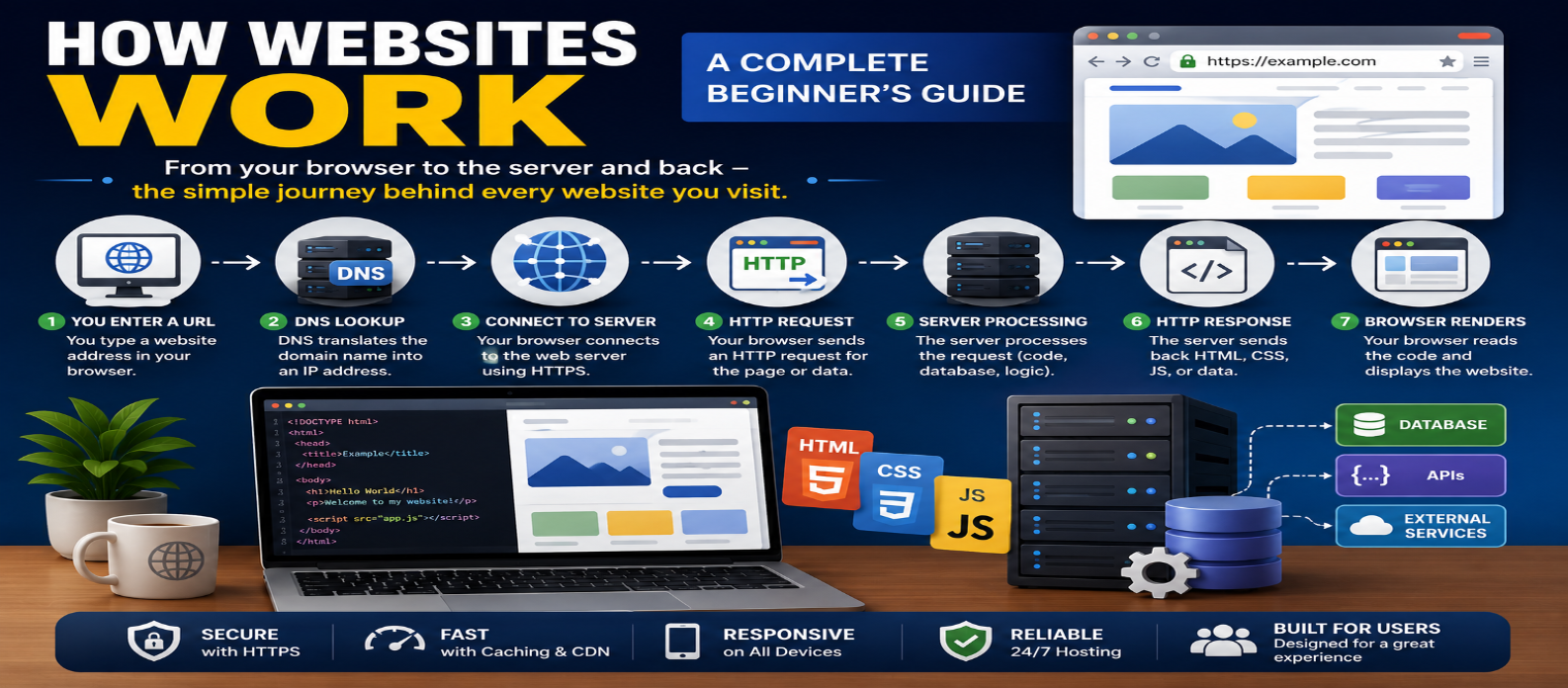
"Learn how websites work from the moment you enter a URL, including domains, DNS, hosting, HTTP and HTTPS, servers, HTML, CSS, JavaScript, backends, databases, APIs, cookies, caching, and browser rendering."
How Websites Work: A Complete Beginner's Guide for 2026
You enter a website address, press Enter, and a finished page appears on your screen. Behind that simple action, several systems work together: DNS finds the destination, a server receives your request, website code and data are delivered, and your browser turns everything into an interactive page.
Understanding this process makes concepts such as domains, hosting, frontend development, backend development, APIs, and databases much easier to connect.
What Is a Website?
A website is a collection of related web pages and resources available through the web.
A page may contain:
HTML       → Structure
CSS        → Presentation
JavaScript → Behavior
Images     → Visual content
Data       → Dynamic information
Simple websites may consist mainly of static files. More complex sites can include server-side applications, databases, authentication, APIs, payments, search systems, and other services.
What Happens When You Visit a Website?
Suppose you enter:
https://example.com/productsA simplified journey is:
URL
 ↓
DNS
 ↓
Web Server
 ↓
Website/Application
 ↓
HTTP Response
 ↓
Browser
 ↓
Rendered Page
Let's follow that process.
1. The Browser Reads the URL
The URL tells the browser what resource you want.
Consider:
https://example.com/productsIt contains:
https       → Scheme
example.com → Domain
/products   → Path
The browser first needs to determine where the domain's service can be reached.
2. DNS Finds the Destination
Computers use IP addressing for network communication, while people prefer memorable domain names.
The Domain Name System (DNS) connects these concepts.
Conceptually:
example.com
     ↓
    DNS
     ↓
IP Address
DNS information may already be cached. Otherwise, a DNS lookup helps obtain the information required to locate the server.
3. The Browser Connects to the Server
Once the destination is known, the browser establishes the required network communication.
For an HTTPS website, secure communication is established using TLS.
This helps provide:
Encryption — Protects data in transit.
Authentication — Helps verify the server.
Integrity — Helps detect modification of protected traffic.
The browser can then exchange HTTP messages securely.
4. The Browser Sends an HTTP Request
The browser requests the page:
GET /products
Host: example.com
The request can also contain headers providing additional information.
For other actions, websites may use methods such as:
GET    → Retrieve
POST   → Submit/Create
PUT    → Replace
PATCH  → Partially update
DELETE → Delete
What happens next depends on the website architecture.
5. The Server Processes the Request
For a simple static website, the server might immediately return an HTML file.
For a dynamic website, the request may pass through application code:
Browser Request
      ↓
Web Server
      ↓
Application Logic
      ↓
Database / API / Cache
      ↓
Response
Imagine requesting a product page.
The backend might:
- Read the product ID.
- Check whether the request is valid.
- Retrieve product information.
- Check inventory.
- Build or prepare a response.
- Send it to the browser.
This work happens before or alongside what users see on screen.
Frontend vs Backend
A website is often discussed in terms of frontend and backend.
Frontend
The frontend is the part executed or presented in the user's browser.
Core technologies include:
HTML
CSS
JavaScript
HTML describes page structure, CSS controls presentation, and JavaScript adds behavior and application logic.
Backend
The backend runs on server-side infrastructure.
It may handle:
- Authentication
- Business rules
- Database operations
- Payments
- Permissions
- API endpoints
- Data processing
Not every website needs a complex backend.
A portfolio containing static pages can work without its own traditional application server or database.
6. The Server Sends an HTTP Response
The server returns a response containing a status code, headers, and possibly a body.
For example:
HTTP/1.1 200 OK
Content-Type: text/html
Common status codes include:
200 → Success
301 → Permanent redirect
404 → Resource not found
500 → Server error
The response body might contain HTML, JSON, an image, or another type of data.
7. The Browser Processes HTML
Suppose the response contains:
<h1>Our Products</h1>
<p>Explore the latest products.</p>
The browser parses the HTML and creates an internal representation of the page known as the DOM (Document Object Model).
Conceptually:
HTML
 ↓
DOM
 ↓
Page Structure
JavaScript can later read and modify this DOM.
8. CSS Controls Presentation
The page may reference CSS:
<link rel="stylesheet" href="/styles.css">The browser requests the stylesheet and processes its rules.
For example:
h1 {
  font-size: 2rem;
}
CSS controls properties such as:
- Layout
- Spacing
- Typography
- Colors
- Responsive behavior
- Animations
The browser combines information from the page structure and styles when determining how content should appear.
9. JavaScript Adds Behavior
A page can also load JavaScript:
<script src="/app.js" defer></script>JavaScript can make the page interactive.
For example:
const button =
  document.querySelector("#buy");

button.addEventListener("click", () => {
  console.log("Product selected");
});
JavaScript may also request new information without loading an entirely new page.
That's how interfaces can update search results, notifications, shopping carts, or dashboards dynamically.
How APIs Fit Into Websites
An API allows software components to communicate through a defined interface.
A frontend might request:
GET /api/products/42and receive:
{
  "id": 42,
  "name": "Keyboard",
  "price": 2499
}
JavaScript can then use that information to update the interface.
A common architecture is:
Browser
   ↓
Frontend
   ↓
API
   ↓
Backend
   ↓
Database
What Does a Database Do?
A database stores structured information that applications need to retrieve or modify.
Examples include:
Users
Products
Orders
Blog Posts
Comments
Inventory
When you log in, for example, the backend may retrieve account information and verify authentication data.
Browsers normally shouldn't receive unrestricted direct access to a private application database.
The backend acts as a controlled layer between them.
What Are Cookies?
Websites sometimes need to remember information between requests.
A cookie is a small piece of data associated with a website that the browser can store and send according to its rules.
Cookies can support features such as:
- Login sessions
- User preferences
- Shopping carts
- Security mechanisms
Cookies aren't automatically "tracking files." Their purpose depends on how the website uses them.
Other browser storage technologies also exist.
How Does Caching Make Websites Faster?
Without caching, the same resources might need to be generated or downloaded repeatedly.
Caching allows reusable data to be stored temporarily.
Caching can occur in:
Browser
CDN
Server
Application
Database layer
For example, a browser may reuse an image it has already downloaded instead of requesting the entire file again.
Correct caching can significantly improve performance, but outdated caching rules can also cause users to receive stale content.
Where Does a CDN Fit?
A Content Delivery Network (CDN) can distribute cached resources through multiple geographic locations.
Instead of every visitor retrieving an image from the origin server:
Visitor
   ↓
Nearby CDN Location
   ↓
Origin Server when needed
CDNs can reduce latency and lower traffic reaching the origin infrastructure.
Static vs Dynamic Websites
Static Website
Content is largely prepared before the request:
Request
 ↓
Existing HTML/CSS/JS
 ↓
Browser
Static sites can be fast and relatively simple.
Dynamic Website
Content can be generated or retrieved based on the request:
Request
 ↓
Application
 ↓
Database / API
 ↓
Generated Response
Online stores, dashboards, social platforms, and account-based applications commonly use dynamic behavior.
Many modern websites combine both approaches.
What Happens When You Click a Button?
Not every click contacts a server.
JavaScript might simply:
Open a menu
Hide an element
Change a tab
Validate a form
Other actions require server communication:
Place an order
Save a profile
Submit a comment
Load search results
Log into an account
For those operations, JavaScript or the browser may send another HTTP request, receive a response, and update the page.
Why Websites Sometimes Load Slowly
A slow website can have many causes:
- Large images
- Excessive JavaScript
- Too many network requests
- Slow server processing
- Unoptimized database queries
- Poor caching
- Third-party scripts
- Network latency
This is why website performance isn't determined by hosting speed alone.
The entire journey matters.
How Websites Work in One Diagram
USER ENTERS URL
       ↓
DNS FINDS DESTINATION
       ↓
HTTPS CONNECTION
       ↓
HTTP REQUEST
       ↓
WEB SERVER
       ↓
BACKEND / DATABASE / API
       ↓
HTTP RESPONSE
       ↓
HTML + CSS + JAVASCRIPT
       ↓
BROWSER RENDERS PAGE
       ↓
USER INTERACTS
This model covers the basic lifecycle of many modern websites.
Conclusion
A website isn't just a collection of pages sitting somewhere on the internet. It's the result of several technologies working together.
The core journey is:
Domain → DNS → Server → HTTP/HTTPS → HTML/CSS/JavaScript → Browser
Dynamic websites can add:
Backend → Database → API → Authentication → Caching
Once you understand this flow, concepts such as web development, hosting, APIs, browser rendering, performance, and website security become much easier to learn because you can see exactly where each technology fits.
Get a Free Access To 200+ Free Tools:
|
Home Page |
|
|
Calculator Tools |
|
|
Text & Converter Tools |
|
|
PDF & Image Tools |
|
|
Games & Developer Tools |
|
|
Resume Builder |