
How the Internet Works: Complete Beginner's Guide for 2026
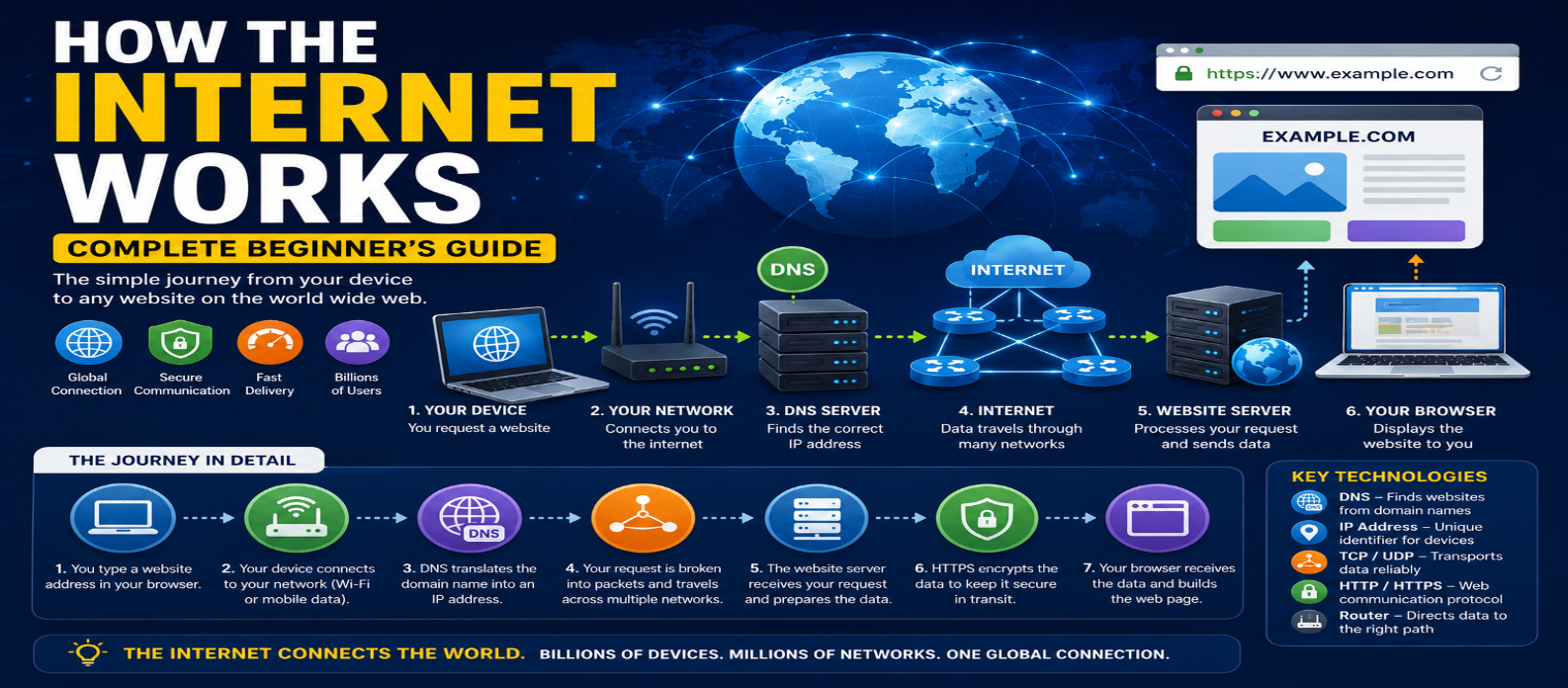
"Learn how the internet works from start to finish, including ISPs, DNS, IP addresses, packets, routers, TCP, UDP, ports, HTTPS, servers, browsers, CDNs, and what happens when you visit a website."
How the Internet Works: Complete Beginner's Guide for 2026
You type a website address, press Enter, and a page appears within seconds.
Behind that simple action, your device may perform a DNS lookup, establish network connections, exchange encrypted data, route packets across multiple networks, contact servers, and download the resources needed to display the page.
The internet makes all of this possible.
You don't need to be a network engineer to understand it. Once you learn a few core concepts, the internet becomes much less mysterious.
What Is the Internet?
The internet is a massive network of interconnected networks that communicate using standardized protocols.
It connects:
- Computers
- Smartphones
- Servers
- Routers
- Data centers
- Business networks
- Home networks
- Cloud infrastructure
- Internet service providers
There isn't one single computer called "the internet."
Instead, thousands of independent networks connect and exchange traffic.
A simplified picture is:
Your Device
    ↓
Home / Mobile Network
    ↓
Internet Service Provider
    ↓
Other Networks
    ↓
Website Server
Internet vs World Wide Web
The internet and the web aren't exactly the same thing.
The internet is the underlying networking infrastructure.
The World Wide Web is one major service that operates over it.
Other internet-based services include email, messaging, video calls, online gaming, and file transfers.
Think of it this way:
Internet = Infrastructure
Web = Websites and web applications using that infrastructure
What Happens When You Visit a Website?
Suppose you enter:
https://example.comA simplified journey is:
1. Your browser reads the URL
2. DNS helps locate the destination
3. Your device establishes a connection
4. HTTPS establishes secure communication
5. The browser sends an HTTP request
6. The server processes the request
7. The server returns a response
8. Your browser downloads required resources
9. The page is rendered
Let's examine the important pieces.
Step 1: Your Device Connects to a Network
Before reaching the internet, your computer or phone needs network access.
At home, the path might look like:
Laptop
   ↓ Wi-Fi
Router
   ↓
Internet Provider
On a smartphone using mobile data, the path involves your mobile network instead.
Your ISP (Internet Service Provider) provides connectivity between your network and the wider internet.
Step 2: DNS Finds Where to Connect
Humans prefer names such as:
example.comNetworks use IP addressing to route traffic.
The Domain Name System (DNS) helps resolve domain names into information that lets your device locate the appropriate server.
Conceptually:
example.com
     ↓
    DNS
     ↓
Server IP Address
Your device doesn't necessarily perform every lookup from scratch. Browsers, operating systems, DNS resolvers, and other systems can cache DNS information.
Step 3: IP Addresses Identify Network Destinations
An IP address provides addressing information for communication across IP networks.
Example IPv4:
192.0.2.10Example IPv6:
2001:db8::10IP addresses help routers determine where packets should travel.
Your home devices may use private addresses internally, while your network communicates externally through public addressing.
Step 4: Data Is Divided Into Packets
Internet data isn't usually sent as one enormous continuous piece.
Information is divided into smaller units called packets.
Conceptually:
Large Data
   ↓
[Packet 1]
[Packet 2]
[Packet 3]
[Packet 4]
Packets contain information needed for network delivery along with portions of the actual data.
Different packets may potentially travel through different network paths before reaching their destination.
Step 5: Routers Move Packets Between Networks
Routers are devices or systems that forward packets between networks.
Imagine the internet as a huge collection of connected roads.
A router's job is similar to deciding which road traffic should take next.
A packet might travel:
Your Device
    ↓
Home Router
    ↓
ISP Network
    ↓
Intermediate Networks
    ↓
Data Center Network
    ↓
Server
Routers use routing information to determine suitable next destinations.
They don't need a complete map of every individual device on Earth.
Step 6: TCP or UDP Helps Transport Data
Applications need ways to transport information between systems.
Two important transport protocols are TCP and UDP.
TCP
TCP provides a reliable, ordered byte stream between endpoints.
It includes mechanisms for detecting missing data and retransmitting when necessary.
Traditional HTTP/1.1 and HTTP/2 commonly operate over TCP.
UDP
UDP provides connectionless datagram delivery with less built-in reliability behavior.
Applications can build additional features on top of it when needed.
Modern HTTP/3 uses QUIC, which operates over UDP while providing reliability, security, and multiplexing features at a higher layer.
So "UDP means unreliable applications" is an oversimplification.
Step 7: Ports Identify Services
An IP address identifies a network endpoint, while ports help direct transport traffic to the appropriate application or service.
Common examples include:
HTTP  → Port 80
HTTPS → Port 443
A simplified analogy is:
IP Address = Building
Port = Door
The analogy isn't technically perfect, but it helps beginners understand why both are needed.
Step 8: HTTPS Creates a Secure Connection
Most modern websites use:
https://HTTPS protects HTTP communication using TLS encryption.
Before normal HTTP data is exchanged securely, the client and server establish a protected TLS connection.
HTTPS provides:
Encryption — Helps prevent others from reading traffic.
Authentication — Helps verify the server.
Integrity — Helps detect tampering.
After the secure connection is established, HTTP requests and responses can travel through it.
Step 9: Your Browser Sends an HTTP Request
Your browser can now request a resource.
Conceptually:
GET / HTTP/1.1
Host: example.com
The server receives the request and decides what to return.
It might serve a static HTML file or run application logic involving:
Application
Database
Cache
API
Authentication
The result is returned as an HTTP response.
Step 10: The Server Responds
A simplified response might contain:
HTTP/1.1 200 OK
Content-Type: text/html
followed by HTML.
The browser reads that HTML and may discover additional resources:
CSS
JavaScript
Images
Fonts
Videos
API Data
Those resources can require additional requests.
How the Browser Builds the Page
Receiving HTML isn't the end.
The browser must process it.
A simplified flow is:
HTML → Page Structure
CSS → Styling
JavaScript → Behavior
Images/Fonts → Visual Resources
        ↓
Rendered Web Page
JavaScript may also request more data after the initial page loads.
That's why some websites display content progressively rather than everything appearing simultaneously.
Where Do Website Servers Live?
Website servers may operate in:
- Data centers
- Cloud platforms
- Dedicated servers
- Virtual machines
- Distributed hosting infrastructure
Large websites often don't depend on one physical machine.
Traffic may be distributed across multiple servers, geographic regions, or data centers for performance and reliability.
What Is a CDN?
A Content Delivery Network (CDN) uses geographically distributed infrastructure to deliver content closer to users.
Without a CDN:
User in India
     ↓
Distant Origin Server
With a CDN:
User in India
     ↓
Nearby CDN Location
     ↓
Origin when necessary
CDNs commonly cache static resources such as images, CSS, JavaScript, fonts, and videos.
This can reduce latency and decrease load on the origin server.
Does Internet Data Travel Through Satellites?
Sometimes—but much global internet traffic travels through terrestrial and submarine fiber-optic cables.
Undersea cables connect continents and carry enormous amounts of international data.
Satellite internet is important for locations where terrestrial infrastructure is difficult to reach, but the internet shouldn't be imagined primarily as satellites communicating between every website and user.
Why Does Internet Speed Vary?
Your internet experience depends on more than the advertised connection speed.
Important factors include:
Bandwidth — How much data can be transferred over time.
Latency — How long data takes to travel between endpoints.
Network congestion — How busy network paths are.
Wi-Fi quality — Signal strength and interference matter.
Server performance — The website itself may respond slowly.
Distance — Longer network paths can increase latency.
Website size — Large images and scripts take longer to transfer and process.
A fast connection can't completely compensate for a badly optimized website.
What Happens When the Internet "Goes Down"?
Many different failures can look like "the internet is broken."
For example:
Wi-Fi Problem
Router Failure
ISP Outage
DNS Failure
Cable Damage
Server Outage
Website Error
If one website doesn't load while others work, the problem may be with that website rather than your internet connection.
Understanding the layers helps troubleshooting.
The Internet in One Diagram
Here's the entire process simplified:
YOU
 ↓
DEVICE
 ↓
Wi-Fi / Mobile Network
 ↓
ROUTER / ISP
 ↓
DNS resolves domain
 ↓
INTERNET ROUTERS
 ↓
SERVER / CDN
 ↓
HTTPS + HTTP
 ↓
RESPONSE
 ↓
BROWSER
 ↓
WEB PAGE
The real internet is much more complex, but this model explains the essential journey.
Common Internet Misconceptions
"The Internet and Wi-Fi Are the Same"
Wi-Fi connects devices wirelessly to a local network. That network may then provide internet access.
"The Internet Is Stored in the Cloud"
"Cloud" services still run on physical computing infrastructure somewhere.
"Every Website Has One Server"
Large services may use thousands of machines and distributed infrastructure.
"Faster Mbps Means Every Website Loads Instantly"
Latency, server speed, page size, and browser processing also matter.
"Incognito Mode Makes You Anonymous"
Private browsing mainly changes what the browser stores locally. It doesn't remove your device from internet networking.
Conclusion
The internet works because independent networks agree to communicate using standardized protocols.
When you visit a website, several systems work together:
DNS finds the destination.
IP provides network addressing.
Routers move packets.
TCP, UDP, or QUIC help transport data.
TLS protects HTTPS communication.
HTTP carries web requests and responses.
Servers provide content.
Browsers turn that content into the page you see.
You don't need to memorize every networking protocol to understand the internet. Start with this journey from device → network → DNS → routing → server → response → browser, and the rest of web technology becomes much easier to connect.
Get a Free Access To 200+ Free Tools:
|
Home Page |
|
|
Calculator Tools |
|
|
Text & Converter Tools |
|
|
PDF & Image Tools |
|
|
Games & Developer Tools |
|
|
Resume Builder |