
How DNS Works: Complete Beginner's Guide for 2026
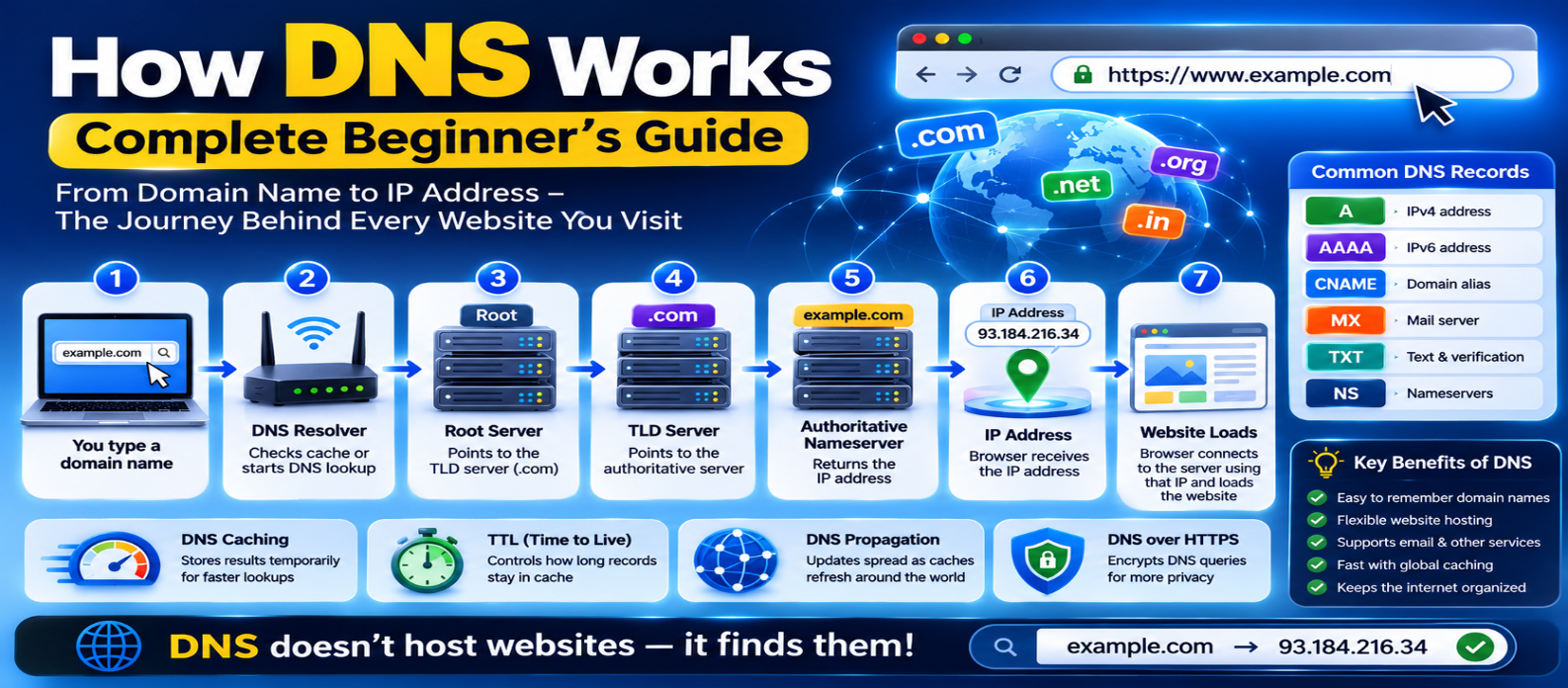
"Learn how DNS works step by step, including recursive resolvers, root and TLD servers, authoritative nameservers, A, AAAA, CNAME, MX and TXT records, DNS caching, TTL, propagation, and troubleshooting."
How DNS Works: Complete Beginner's Guide for 2026
When you type a domain such as:
example.comyour browser needs to determine where that website can be reached.
That's where DNS comes in.
DNS is one of the internet's essential systems. It allows people to use memorable domain names while computers and networks use information such as IP addresses to establish connections.
Here's how the process works from beginning to end.
What Is DNS?
DNS stands for Domain Name System.
It is a distributed naming system that translates domain names into information computers need to locate internet services.
The simplest example is:
example.com
     ↓
    DNS
     ↓
IP Address
     ↓
Web Server
DNS is often described as the "phonebook of the internet." That's useful for beginners, although DNS does much more than map names to IP addresses.
It also provides information about email servers, aliases, service configuration, verification records, and more.
Why Do We Need DNS?
Imagine having to remember an address like:
203.0.113.25for every website you visit.
That would be inconvenient.
Domain names provide memorable identifiers:
example.comDNS lets the underlying server addresses change without requiring users to learn a new domain.
The domain can remain the same while its DNS configuration points somewhere different.
What Happens When You Enter a Domain?
Suppose you visit:
https://shop.example.comYour browser needs DNS information for:
shop.example.comA simplified DNS lookup looks like this:
Browser
   ↓
DNS Resolver
   ↓
Root DNS
   ↓
TLD DNS
   ↓
Authoritative DNS
   ↓
IP Address
   ↓
Browser
However, not every request travels through every step. DNS caching can often provide the answer much earlier.
Let's examine the process.
Step 1: Check Existing DNS Information
Before performing a complete lookup, your system may check whether the answer is already available.
DNS information can be cached by different components, including:
- Browser-related components
- Operating system
- Local network equipment
- Recursive DNS resolver
If a valid cached answer exists, the lookup can finish quickly.
If not, the resolver may need to obtain the answer.
Step 2: The Recursive DNS Resolver
Your device typically sends DNS queries to a recursive resolver.
The resolver may be operated by:
- Your internet provider
- An organization
- A public DNS service
- Your network administrator
Its job is to obtain the DNS answer on behalf of the client.
If it doesn't already have the required information cached, it follows the DNS hierarchy.
Step 3: Root DNS Servers
Suppose the resolver needs information for:
www.example.comIt can begin with the DNS root.
The root doesn't normally return the final IP address for the website.
Instead, it helps direct the resolver toward the appropriate top-level domain (TLD) nameservers.
For:
example.comthe relevant TLD is:
.comConceptually:
Resolver
   ↓
Root
   ↓
"Ask the .com nameservers"
Step 4: TLD Nameservers
The resolver then asks the appropriate TLD nameserver.
For example:
.comThe TLD infrastructure knows which authoritative nameservers are responsible for domains registered under that TLD.
So the response essentially points the resolver toward the nameservers responsible for:
example.comThe resolver can then continue to the authoritative source.
Step 5: Authoritative Nameserver
An authoritative nameserver provides DNS information for a domain according to the zone data it serves.
The resolver asks for the required record.
For example:
What is the A record for
www.example.com?
The authoritative server may respond with an IPv4 address such as:
203.0.113.25The recursive resolver returns the result to the client and can cache it for later requests.
Step 6: The Browser Connects to the Destination
DNS resolution doesn't download the website itself.
It only helps the browser determine where the service can be reached.
After DNS resolution:
Domain
   ↓
DNS
   ↓
IP Address
   ↓
Network Connection
   ↓
HTTPS / HTTP
   ↓
Website
The browser then establishes the required network connection and continues the normal website-loading process.
What Is a DNS Record?
DNS information is stored in different types of records.
Each record type has a specific purpose.
A Record
Maps a hostname to an IPv4 address.
example.com → 203.0.113.25AAAA Record
Maps a hostname to an IPv6 address.
example.com → 2001:db8::25CNAME Record
Makes one hostname an alias of another hostname.
Conceptually:
www.example.com
       ↓
example-host.example.net
The target hostname is then resolved through DNS.
MX Record
Identifies mail servers responsible for receiving email for a domain.
Without correctly configured mail-related DNS, domain email may not function as intended.
TXT Record
Stores text data.
TXT records are commonly used for:
- Domain verification
- Email authentication policies
- Service configuration
NS Record
Specifies the authoritative nameservers associated with a DNS zone.
These records help identify which DNS servers provide authoritative information.
What Is DNS Caching?
Without caching, DNS infrastructure would have to perform far more repetitive work.
Suppose thousands of users request the same domain.
Instead of repeating the entire hierarchy every time, resolvers can temporarily store previous answers.
Conceptually:
First Request
Domain → DNS Hierarchy → Answer

Later Request
Domain → Cached Answer
Caching can reduce lookup time and DNS infrastructure load.
What Is TTL?
DNS records commonly include a TTL, or Time to Live.
TTL tells DNS caches approximately how long a record can be reused before it should be considered expired and refreshed.
For example:
TTL = 3600 secondsmeans a cache may retain the record for up to one hour, depending on resolver behavior and configuration.
This becomes important when changing DNS records.
What Is DNS Propagation?
People often say:
"My DNS is still propagating."
DNS doesn't usually push a new record instantly to every DNS server worldwide.
Instead, previously cached information expires according to caching behavior and TTL values, after which resolvers retrieve updated records.
That means after changing:
Old Server
    ↓
New Server
some users may temporarily receive old cached information while others receive the new answer.
This is commonly referred to as DNS propagation.
Domain Registrar vs DNS Provider
These services are related but not necessarily the same.
Domain Registrar
Manages your domain registration.
DNS Provider
Hosts and manages the DNS zone and records used for the domain.
Web Hosting Provider
Runs or serves your website.
You might use:
Registrar → Company A
DNS       → Company B
Hosting   → Company C
Or one provider may handle all three.
Understanding the distinction makes website migrations much safer.
What Happens When You Change Hosting?
Suppose your domain currently resolves to:
Old Server
203.0.113.10
You move the website to:
New Server
203.0.113.50
You may update the relevant DNS record:
Before:
example.com → 203.0.113.10

After:
example.com → 203.0.113.50
After caches refresh, users begin reaching the new destination.
The domain itself hasn't changed.
Only its DNS configuration has.
Does DNS Make the Internet Faster?
DNS can affect how quickly a connection begins because the client may need to resolve a hostname before contacting the server.
Caching helps reduce repeated lookup delays.
However, DNS is only one part of website performance.
After resolution, speed still depends on:
- Network latency
- Server response time
- Website size
- Images
- JavaScript
- Caching
- CDN configuration
- Browser processing
Changing DNS alone won't fix an otherwise slow website.
What Is DNS Over HTTPS?
Traditional DNS queries aren't necessarily encrypted.
DNS over HTTPS (DoH) sends DNS queries through HTTPS, helping protect DNS traffic between the client and the configured DoH resolver.
Another technology, DNS over TLS (DoT), protects DNS traffic using TLS through a dedicated approach.
These technologies improve privacy for DNS transport, but they don't make users completely anonymous online.
Common DNS Problems
Website Doesn't Load After DNS Change
Old records may still be cached, or the new records may be incorrect.
www Works but Root Domain Doesn't
The DNS configuration for:
www.example.comand:
example.commay be different.
Check both.
Website Works but Email Stops
Changing nameservers or DNS records can accidentally remove required MX or email-related TXT records.
Wrong IP Address
An outdated A or AAAA record may point visitors to old infrastructure.
Incorrect CNAME
A misconfigured alias can prevent the hostname from resolving correctly.
Practical DNS Troubleshooting Checklist
When a domain isn't working, check:
1. Is the domain registration active?
2. Are the correct nameservers configured?
3. Does the DNS zone contain the expected records?
4. Are A and AAAA records pointing where intended?
5. Is the www hostname configured?
6. Were email records preserved?
7. Could cached DNS information still be active?
8. Is the web server actually configured for the domain?
DNS problems and hosting problems can look similar, so troubleshooting them separately is useful.
DNS in One Diagram
YOU ENTER
example.com
     ↓
CHECK CACHE
     ↓
RECURSIVE RESOLVER
     ↓
ROOT SERVER
     ↓
TLD SERVER
     ↓
AUTHORITATIVE SERVER
     ↓
DNS ANSWER
     ↓
BROWSER
     ↓
WEBSITE SERVER
If a valid answer is already cached, several middle steps can be skipped.
Conclusion
DNS is the naming system that helps connect human-friendly domain names with the technical information needed to reach internet services.
For a typical uncached lookup, the journey is:
Browser → Recursive Resolver → Root → TLD → Authoritative Nameserver → DNS Answer
The key concepts to remember are:
Domain → The name people use
DNS → Resolves information about that name
A/AAAA → Address records
CNAME → Hostname alias
MX → Mail routing
TTL → Controls caching duration
Once you understand DNS, tasks such as connecting a domain, moving a website, configuring email, creating subdomains, and troubleshooting domain problems become much easier.
Get a Free Access To 200+ Free Tools:
|
Home Page |
|
|
Calculator Tools |
|
|
Text & Converter Tools |
|
|
PDF & Image Tools |
|
|
Games & Developer Tools |
|
|
Resume Builder |