
Domain vs Hosting: What's the Difference? Complete Beginner's Guide for 2026
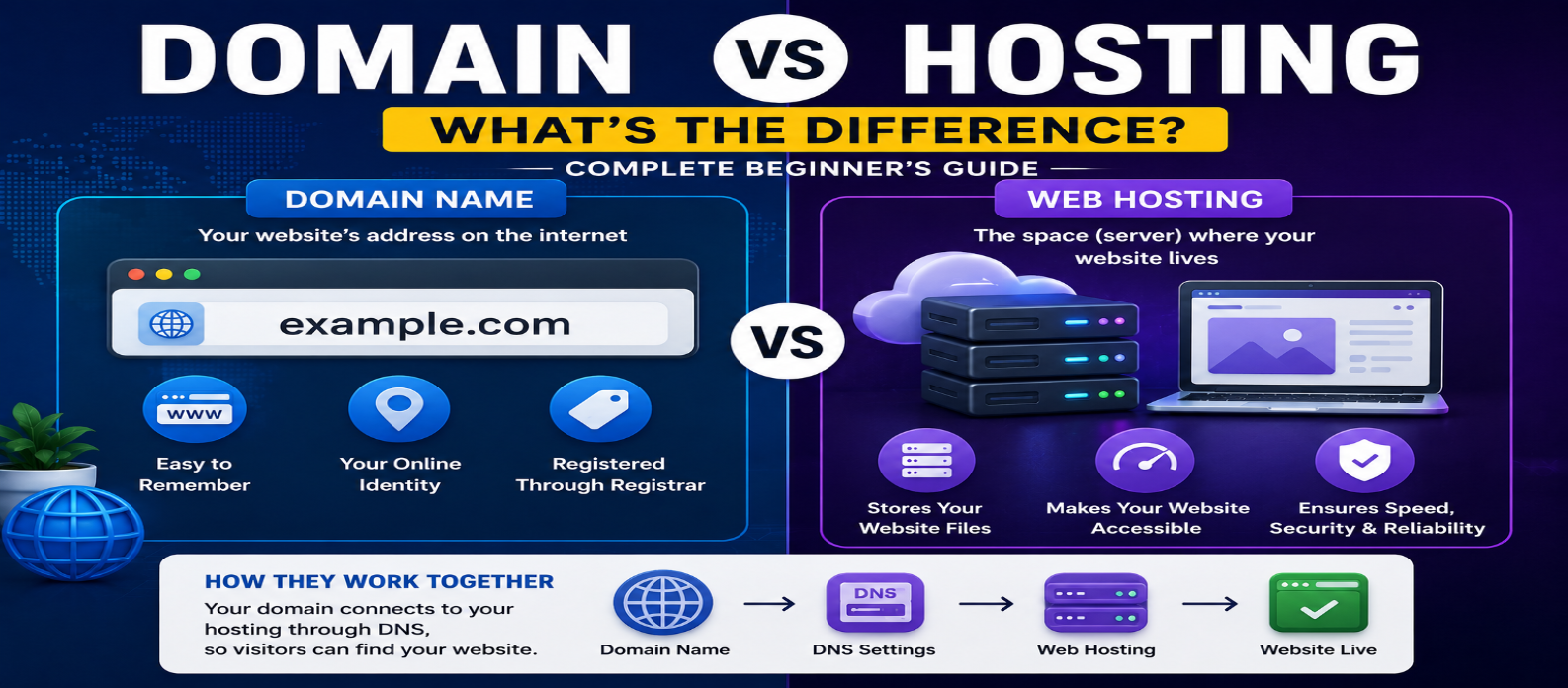
"Learn the difference between a domain name and web hosting, how they work together with DNS and HTTPS, whether you need both, and what happens when you change hosting or transfer a domain."
Domain vs Hosting: What's the Difference? Complete Beginner's Guide
If you're building your first website, domain name and web hosting are two terms you'll encounter almost immediately.
They're often sold together, which makes it easy to assume they're the same thing.
They're not.
A domain name gives people a recognizable way to reach your website, while web hosting provides the infrastructure that stores, runs, or serves the website.
You normally need both for a traditional public website, but they perform completely different jobs.
Domain vs Hosting: Quick Answer
The simplest comparison is:
| Domain Name | Web Hosting |
|---|---|
| Your website's name/address | Infrastructure serving the website |
Example: example.com |
Server or hosting platform |
| Connected through DNS | Contains or runs website resources |
| Registered for a period | Usually purchased as a service |
| Can point to different hosting | Can host one or many sites depending on plan |
A useful analogy is:
Domain = Street address
Hosting = Building
Website = What exists inside the building
The analogy isn't technically perfect, but it's useful for understanding the difference.
What Is a Domain Name?
A domain name is a human-readable name used to identify an internet resource.
Example:
example.comWithout domain names, users would often need to interact more directly with network addressing.
Domains make websites easier to identify, remember, and share.
A domain can also contain subdomains:
blog.example.com
shop.example.com
support.example.com
The domain itself doesn't contain your website files.
Instead, DNS configuration helps direct requests toward the services associated with that domain.
What Is Web Hosting?
Web hosting provides the infrastructure required to make website content or applications available online.
Your hosting environment may serve:
HTML
CSS
JavaScript
Images
Databases
Backend applications
When someone visits your website, the hosting infrastructure responds to the browser's request.
For example:
Visitor
   ↓
example.com
   ↓
DNS
   ↓
Hosting
   ↓
Website
Hosting can take many forms, including shared hosting, VPS infrastructure, dedicated servers, cloud platforms, managed hosting, and static hosting.
How Domain and Hosting Work Together
Suppose you register:
mywebsite.comand deploy your website to a hosting provider.
The two aren't automatically the same service.
You configure DNS so the domain points toward the appropriate hosting infrastructure.
The process becomes:
User types mywebsite.com
          ↓
         DNS
          ↓
Finds appropriate destination
          ↓
     Hosting Server
          ↓
       Website
This connection is what allows visitors to use a memorable domain rather than needing to know the underlying infrastructure.
Can You Buy a Domain Without Hosting?
Yes.
You can register a domain even if you haven't built a website yet.
People sometimes register domains because they:
- Plan to launch a website later
- Want to protect a brand name
- Need a domain for email
- Are preparing a future project
Without hosting or another connected service, however, registering the domain alone doesn't automatically create a functioning website.
Can You Have Hosting Without a Domain?
Technically, yes.
A development or hosting environment may be accessible using an IP address, temporary hostname, provider-generated URL, or local development address.
For example:
project.hosting-example.testHowever, a custom domain provides a cleaner and more memorable identity for a public-facing website.
So while hosting can exist without your own domain, most serious public websites eventually use one.
Do Domain and Hosting Need to Be From the Same Company?
No.
You might have:
Domain → Provider A
DNS → Provider B
Hosting → Provider C
Email → Provider D
Or one company might provide everything.
Both approaches can work.
Using one provider can simplify management for beginners, while separating services can provide additional flexibility.
What's important is understanding where each service is managed.
What Happens If You Change Hosting?
Changing hosting doesn't necessarily mean changing your domain.
Suppose:
example.comcurrently points to Hosting Company A.
You move your website to Hosting Company B.
After the new website is ready, you update the relevant DNS configuration.
Conceptually:
Before:

example.com
    ↓
Hosting A


After:

example.com
    ↓
Hosting B
Your visitors can continue using the same domain name.
This separation is one of the major advantages of the domain system.
What Happens If You Transfer Your Domain?
A domain can generally be transferred from one registrar to another when transfer requirements are satisfied.
For example:
Registrar A
    ↓
Registrar B
That doesn't automatically mean the website itself moves.
Your hosting can remain unchanged if the DNS configuration continues pointing to the same destination.
This is why domain transfer and website migration are different tasks.
Domain Renewal vs Hosting Renewal
Both services may require recurring payments, but they're renewed separately.
Domain Renewal
Keeps your registration active.
If you fail to renew a domain, it can eventually become unavailable to you and potentially become available for registration by someone else.
Hosting Renewal
Keeps the hosting service active.
If hosting expires, the website may stop being served even though you still control the domain.
This produces two different failure scenarios:
Domain Active + Hosting Expired
→ Website may be unavailable

Domain Expired + Hosting Active
→ Hosting exists, but domain may stop directing visitors correctly
Keeping track of both is important.
Where Does DNS Fit In?
DNS is the connection beginners often miss.
Suppose you have:
Domain:
example.com

Hosting:
Server infrastructure
DNS provides records that help applications find services associated with the domain.
Common DNS records include:
A     → IPv4 destination
AAAA  → IPv6 destination
CNAME → Hostname alias
MX    → Mail servers
TXT   → Text-based configuration/verification
Your hosting provider usually tells you which records need to be configured.
DNS changes can take time to become consistently visible because DNS information is cached at multiple levels.
Where Does HTTPS Fit?
HTTPS is another separate concept.
Consider:
https://example.comHere:
example.com = domain
https:// = URL scheme indicating HTTPS
Hosting = infrastructure serving the site
TLS certificate = helps establish authenticated encrypted HTTPS communication
Modern hosting platforms often automate certificate setup, but don't confuse HTTPS with either the domain or hosting itself.
Do You Need Both for WordPress?
For a typical self-hosted WordPress website, you generally need:
A domain name — so visitors have a recognizable address.
Web hosting — capable of running the WordPress application and its requirements.
Some hosting companies bundle domain registration with hosting plans, which can make them appear like one product.
They're still separate services underneath.
Domain vs Hosting vs Website
These three concepts are also different.
Domain
example.comThe name visitors use.
Hosting
The infrastructure serving the website.
Website
The actual content and application:
Pages
Images
CSS
JavaScript
Blog Posts
Database Content
Backend Code
You can move the website to different hosting while keeping the same domain.
Domain vs Hosting Cost
Domains are usually registered and renewed according to the chosen extension and registrar pricing.
Hosting prices vary much more because hosting products can range from simple shared plans to powerful cloud infrastructure.
Costs may depend on:
- Storage
- Traffic
- CPU and memory
- Managed services
- Backups
- Support
- Database resources
- Security features
Always check renewal pricing, not only introductory pricing.
Common Beginner Mistakes
Thinking Buying a Domain Creates a Website
A domain only gives you control over the name. You still need website content and somewhere to serve it.
Thinking Hosting Includes Permanent Domain Ownership
A bundled domain may have separate renewal conditions.
Cancelling Old Hosting Too Early
When migrating, confirm the new website works correctly before removing the old environment.
Changing DNS Without Saving Existing Records
DNS may also control email and other services. Incorrect changes can disrupt more than the website.
Forgetting Which Provider Controls What
Keep a record of where your domain, DNS, hosting, and email are managed.
What Should You Buy First?
Either can technically come first, but a practical beginner workflow is:
1. Choose your website name
2. Check domain availability
3. Register the domain
4. Choose hosting suitable for the website
5. Build or deploy the website
6. Configure DNS
7. Enable HTTPS
8. Test the site
This gives each service a clear purpose.
The Difference in One Diagram
DOMAIN NAME
example.com
     ↓
     DNS
     ↓
WEB HOSTING
Server / Platform
     ↓
WEBSITE
HTML + CSS + JS
Images + Database
     ↓
VISITOR'S BROWSER
That's the relationship.
The domain tells users where to go.
Hosting provides what responds when they get there.
Conclusion
A domain name and web hosting work together, but they aren't interchangeable.
Remember:
Domain = Your website's recognizable name
DNS = Connects that name with internet services
Hosting = Infrastructure that serves or runs the website
Website = The actual content and application
You can register your domain and purchase hosting from the same company or different providers. You can also change hosting without changing your domain.
Understanding this separation makes it much easier to launch websites, migrate hosting, configure DNS, manage renewals, and troubleshoot problems without confusing one service with another.
Get a Free Access To 200+ Free Tools:
|
Home Page |
|
|
Calculator Tools |
|
|
Text & Converter Tools |
|
|
PDF & Image Tools |
|
|
Games & Developer Tools |
|
|
Resume Builder |