
DNS Records Explained: A Complete Guide for Beginners in 2026
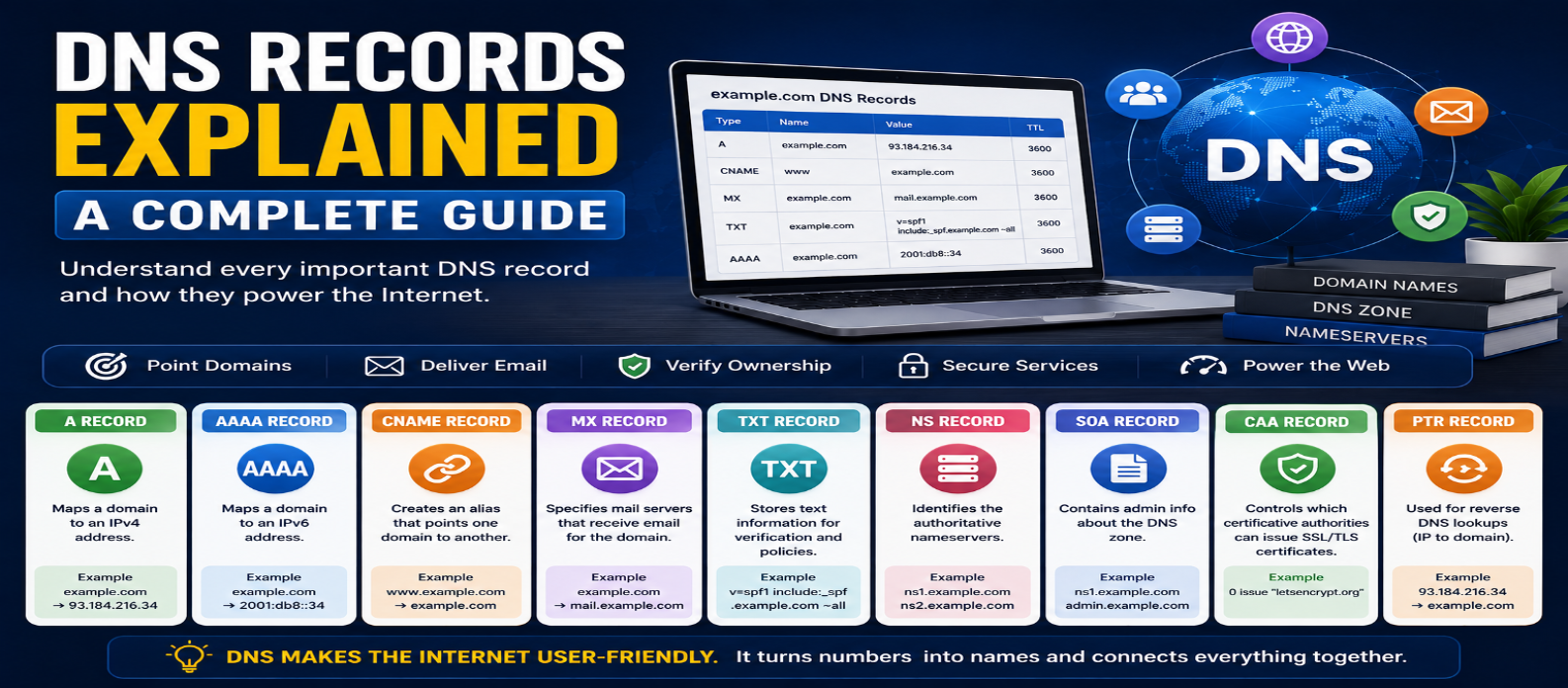
"Learn how DNS records work, including A, AAAA, CNAME, MX, TXT, NS, SOA, CAA and PTR records, plus TTL, DNS zones, subdomains, propagation, website migration, and common configuration mistakes."
DNS Records Explained: A Complete Guide for Beginners
A domain name alone doesn't tell the internet where your website lives, which servers receive your email, or how certain services should verify your domain.
That information is provided through DNS records.
If you own a website, you'll eventually encounter terms such as A, AAAA, CNAME, MX, TXT, and NS. Understanding what each record does makes domain setup, website migrations, email configuration, and troubleshooting much easier.
What Is a DNS Record?
A DNS record is an entry in the Domain Name System that provides information about a domain or hostname.
For example, a record can say:
example.com
     ↓
203.0.113.25
Another record could specify where email for the domain should be delivered.
DNS therefore does much more than translate domain names into IP addresses.
A typical DNS zone may contain several record types, each with a different purpose.
DNS Records at a Glance
Here are the records beginners are most likely to encounter:
| Record | Main Purpose |
|---|---|
| A | Points a hostname to an IPv4 address |
| AAAA | Points a hostname to an IPv6 address |
| CNAME | Makes one hostname an alias of another |
| MX | Specifies mail servers |
| TXT | Stores text-based information |
| NS | Identifies authoritative nameservers |
| SOA | Contains administrative zone information |
| CAA | Controls which certificate authorities may issue certificates |
| PTR | Supports reverse DNS lookups |
Let's look at each one.
1. A Record
An A record maps a hostname to an IPv4 address.
Example:
example.com → 203.0.113.25If your web server uses that IPv4 address, an A record can help direct visitors toward it.
You may also create records for subdomains:
blog.example.com → 203.0.113.50A records are among the most common DNS records used for websites.
2. AAAA Record
An AAAA record performs a similar job but uses an IPv6 address.
Example:
example.com
      ↓
2001:db8:1234::25
The difference is simple:
A    → IPv4
AAAA → IPv6
A hostname can have both A and AAAA records when a service supports both protocols.
3. CNAME Record
A CNAME, or Canonical Name record, makes one hostname an alias of another hostname.
For example:
www.example.com
       ↓
example-host.example.net
Instead of pointing directly to an IP address, the CNAME points to another domain name.
This can be useful when a hosting or software service gives you a hostname to use.
One important distinction:
A record → IP address
CNAME → Another hostname
A CNAME isn't simply another type of A record.
4. MX Record
An MX (Mail Exchange) record tells email systems which mail servers accept email for a domain.
Example:
example.com
    ↓
mail.example.net
MX records can have priority values.
Conceptually:
10 mail1.example.net
20 mail2.example.net
Lower preference numbers are generally attempted before higher ones.
Incorrect MX records can prevent email from being delivered correctly even when the website itself works normally.
5. TXT Record
A TXT record stores text associated with a domain.
TXT records are widely used for:
- Domain ownership verification
- Email authentication
- Service configuration
- Security policies
You may encounter TXT records when configuring systems such as SPF, DKIM, or DMARC for email.
For example, a service might ask you to create a verification record:
service-verification=abc123The exact value should normally be copied exactly as provided by the service you're configuring.
6. NS Record
An NS (Name Server) record identifies authoritative nameservers for a DNS zone.
Conceptually:
example.com
   ↓
ns1.dns-provider.test
ns2.dns-provider.test
These nameservers provide authoritative DNS information for the domain.
NS configuration is especially important when moving DNS management from one provider to another.
Changing nameservers can affect the entire DNS zone, including website and email records.
7. SOA Record
SOA stands for Start of Authority.
An SOA record contains administrative information about a DNS zone.
It can include information such as:
- Primary nameserver
- Responsible-party information
- Zone serial number
- Refresh timing
- Retry timing
- Expiration-related values
Most beginners won't need to edit SOA records manually because DNS providers typically manage them.
However, understanding their purpose is useful when learning how DNS zones operate.
8. CAA Record
A CAA (Certification Authority Authorization) record allows a domain owner to specify which certificate authorities are permitted to issue certificates for the domain.
Conceptually:
example.com
   ↓
Permitted Certificate Authority
CAA adds another layer of control to certificate issuance.
It's different from the TLS certificate itself—the DNS record communicates authorization information used during certificate issuance processes.
9. PTR Record
A PTR record is associated with reverse DNS.
Normal DNS might resolve:
example.com
     ↓
203.0.113.25
Reverse DNS can work conceptually in the opposite direction:
203.0.113.25
     ↓
hostname.example.com
PTR records are particularly relevant to mail-server configuration and network administration.
Unlike ordinary records in your domain's DNS zone, reverse DNS is generally controlled by the organization responsible for the IP address.
What Is a DNS Zone?
A DNS zone is an administratively managed portion of the DNS namespace.
A simplified zone for example.com might contain:
example.com       A      203.0.113.25
www               CNAME  example.com
mail              A      203.0.113.40
example.com       MX     mail.example.com
example.com       TXT    "verification-value"
A DNS management dashboard provides an interface for editing this information.
The exact interface differs between providers, but the underlying concepts remain similar.
What Do Name, Type, Value and TTL Mean?
When creating a DNS record, you'll commonly see fields such as:
Name or Host
Specifies which hostname the record applies to.
Examples:
@
www
blog
shop
Many DNS interfaces use @ to represent the zone's root domain, but interface conventions can vary.
Type
The DNS record type:
A
AAAA
CNAME
MX
TXT
Value or Target
The destination or information stored by the record.
For example:
203.0.113.25TTL
TTL (Time to Live) controls how long DNS caches may reuse the record before refreshing it.
Root Domain vs Subdomain Records
Suppose your domain is:
example.comThat's commonly called the root or apex domain in practical DNS discussions.
A subdomain could be:
blog.example.comThese hostnames can have different DNS records.
For example:
example.com
     ↓
Server A

blog.example.com
     ↓
Server B
This allows different parts of a domain to use different infrastructure.
Can One Domain Have Multiple A Records?
Yes.
A hostname can have multiple A records:
example.com → 203.0.113.10
example.com → 203.0.113.20
DNS responses can provide multiple addresses.
However, simply adding multiple records isn't automatically a complete high-availability or load-balancing strategy. Application architecture, health checking, caching, and traffic management also matter.
What Happens After Changing a DNS Record?
Suppose you change:
Old:
example.com → 203.0.113.10

New:
example.com → 203.0.113.50
The authoritative DNS data may update quickly, but recursive resolvers can still have the old answer cached.
As cached entries expire according to TTL and resolver behavior, updated information becomes visible.
This delay is commonly called DNS propagation.
DNS Records vs Nameservers
These concepts are often confused.
Nameservers tell the DNS hierarchy where authoritative information for your domain is available.
DNS records are the actual entries describing services associated with the domain.
Think:
Nameservers
     ↓
Where DNS is managed

DNS Records
     ↓
What the domain should resolve to
Changing an A record is very different from changing your domain's nameservers.
DNS Records and Website Migration
When moving a website to another server, you may need to change an A, AAAA, or CNAME record.
Before changing anything:
1. Record the existing DNS configuration.
2. Identify exactly which website records need changing.
3. Preserve email-related records.
4. Confirm the new server is ready.
5. Update only the necessary records.
6. Keep the old hosting available during the transition when practical.
This reduces the chance of accidentally breaking unrelated services.
Common DNS Record Mistakes
Deleting MX Records During a Website Move
Moving a website doesn't necessarily require changing email records.
Confusing CNAME With A Records
CNAME points to a hostname; A points to an IPv4 address.
Changing Nameservers Instead of One Record
A full nameserver change can affect every DNS service associated with the domain.
Forgetting the www Hostname
example.com and www.example.com may require separate configuration.
Ignoring IPv6
An outdated AAAA record can cause unexpected behavior for users connecting over IPv6.
Expecting DNS Changes to Be Instant Everywhere
Cached records may remain temporarily.
Practical DNS Record Checklist
Before editing DNS, ask:
What service am I configuring?
Website? Email? Verification? Subdomain?
Then determine:
Which hostname?
example.com
www.example.com
blog.example.com
Which record type?
A / AAAA / CNAME / MX / TXTWhat exact value is required?
Finally, save the existing configuration before making major changes.
That simple habit can make troubleshooting much easier.
Conclusion
DNS records tell internet systems how different services associated with a domain should be located or configured.
The most important records for beginners are:
A → IPv4 address
AAAA → IPv6 address
CNAME → Hostname alias
MX → Mail servers
TXT → Text, verification and policies
NS → Authoritative nameservers
Once you understand these records, managing domains becomes far less intimidating. You'll know what to change when moving a website, connecting a subdomain, configuring email, verifying a service, or diagnosing why a domain isn't behaving as expected.
Get a Free Access To 200+ Free Tools:
|
Home Page |
|
|
Calculator Tools |
|
|
Text & Converter Tools |
|
|
PDF & Image Tools |
|
|
Games & Developer Tools |
|
|
Resume Builder |