
Cumulative Layout Shift Explained: Complete CLS Guide for 2026
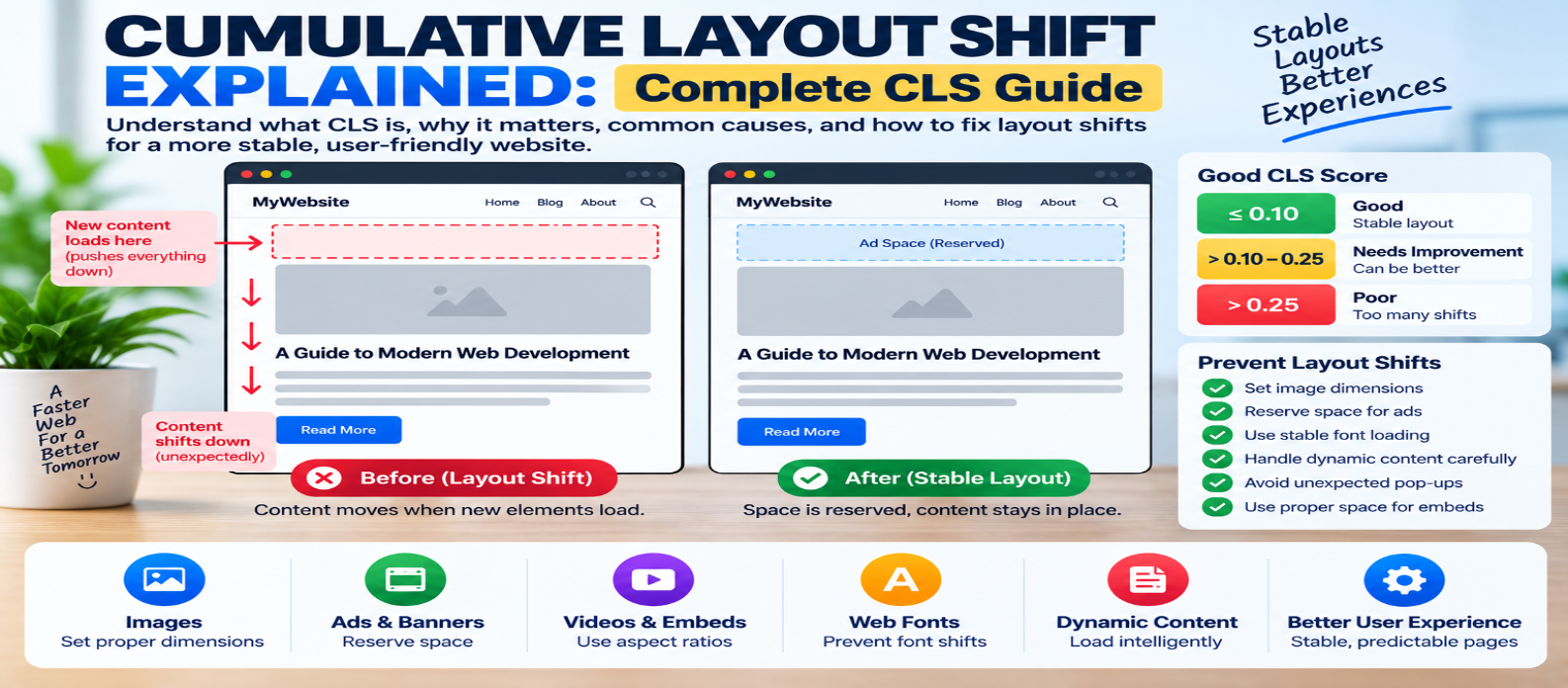
"Learn what Cumulative Layout Shift (CLS) is, what a good CLS score means, how layout shifts are measured, and how to fix instability caused by images, ads, embeds, fonts, dynamic content, banners, and animations."
Cumulative Layout Shift Explained: Complete CLS Guide
You're about to tap a button when the page suddenly moves. The button shifts downward, an advertisement appears above it, and you accidentally tap something else.
That's a layout shift—and when unexpected shifts accumulate, they can make a website frustrating to use.
Cumulative Layout Shift (CLS) is a Core Web Vital that measures visual stability. Unlike loading metrics, CLS isn't primarily about how fast something appears. It asks a different question:
Does the page stay where the user expects it to stay?
What Is Cumulative Layout Shift?
CLS measures unexpected movement of visible page elements during a user's experience.
Imagine this:
Before:

[ Article Title ]

[ Read More Button ]


After image loads:

[ Large Image     ]

[ Article Title ]

[ Read More Button ]
If the browser didn't reserve space for the image beforehand, existing content gets pushed downward when the image appears.
That movement can contribute to CLS.
A stable page instead reserves the required space from the beginning:
[ Reserved Image Space ]

[ Article Title ]

[ Read More Button ]
When the image arrives, it fills the existing area rather than moving everything around it.
What Is a Good CLS Score?
Common Core Web Vitals thresholds are:
Good               ≤ 0.10
Needs Improvement  > 0.10–0.25
Poor               > 0.25
For real-user assessment, the goal is generally to achieve CLS of 0.1 or less at the 75th percentile of page visits.
Unlike LCP and INP, CLS doesn't use seconds or milliseconds.
It's a unitless score calculated from the size and movement of unstable elements.
How Is CLS Calculated?
A simplified layout-shift score uses two concepts:
Layout Shift Score
        =
Impact Fraction
        ×
Distance Fraction
Impact Fraction
Represents how much of the viewport is affected by unstable elements.
Distance Fraction
Represents how far those elements move relative to the viewport.
A large element moving a long distance can therefore produce a bigger shift than a small element moving slightly.
Modern CLS calculation groups layout shifts into session windows and uses the largest relevant group rather than simply adding every shift across an indefinitely long page session.
You don't need to calculate this manually—the important goal is finding and preventing unexpected movement.
What Does Not Count as a Bad Layout Shift?
Not every movement is undesirable.
Suppose a visitor intentionally clicks:
Show Moreand additional content expands immediately.
The movement was expected because it resulted from the user's action.
CLS is primarily concerned with unexpected layout shifts, although the exact metric uses timing rules to determine which shifts are associated with recent user input.
Animations using transforms can also visually move elements without necessarily causing layout shifts in the same way as changing layout geometry.
The goal isn't to make your website motionless. It's to prevent surprising movement.
1. Images Without Dimensions
Images are one of the most common causes of layout instability.
Problem:
<img src="product.webp"
     alt="Product">
Before downloading the image, the browser may not know how much vertical space it requires.
A better approach is to provide dimensions:
<img
  src="product.webp"
  width="800"
  height="600"
  alt="Product">
The browser can determine the aspect ratio and reserve space before the image finishes loading.
CSS can still make the image responsive:
img {
  max-width: 100%;
  height: auto;
}
2. Advertisements Without Reserved Space
Advertisements are another frequent source of layout shifts.
Imagine:
Article Heading
Article Text
Then an advertisement loads above them:
Advertisement
Article Heading ↓
Article Text    ↓
Everything moves.
Reserve an appropriate container for the ad:
.ad-slot {
  min-height: 250px;
}
The exact dimensions should match your advertising layout.
If ad sizes vary, design the container so changes don't unexpectedly push important content around.
3. Embedded Content
Videos, maps, social posts, and other embeds can create similar problems.
Instead of waiting for an iframe or widget to determine its own height, create a stable container.
For example:
.video {
  aspect-ratio: 16 / 9;
}
This reserves the correct shape before the embedded content finishes loading.
4. Dynamically Inserted Content
A website may insert:
Cookie Banner
Promotion
Newsletter Form
Notification
Related Content
after the page begins rendering.
If this content appears above existing elements, it can push them downward.
Avoid inserting unexpected content above what users are already viewing.
Better options include:
- Reserve space beforehand
- Use overlays when appropriate
- Place new content below existing content
- Trigger expansions from explicit user actions
5. Web Fonts
Fonts can contribute to layout movement when fallback text and the final web font have noticeably different dimensions.
The sequence might be:
Fallback Font
      ↓
Web Font Downloads
      ↓
Text Width/Height Changes
      ↓
Layout Moves
To reduce font-related shifts:
- Use suitable fallback fonts
- Load only required fonts
- Optimize font delivery
- Choose an appropriate
font-display - Consider font metric adjustments when needed
The goal is to minimize dimensional differences during font swapping.
6. Late-Loading Headers and Banners
Suppose the page initially shows:
Navigation
Article
Then JavaScript inserts:
SPECIAL OFFER
Navigation
Article
The entire page moves.
If the banner is expected, reserve its space before rendering the rest of the interface.
This principle applies to announcements, consent notices, app-install banners, and promotional bars.
7. Animations That Trigger Layout
Animations can also create instability when they repeatedly change layout properties.
Animating properties such as:
width
height
top
left
margin
can cause layout recalculation.
When visually appropriate, animations based on:
transform
opacity
can often be smoother because they may avoid repeatedly changing document layout.
Use animation because it improves the interface—not simply because it moves.
CLS vs LCP vs INP
The three Core Web Vitals answer different questions.
Largest Contentful Paint (LCP)
How quickly does the main content appear?
Good target:
≤ 2.5 secondsInteraction to Next Paint (INP)
How quickly does the page respond to interactions?
Good target:
≤ 200 millisecondsCumulative Layout Shift (CLS)
How visually stable is the page?
Good target:
≤ 0.1A high-quality experience needs to consider all three.
How to Find CLS Problems
Don't guess which element is moving.
Use browser performance diagnostics and real-user performance data where available.
Look for patterns such as:
Image loads
     ↓
Heading moves
     ↓
Button moves
     ↓
CLS increases
Then identify what introduced the unexpected movement.
Testing on mobile layouts is especially important because limited screen space can make shifts more disruptive.
Lab CLS vs Real-User CLS
A short synthetic test might not reproduce every layout shift.
Real visitors may experience shifts caused by:
- Personalized content
- Advertisements
- Cookie notices
- Slow fonts
- Different screen sizes
- Long page sessions
- Dynamic application states
Lab testing helps reproduce specific problems.
Field data shows what actual visitors experience.
Use both when possible.
Common CLS Mistakes
Adding width and height Only Through Late CSS
The browser should be able to reserve the required space as early as practical.
Reserving Space for Images but Ignoring Ads
Ads and embeds can create much larger shifts.
Optimizing Only the Homepage
Article, product, checkout, and other templates may behave differently.
Removing Every Animation
Animation isn't automatically a CLS problem.
Testing Only Initial Page Load
Layout shifts can occur later while users scroll and interact.
Practical CLS Optimization Checklist
Check these areas:
1. Images
Provide dimensions or a stable aspect ratio.
2. Videos and embeds
Reserve their space before loading.
3. Advertisements
Create appropriately sized slots.
4. Dynamic content
Don't unexpectedly insert it above existing content.
5. Fonts
Reduce disruptive font swaps.
6. Headers and banners
Allocate their space early.
7. Animations
Prefer techniques that don't repeatedly change layout where appropriate.
8. Mobile layouts
Test on narrow screens.
9. Real users
Check field data for shifts missed in development.
A Simple CLS Workflow
MEASURE CLS
     ↓
IDENTIFY SHIFT
     ↓
FIND MOVING ELEMENT
     ↓
FIND WHAT CAUSED IT
     ↓
RESERVE SPACE / FIX LAYOUT
     ↓
TEST AGAIN
     ↓
VERIFY WITH REAL USERS
The most effective CLS optimization is usually straightforward:
Give the browser enough information to know where content belongs before that content arrives.
Conclusion
Cumulative Layout Shift measures how much unexpected visual movement users experience while using a page.
A good target is:
CLS ≤ 0.1
When CLS is high, investigate:
Images → Are dimensions reserved?
Ads → Do slots have stable space?
Embeds → Is their aspect ratio known?
Dynamic content → Is it pushing existing content?
Fonts → Does text resize when fonts load?
Animations → Are they changing layout unnecessarily?
A visually stable website feels calmer, more predictable, and easier to use.
The goal isn't simply to reduce a metric. It's to ensure that when a visitor is reading something or about to click a button, the page stays where they expect it to be.
Get a Free Access To 200+ Free Tools:
|
Home Page |
|
|
Calculator Tools |
|
|
Text & Converter Tools |
|
|
PDF & Image Tools |
|
|
Games & Developer Tools |
|
|
Resume Builder |