
CSS Variables Explained: Complete Beginner's Guide for 2026
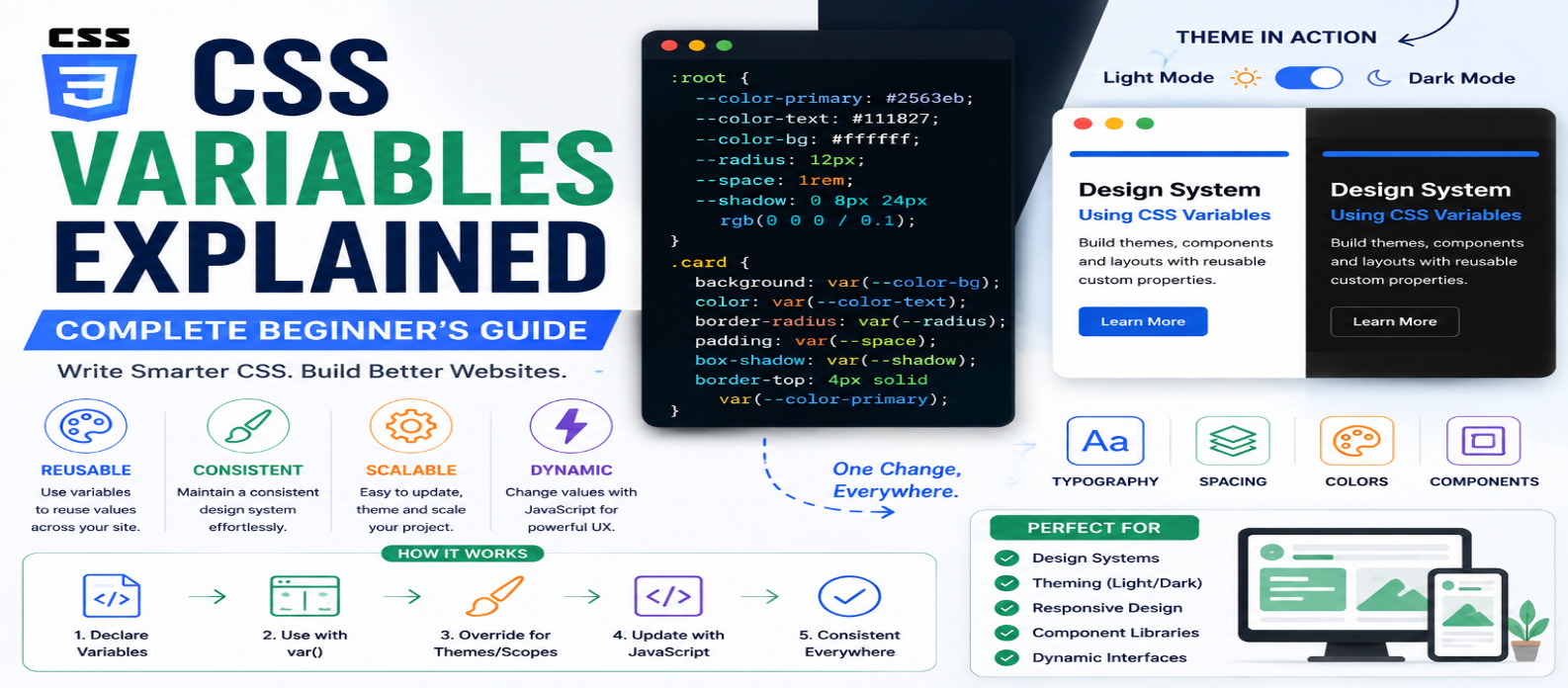
"Learn CSS variables from scratch with practical examples covering custom properties, var(), , scope, inheritance, fallbacks, themes, responsive values, design tokens, and JavaScript integration."
CSS Variables Explained: Complete Beginner's Guide for 2026
Imagine using the same blue color in 30 places across a website. Later, the design changes and that blue needs to become purple.
Without a reusable value, you may need to find and replace the color throughout your stylesheet.
CSS custom properties, commonly called CSS variables, provide a better approach. You can define a value once, give it a meaningful name, and reuse it throughout your CSS.
They are useful for much more than colors. CSS variables can manage spacing, typography, component settings, responsive values, themes, and even values changed dynamically with JavaScript.
What Are CSS Variables?
A CSS custom property is a named value defined using a name beginning with two hyphens:
:root {
  --primary-color: #2563eb;
}
You access it using the var() function:
.button {
  background-color: var(--primary-color);
}
If you later change:
--primary-color: #7c3aed;every declaration using that variable can receive the new value automatically according to normal CSS rules.
The basic pattern is:
--variable-name: value;

property: var(--variable-name);
Why Use CSS Variables?
Consider this stylesheet:
.button {
  background: #2563eb;
}

.link {
  color: #2563eb;
}

.badge {
  border-color: #2563eb;
}
The same value appears repeatedly.
Using a custom property:
:root {
  --brand-color: #2563eb;
}

.button {
  background: var(--brand-color);
}

.link {
  color: var(--brand-color);
}

.badge {
  border-color: var(--brand-color);
}
Now the value has meaning.
--brand-color communicates why the color exists rather than only what its hexadecimal value is.
What Is :root?
You'll frequently see CSS variables declared inside:
:root {
  --text-color: #222;
  --background-color: #fff;
}
:root selects the document's root element. In HTML, that's the <html> element.
Variables declared there are commonly used as global design values because descendants can inherit custom properties.
This makes :root useful for values shared throughout a site.
CSS Variables Can Store More Than Colors
Custom properties can contain many kinds of CSS values.
:root {
  --brand: #2563eb;
  --space: 1rem;
  --radius: 12px;
  --container: 1200px;
  --shadow: 0 8px 30px rgb(0 0 0 / 0.1);
}
Then:
.card {
  padding: var(--space);
  border-radius: var(--radius);
  box-shadow: var(--shadow);
}
Useful candidates include:
Colors → Spacing → Font Sizes → Borders → Shadows → Component Sizes
Variables are particularly valuable when a value represents part of your design system.
Understanding Scope
CSS variables don't have to be global.
You can define them on individual elements:
.card {
  --card-color: #2563eb;

  border-top:
    4px solid var(--card-color);
}
The variable is available to that element and can be inherited by its descendants.
This allows components to maintain their own configurable values.
For example:
.alert {
  --accent: #2563eb;
  border-left: 4px solid var(--accent);
}

.alert.warning {
  --accent: #f59e0b;
}

.alert.error {
  --accent: #dc2626;
}
The component's structure remains the same while the custom property changes its appearance.
CSS Variables and Inheritance
Custom properties normally participate in CSS inheritance.
Example:
.article {
  --accent: green;
}

.article a {
  color: var(--accent);
}
The link can use --accent because it inherits the value from its ancestor.
This makes custom properties powerful for component-level theming.
However, remember that the normal cascade still matters.
Specificity, inheritance, source order, and scope can all influence which value is ultimately used.
Using Fallback Values
The var() function can provide a fallback:
.button {
  color: var(--button-text, white);
}
If --button-text isn't defined appropriately, white can be used as the fallback.
Another example:
.card {
  padding: var(--card-padding, 1rem);
}
Fallbacks are useful for components that provide sensible defaults while allowing customization.
Creating Light and Dark Themes
CSS variables make themes much easier to manage.
Start with default values:
:root {
  --background: #ffffff;
  --text: #111827;
  --surface: #f3f4f6;
}
Then override them for dark mode:
@media (prefers-color-scheme: dark) {
  :root {
    --background: #111827;
    --text: #f9fafb;
    --surface: #1f2937;
  }
}
Your components don't need separate dark-mode rules:
body {
  background: var(--background);
  color: var(--text);
}

.card {
  background: var(--surface);
}
The components simply consume semantic variables.
User-Controlled Themes
You can also apply variables through a class or data attribute:
:root {
  --background: white;
  --text: #111;
}

[data-theme="dark"] {
  --background: #111;
  --text: white;
}
Changing the attribute changes the values used throughout the interface.
This separates:
Theme values → Component styling
and prevents every component from needing completely separate theme CSS.
Responsive CSS Variables
Custom properties work inside media queries.
:root {
  --page-padding: 1rem;
}

@media (min-width: 900px) {
  :root {
    --page-padding: 2rem;
  }
}
Components can simply use:
.container {
  padding-inline: var(--page-padding);
}
Instead of rewriting the entire component at a breakpoint, you change only the design value.
You can also combine variables with fluid CSS:
:root {
  --heading-size:
    clamp(2rem, 5vw, 4rem);
}
Changing CSS Variables With JavaScript
Unlike variables processed before CSS reaches the browser, custom properties exist in the browser's styling system and can be changed dynamically.
For example:
document.documentElement.style.setProperty(
  "--brand-color",
  "#7c3aed"
);
This can be useful for:
- Theme controls
- User customization
- Interactive visualizations
- Dynamic component values
JavaScript can change one custom property while CSS continues controlling where that value is used.
CSS Variables vs Preprocessor Variables
CSS custom properties and variables from tools such as preprocessors aren't identical.
A preprocessor variable is typically resolved while generating CSS.
A CSS custom property remains part of the final CSS and participates in the browser's cascade.
That means custom properties can respond to:
Inheritance → Media Queries → Element Scope → State → JavaScript
This runtime behavior is one of their biggest advantages.
Naming CSS Variables
Names should communicate purpose.
Instead of:
--blue: #2563eb;
--small: 8px;
consider:
--color-primary: #2563eb;
--space-small: 0.5rem;
Even better, semantic design values can describe their role:
--color-text: #111827;
--color-surface: #ffffff;
--color-action: #2563eb;
If your primary color changes from blue to purple, a name such as --color-action can remain meaningful.
Practical Design Token Example
A small project might begin with:
:root {
  --color-primary: #2563eb;
  --color-text: #111827;
  --color-surface: #ffffff;

  --space-sm: 0.5rem;
  --space-md: 1rem;
  --space-lg: 2rem;

  --radius-sm: 6px;
  --radius-md: 12px;
}
Then components consume those values:
.card {
  color: var(--color-text);
  background: var(--color-surface);
  padding: var(--space-lg);
  border-radius: var(--radius-md);
}
This creates a small, reusable design vocabulary.
Common CSS Variable Mistakes
Making Every Value a Variable
Not every 3px or one-time value needs a custom property. Create variables when reuse, meaning, or configurability provides value.
Using Meaningless Names
--color-1 becomes confusing quickly. Prefer names that explain purpose.
Forgetting Scope
A variable defined inside one component may not be available elsewhere.
Ignoring the Cascade
Custom properties follow CSS rules. Unexpected values often come from inheritance or overrides.
Creating Too Many Global Variables
Component-specific values can remain scoped to components rather than turning :root into a huge collection of unrelated settings.
Conclusion
CSS variables make stylesheets easier to reuse, customize, and maintain.
Start with:
:root {
  --primary-color: #2563eb;
}
and use:
color: var(--primary-color);Then move into scope, inheritance, fallbacks, themes, responsive values, and JavaScript-controlled properties.
The biggest benefit isn't simply avoiding repeated values. CSS variables allow you to create a consistent vocabulary for your design so that components can share and adapt important styling decisions without duplicating CSS.
Get a Free Access To 200+ Free Tools:
|
Home Page |
|
|
Calculator Tools |
|
|
Text & Converter Tools |
|
|
PDF & Image Tools |
|
|
Games & Developer Tools |
|
|
Resume Builder |