
CSRF Attacks Explained: Complete Guide to Cross-Site Request Forgery
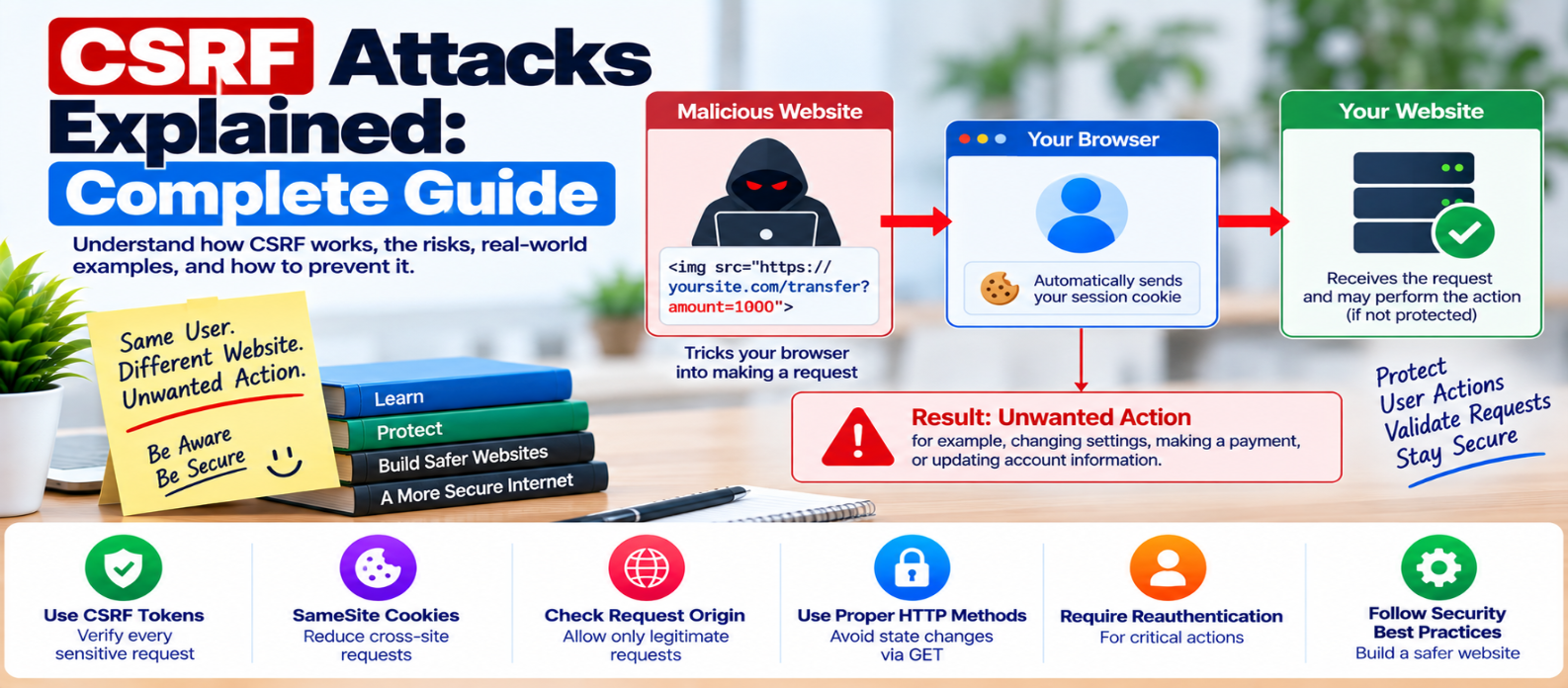
"Learn what Cross-Site Request Forgery (CSRF) is, how it abuses authenticated browser sessions, and how CSRF tokens, SameSite cookies, origin verification and reauthentication help prevent attacks."
CSRF Attacks Explained: Complete Guide
Cross-Site Request Forgery, commonly called CSRF, is a web security vulnerability where an attacker attempts to make a user's browser perform an unwanted action on a website where that user is already authenticated.
The important idea is that CSRF doesn't necessarily require stealing a user's password or session cookie.
Instead, it abuses the fact that a browser may automatically include authentication credentials with certain requests.
Let's see how that works—and how websites can prevent it.
What Is a CSRF Attack?
Imagine you're signed into a website.
Your browser has an authenticated session:
Browser
   ↓
Authenticated Session
   ↓
Your Account
Now imagine you visit another, malicious website.
That site attempts to cause your browser to send a request to the website where you're already logged in.
If the target application accepts the request without verifying that it genuinely came from its own authorized workflow, an unwanted action may occur.
Conceptually:
User Logs In
     ↓
Browser Has Authentication
     ↓
User Visits Malicious Page
     ↓
Unwanted Request Is Triggered
     ↓
Browser May Include Credentials
     ↓
Vulnerable Website Accepts Request
That is the central CSRF problem.
Why Does Authentication Matter?
Many websites maintain login sessions using cookies.
Depending on their configuration and request context, browsers can automatically attach relevant cookies when sending requests.
The server may therefore see:
Valid Session Cookie
        ↓
Authenticated User
But authentication alone doesn't prove that the user intentionally initiated a particular action.
This distinction is critical:
Authentication asks:
"Which user is making this request?"
CSRF protection asks:
"Did this request originate through an authorized interaction with our application?"
What Actions Are Most Sensitive?
CSRF is particularly relevant to requests that change application state.
Examples include:
- Changing an email address
- Updating account settings
- Changing a password
- Creating or deleting content
- Modifying permissions
- Making purchases
- Performing administrative actions
A read-only page should ideally remain read-only.
Avoid using GET requests for actions that modify data.
For example:
GET /delete-accountis a poor design because GET requests are expected to retrieve resources rather than perform destructive operations.
CSRF Tokens: A Primary Defense
A common CSRF defense is a unique, unpredictable token associated with the user's session or request context.
A form might conceptually contain:
<form method="post" action="/profile/update">
  <input type="hidden"
         name="csrf_token"
         value="[UNPREDICTABLE_TOKEN]">

  <!-- profile fields -->
</form>
When the request reaches the server, the application verifies the token.
The simplified flow becomes:
User Opens Legitimate Form
        ↓
Application Supplies CSRF Token
        ↓
User Submits Form
        ↓
Server Validates Token
        ↓
Valid? → Process Request
Invalid? → Reject Request
A third-party site shouldn't be able to simply guess a properly generated token.
CSRF Tokens Must Be Implemented Correctly
A token is useful only if it is designed and validated securely.
Good CSRF tokens should generally be:
- Unpredictable
- Properly associated with the protected context
- Validated on the server
- Protected from unnecessary exposure
Don't create predictable tokens from usernames, timestamps, sequential numbers, or similar values.
Where a mature framework provides built-in CSRF protection, using its established mechanism is usually safer than inventing a custom token system.
SameSite Cookies
The SameSite cookie attribute can limit when browsers send cookies with cross-site requests.
Common settings include:
SameSite=Strict
SameSite=Lax
SameSite=None
The right choice depends on the application's behavior.
Strict provides stronger cross-site restrictions but may interfere with legitimate workflows.
Lax permits certain common navigational situations while restricting many cross-site cookie scenarios.
None allows cross-site use and requires appropriate secure transport configuration in modern browsers.
SameSite cookies provide an important defensive layer, but applications should choose settings deliberately rather than assuming one value works for every site.
Check Origin Information
For sensitive requests, applications can also verify available request-origin information such as the Origin header.
The server can reject requests that clearly originate from an unauthorized site.
Conceptually:
Request
   ↓
Expected Origin?
 ↙          ↘
Yes          No
 ↓            ↓
Continue     Reject
Origin verification can complement token-based defenses.
It should be implemented carefully because deployment architectures, proxies, and browser behavior can affect request information.
Require Reauthentication for Critical Actions
Some operations deserve additional protection even when a user already has an active session.
Examples might include:
- Changing authentication credentials
- Disabling security features
- Performing highly sensitive account operations
- Changing critical administrative settings
Requiring the user to confirm a password, MFA challenge, or another authentication factor can reduce the impact of several attack scenarios.
This is step-up authentication, not a replacement for normal CSRF defenses.
Protect JSON APIs Correctly
Modern applications frequently communicate through APIs rather than traditional HTML forms.
Don't assume that using JSON automatically eliminates CSRF.
The actual risk depends on:
- How authentication works
- Whether credentials are automatically attached
- Which content types the endpoint accepts
- Cross-origin policies
- Server validation
If an API uses cookie-based authentication, its state-changing endpoints still deserve careful CSRF analysis.
CSRF vs XSS
CSRF and Cross-Site Scripting (XSS) are different vulnerabilities.
CSRF
Attempts to make a user's browser send an unwanted authenticated request.
XSS
Allows attacker-controlled active content to execute within the context of a vulnerable website.
A useful distinction:
CSRF → Abuses trusted authentication

XSS  → Abuses trusted website content
Strong XSS prevention is also important because XSS can sometimes undermine assumptions made by other browser-side security controls.
Common CSRF Prevention Mistakes
Avoid relying solely on:
"The user is logged in."
That is precisely the condition CSRF may exploit.
"It's a POST request."
POST alone doesn't prove the request is legitimate.
"The attacker doesn't know the session cookie."
The browser may attach authentication automatically in relevant contexts.
"We use HTTPS."
HTTPS protects network traffic; it doesn't by itself prove user intent.
"We use SameSite cookies."
They are valuable, but security should be designed around the application's complete authentication and request model.
CSRF Prevention Checklist
For sensitive state-changing requests, review whether you:
-
Use framework-provided CSRF protection where appropriate
-
Generate unpredictable CSRF tokens
-
Validate tokens on the server
-
Avoid state changes through GET requests
-
Configure
SameSitecookies appropriately -
Use
Securefor authentication cookies over HTTPS -
Consider
HttpOnlywhere appropriate -
Verify request origin where useful
-
Require reauthentication for highly sensitive operations
-
Review cookie-authenticated APIs
-
Reject unexpected request formats
-
Test CSRF protection after authentication changes
Conclusion
CSRF works by exploiting a gap between authentication and user intent.
A server may know exactly which account a request belongs to while still not knowing whether the user meant to perform that action.
The defensive model is:
Authenticated Request
        ↓
Validate CSRF Protection
        ↓
Check Request Context
        ↓
Authorize the Action
        ↓
Process Safely
Use established CSRF tokens, appropriate SameSite cookie policies, origin checks where useful, correct HTTP methods, and additional authentication for particularly sensitive actions.
The goal is simple:
Don't accept a sensitive request merely because it arrives with valid authentication. Verify that it belongs to a legitimate application interaction too.
Get a Free Access To 200+ Free Tools:
|
Home Page |
|
|
Calculator Tools |
|
|
Text & Converter Tools |
|
|
PDF & Image Tools |
|
|
Games & Developer Tools |
|
|
Resume Builder |