
Cookies Explained: Complete Guide for Beginners in 2026
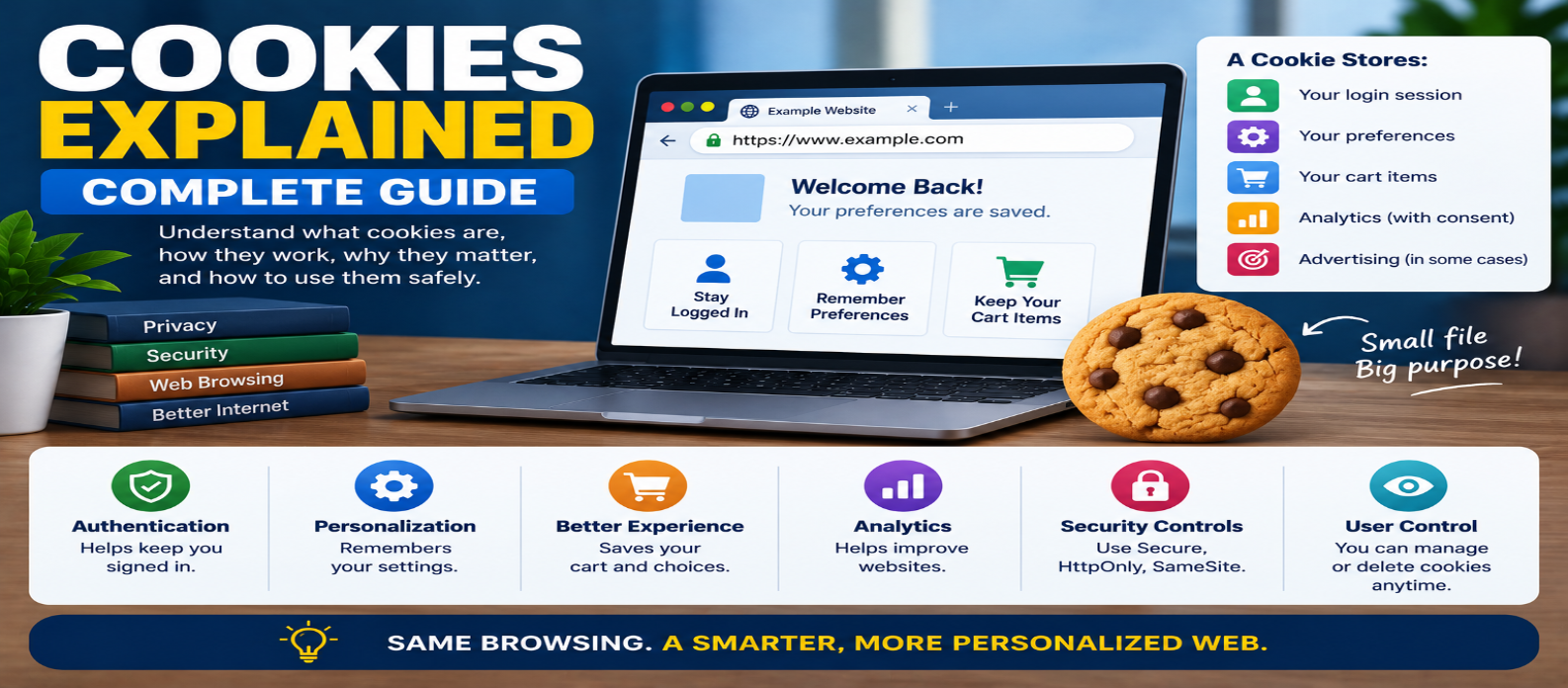
"Learn how browser cookies work, including first-party and third-party cookies, session and persistent cookies, Secure, HttpOnly, SameSite, authentication, tracking, privacy, and the difference between cookies, cache, and local storage."
Cookies Explained: Complete Guide for Beginners in 2026
You've probably seen a website message asking you to "accept cookies." But what exactly are cookies, why do websites use them, and are they always used for tracking?
A browser cookie is simply a small piece of data associated with a website that a browser can store and send with matching HTTP requests according to specific rules.
Cookies help websites remember information between requests. They can keep you signed in, remember preferences, support shopping carts, and—in some cases—enable analytics or advertising.
Here's how they actually work.
What Is a Cookie?
HTTP is fundamentally stateless. A server doesn't automatically remember every previous request from your browser.
Cookies provide one way to maintain state.
Suppose you log into a website. The server might return a header conceptually like:
Set-Cookie: session=abc123The browser stores the cookie.
On later matching requests, it may send:
Cookie: session=abc123The server can use that value to recognize the session.
The cookie itself doesn't necessarily contain your password or complete account information. Secure systems commonly use an opaque session identifier that refers to server-side session data.
How Cookies Work
A simplified cookie lifecycle looks like:
1. Browser requests website
          ↓
2. Server sends Set-Cookie
          ↓
3. Browser stores cookie
          ↓
4. User makes another request
          ↓
5. Browser sends matching cookie
          ↓
6. Server recognizes session/state
Whether a cookie is sent depends on rules such as its domain, path, security attributes, expiration, and browser policies.
Why Do Websites Use Cookies?
Cookies can serve many purposes.
Authentication
After login, a cookie can help maintain your authenticated session.
Without some form of session state, you might effectively need to prove who you are on every page request.
Preferences
A website might remember choices such as:
language=en
theme=dark
Shopping Carts
Cookies can help associate a browser with an existing shopping-cart session.
Security
Cookies can be involved in authentication and security mechanisms.
Analytics and Advertising
Some cookies are used to measure activity or support advertising and tracking.
This is why "cookies" shouldn't automatically be treated as synonymous with "tracking." Their purpose depends on how they're used.
Session Cookies vs Persistent Cookies
Cookies can differ in how long they remain stored.
Session Cookie
A session cookie doesn't include a persistent expiration time and is generally intended to last for the browser session.
Example:
Set-Cookie: session=abc123Persistent Cookie
A persistent cookie includes an expiration mechanism such as Max-Age or Expires.
Example:
Set-Cookie: preference=dark; Max-Age=2592000This example allows the cookie to persist for up to 30 days unless it is removed earlier.
Persistent doesn't mean permanent. Cookies can expire, be deleted by users, or be removed by browser policies.
First-Party vs Third-Party Cookies
This distinction is important for modern web privacy.
First-Party Context
If you're visiting:
shop.example.comcookies associated with the site you're interacting with can support functions such as login sessions and preferences.
Third-Party Context
Web pages can include resources from other sites, such as advertising, analytics, embedded media, or widgets.
Cookies associated with those other sites may be considered third-party in that context.
Historically, third-party cookies have been widely used for cross-site advertising and tracking.
Modern browsers increasingly restrict cross-site cookie behavior, and privacy controls continue to evolve.
What's Inside a Cookie?
A cookie usually contains a name and value:
theme=darkIt can also have attributes controlling its behavior:
Set-Cookie: session=abc123;
Secure;
HttpOnly;
SameSite=Lax;
Path=/
Those attributes are extremely important for security.
What Does Secure Mean?
A cookie with the Secure attribute is sent only over secure connections such as HTTPS, subject to browser rules.
Example:
Set-Cookie: session=abc123; SecureAuthentication cookies should normally be protected appropriately and used with HTTPS.
Secure doesn't encrypt the cookie inside the browser. It controls when the browser transmits it.
What Is HttpOnly?
JavaScript can normally access some cookies through:
document.cookieA cookie marked:
HttpOnlyisn't exposed through normal client-side JavaScript cookie APIs.
This can reduce the risk of sensitive session cookies being directly stolen through certain cross-site scripting attacks.
It doesn't prevent XSS itself, so secure coding is still necessary.
What Is SameSite?
SameSite helps control whether cookies are sent with cross-site requests.
Common values are:
Strict
Lax
None
Strict
Provides strong restrictions on cross-site sending.
Lax
Allows cookies in some cross-site navigation situations while restricting others.
None
Allows cross-site use when browser requirements are satisfied. Cookies using SameSite=None are generally required to also use Secure.
Choosing the right value depends on how the application works.
SameSite is also an important defense layer against certain Cross-Site Request Forgery (CSRF) attacks.
Cookie Domain and Path
Cookies don't automatically apply to every possible website or URL.
Their scope can be controlled.
For example:
Path=/accountlimits the cookie's path scope.
Domain rules determine which hosts can receive a cookie.
This is why a cookie created for one unrelated website isn't simply sent to every website you visit.
Browsers decide whether a cookie matches a request before attaching it.
Can Cookies Store Passwords?
They technically store text values, but websites shouldn't store plaintext passwords in cookies.
A safer authentication design commonly works like:
Login Credentials
      ↓
Server verifies user
      ↓
Session created
      ↓
Session identifier stored in cookie
      ↓
Future requests reference session
Sensitive authentication cookies should use appropriate security attributes and unpredictable values.
Are Cookies Dangerous?
Cookies themselves aren't programs.
They don't execute like JavaScript applications and can't independently install software on your computer.
The risks come from what information they contain and how websites use or protect them.
Poorly secured cookies can contribute to problems such as:
- Session theft
- Account compromise
- Cross-site tracking
- Privacy concerns
That's why cookie security and browser protections matter.
Cookies vs Browser Cache
These are completely different.
Cookies
Store small pieces of state or information associated with websites.
session=abc123
theme=dark
Browser Cache
Stores reusable website responses and resources:
logo.webp
styles.css
app.js
Clearing your cache therefore isn't the same as deleting cookies.
Deleting cookies may sign you out of websites, while clearing cached files usually forces resources to be downloaded again.
Cookies vs Local Storage
Web browsers also provide storage APIs such as localStorage.
Example:
localStorage.setItem("theme", "dark");One major difference is that localStorage values aren't automatically attached to every matching HTTP request.
Cookies can be.
This makes cookies useful for server-managed sessions but also means cookie size and scope should be controlled carefully.
Sensitive authentication tokens generally shouldn't be placed into browser storage without considering the application's security model.
Why Do Websites Show Cookie Banners?
Some websites use cookies or similar technologies that may require disclosure, consent, or user controls depending on their purpose and applicable privacy laws.
That's why you may see choices such as:
Accept All
Reject Optional
Manage Preferences
Not every cookie necessarily serves the same purpose.
A useful consent system may separate categories such as:
- Strictly necessary
- Preferences
- Analytics
- Advertising
The exact legal requirements depend on the website's users, location, technologies, and applicable laws.
What Happens If You Disable Cookies?
The effect depends on the website.
Some features may stop working correctly, including:
- Staying logged in
- Shopping carts
- Saved preferences
- Certain security features
- Personalized experiences
Blocking third-party cookies may have much less effect on core website functionality than blocking all cookies.
Modern browsers provide increasingly detailed privacy controls rather than treating every cookie identically.
How Long Should Cookies Last?
There's no universal correct duration.
A login session might need a different lifetime from a language preference.
Ask:
Why does this cookie exist?
Then choose the shortest practical lifetime for that purpose.
For example:
Temporary session → Short lifetime
Remembered preference → Longer lifetime
Sensitive authentication → Carefully controlled
Avoid storing data indefinitely simply because it's convenient.
Good Cookie Practices for Developers
When using cookies:
Use HTTPS for production websites.
Use Secure for sensitive cookies where appropriate.
Use HttpOnly when JavaScript doesn't need access.
Configure SameSite intentionally.
Limit Domain and Path scope.
Avoid storing unnecessary sensitive information.
Set reasonable expiration periods.
Provide privacy controls when required.
Most importantly, treat authentication cookies as security-sensitive credentials.
Common Cookie Misconceptions
"All Cookies Track You"
No. Cookies can also handle essential functions such as authentication and preferences.
"Cookies Are Programs"
They're data, not executable applications.
"Deleting Cache Deletes Cookies"
Cache and cookies are separate storage mechanisms.
"Incognito Mode Means Websites Can't Use Cookies"
Private browsing sessions can still use cookies while the session is active, although storage and privacy behavior differs from normal browsing.
"Cookies Automatically Contain My Password"
Proper authentication systems shouldn't store plaintext passwords in cookies.
Cookies in One Diagram
BROWSER
   ↓
Request Website
   ↓
SERVER
   ↓
Set-Cookie
   ↓
BROWSER STORES COOKIE
   ↓
Later Request
   ↓
Matching Cookie Sent
   ↓
SERVER RECOGNIZES STATE
That's the fundamental mechanism.
Conclusion
Browser cookies are small pieces of data that help websites maintain information across otherwise separate HTTP requests.
They can support:
Authentication → Keep users signed in
Preferences → Remember settings
Sessions → Maintain application state
Analytics → Measure activity
Advertising → Support targeting and measurement
Cookies aren't automatically good or bad. Their impact depends on what they store, how they're secured, how long they remain, where they're sent, and how transparently they're used.
For developers, understanding Secure, HttpOnly, SameSite, expiration, Domain, and Path is especially important. For users, understanding the difference between functional cookies and tracking technologies makes browser privacy controls much easier to evaluate.
Get a Free Access To 200+ Free Tools:
|
Home Page |
|
|
Calculator Tools |
|
|
Text & Converter Tools |
|
|
PDF & Image Tools |
|
|
Games & Developer Tools |
|
|
Resume Builder |