
CDN Explained: How Content Delivery Networks Work in 2026
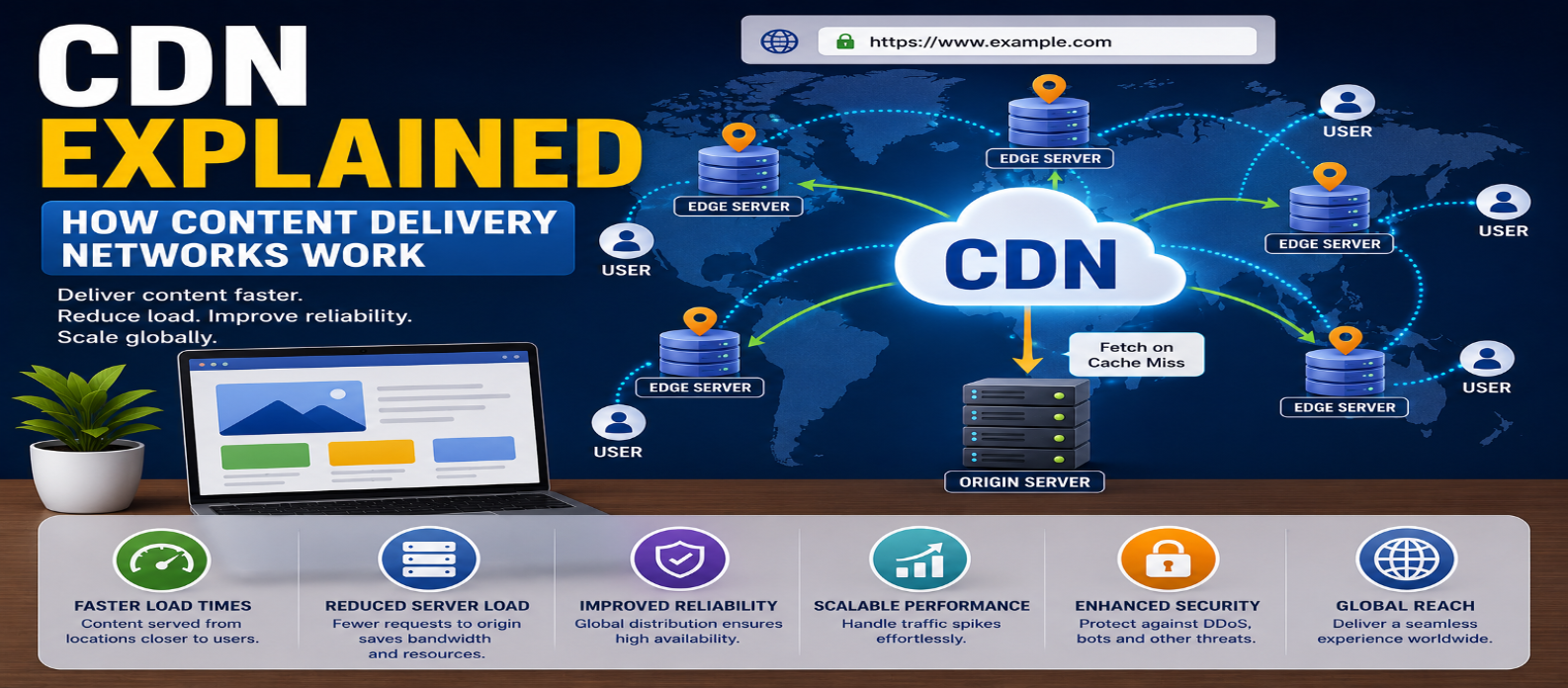
"Learn how a CDN works, including origin and edge servers, cache hits and misses, TTL, Anycast, browser caching, dynamic content, performance, security, and when your website needs a Content Delivery Network."
CDN Explained: How Content Delivery Networks Work
A visitor in India opens a website hosted on a server thousands of kilometers away. Every image, stylesheet, script, and video requested directly from that origin has distance and network conditions working against it.
A Content Delivery Network (CDN) helps by distributing content across geographically distributed infrastructure so users can often receive cacheable resources from a location closer to them.
But a CDN doesn't simply "copy your entire website everywhere." Understanding what actually happens makes CDN configuration much easier.
What Is a CDN?
CDN stands for Content Delivery Network.
It is a distributed network of servers designed to deliver web content efficiently from locations closer to users or otherwise optimized for delivery.
Without a CDN:
Visitor
   ↓
Origin Server
With a CDN:
Visitor
   ↓
Nearby CDN Edge
   ↓
Origin Server when needed
The CDN sits between visitors and the origin infrastructure.
What Is an Origin Server?
The origin server is where the original version of your website or application content is hosted.
It may contain or generate:
- HTML
- Images
- CSS
- JavaScript
- Videos
- Downloads
- API responses
A CDN doesn't necessarily replace the origin.
Instead, it can retrieve content from the origin, cache eligible resources, and deliver them to future visitors.
What Is an Edge Server?
CDN providers operate infrastructure in many geographic locations.
Servers at these locations are commonly called edge servers or edge locations.
Suppose your origin is far from a visitor.
Without an edge:
Visitor ─────────────────→ OriginWith a CDN:
Visitor → Nearby Edge
              ↓
           Origin
       when necessary
Reducing the network distance for frequently requested resources can lower latency and improve loading performance.
How Does a CDN Work?
Imagine your website contains:
/images/product.jpgA visitor requests that image.
The process might look like this:
1. Request Reaches the CDN
The website's DNS and CDN configuration direct the request through CDN infrastructure.
2. CDN Checks Its Cache
The edge checks whether it already has a valid cached copy.
3. Cache Hit
If the resource is cached and still valid:
Visitor
   ↓
CDN Edge
   ↓
Cached Image
The origin doesn't need to serve that request.
4. Cache Miss
If the resource isn't cached:
Visitor
   ↓
CDN Edge
   ↓
Origin Server
The edge requests the content from the origin.
5. Content Can Be Cached
If caching rules allow it, the CDN stores the response temporarily.
Future requests can then be served from the edge.
Cache Hit vs Cache Miss
These two terms are fundamental.
Cache Hit
The CDN already has a usable cached response.
Request → Edge Cache → ResponseThis is generally faster and reduces work for the origin.
Cache Miss
The required content isn't available in the edge cache.
Request → Edge → Origin → Edge → VisitorThe first request may therefore take longer than subsequent cached requests.
What Content Can a CDN Cache?
CDNs commonly cache static resources such as:
- Images
- CSS
- JavaScript
- Fonts
- Videos
- Downloadable files
HTML and API responses can also be cached, but they require more careful rules because their content may vary by user, location, cookies, authentication, or application state.
For example, caching this publicly:
/accountcould be dangerous if it contains private user information.
Caching must match how the application works.
How Does the CDN Choose an Edge Location?
"Nearest server" is a useful beginner explanation, but the real decision can be more sophisticated.
CDNs may consider:
- Network topology
- Latency
- Routing
- Server availability
- Capacity
- Geographic location
- Traffic conditions
Technologies such as DNS-based routing and Anycast can help direct users toward appropriate CDN infrastructure.
The geographically closest data center isn't always the network-fastest one.
What Is Anycast?
With Anycast, multiple network locations can advertise the same IP address.
Internet routing can then direct traffic toward an appropriate location based on routing conditions.
Conceptually:
          ┌→ Edge A
User → CDN IP → Edge B
          └→ Edge C
This is useful for globally distributed services because users don't all need to connect to one physical server.
What Is CDN Caching TTL?
Cached resources shouldn't necessarily remain at the edge forever.
A TTL (Time to Live) helps determine how long a cached response remains reusable.
For example:
Cache TTL: 1 hourAfter the cached content expires, the CDN may need to revalidate it or retrieve an updated version from the origin.
Caching behavior can also be influenced by HTTP headers such as:
Cache-Control
Expires
ETag
Last-Modified
Correct caching balances freshness and performance.
What Happens When You Update a File?
Suppose the CDN cached:
style.cssand you upload a new version.
Some edge locations may still have the previous cached version until it expires or is invalidated.
One solution is cache purging, which asks the CDN to remove cached content.
Another common technique is versioned or hashed filenames:
style.a81c92.cssWhen the file changes, its name changes, so browsers and CDN caches request the new resource.
Does a CDN Help Dynamic Websites?
Yes, but not everything needs to be cached.
A dynamic site might use:
Static Images → CDN Cache
CSS           → CDN Cache
JavaScript    → CDN Cache
Public HTML   → Possibly Cache
User Account  → Origin/Application
Checkout      → Origin/Application
CDNs can also improve dynamic delivery through optimized network routing, connection reuse, compression, and other features even when responses aren't fully cached.
The exact capabilities depend on the CDN.
CDN vs Web Hosting
A CDN and hosting are different.
Web hosting provides the origin infrastructure where the website runs or is stored.
CDN distributes or accelerates content delivery.
Conceptually:
Hosting
  ↓
Origin Website
  ↓
CDN
  ↓
Visitors Worldwide
Some modern platforms combine hosting and CDN functionality, but the concepts remain distinct.
CDN vs Browser Cache
These are also different.
CDN Cache
Stored on CDN infrastructure and shared across requests according to caching rules.
Browser Cache
Stored on an individual user's device.
The journey might be:
Browser Cache
     ↓ if unavailable
CDN Cache
     ↓ if unavailable
Origin Server
Multiple caching layers can work together.
How CDNs Improve Performance
A properly configured CDN can improve performance by:
Reducing Latency
Content can be delivered from infrastructure closer to users.
Reducing Origin Traffic
Cached requests don't always reach the origin.
Handling Traffic Spikes
Distributed infrastructure can absorb substantial request volume, depending on the CDN and configuration.
Optimizing Content Delivery
Some CDNs provide compression, image optimization, protocol improvements, and connection optimization.
A CDN cannot fix every performance problem, however. Slow application code or inefficient database queries may still require optimization at the origin.
CDN and Website Security
Modern CDNs can provide more than caching.
Depending on the provider, features may include:
- DDoS mitigation
- Web Application Firewall (WAF)
- Bot management
- Rate limiting
- TLS termination
- Traffic filtering
Because traffic passes through CDN infrastructure, malicious requests can sometimes be filtered before reaching the origin.
But using a CDN doesn't automatically make a website secure.
The application and origin still require proper protection.
Does Every Website Need a CDN?
Not necessarily.
A CDN is especially useful when:
- Visitors are geographically distributed
- The website serves many static assets
- Traffic volume is significant
- Large files are delivered
- Origin load needs to be reduced
- Global performance matters
A small local website whose visitors and server are in the same region may see less dramatic benefits.
Choose a CDN because it solves a real performance, reliability, or security requirement—not simply because every website "must" have one.
Common CDN Mistakes
Caching Private Content
Never assume every page is safe to cache publicly.
Using Extremely Long Cache Times Without Versioning
Visitors may receive outdated resources.
Purging Everything Too Often
Frequent full-cache purges reduce the benefits of caching.
Ignoring the Origin
The origin still matters because cache misses and dynamic requests may reach it.
Assuming a CDN Automatically Makes a Site Fast
Large JavaScript bundles, unoptimized images, and slow backend code still affect performance.
CDN Request Flow in One Diagram
VISITOR
   ↓
CDN EDGE
   ↓
Is content cached?
   ↓
 ┌─────────────┐
YES            NO
 ↓              ↓
CACHE HIT     ORIGIN
 ↓              ↓
RESPONSE      FETCH CONTENT
                ↓
             CACHE IT
                ↓
             RESPONSE
That's the central idea behind CDN caching.
Conclusion
A Content Delivery Network improves web delivery by placing distributed infrastructure between visitors and the origin server.
The essential flow is:
Visitor → CDN Edge → Cache Check → Origin if Needed → Response
The most important concepts are:
Origin → Original content source
Edge → Distributed CDN location
Cache Hit → Content already available
Cache Miss → Content must be retrieved
TTL → Controls cache freshness
Purge → Removes cached content
A well-configured CDN can reduce latency, lower origin traffic, improve scalability, and add useful security capabilities. But the best results come from combining CDN delivery with optimized code, sensible caching rules, secure infrastructure, and a fast origin.
Get a Free Access To 200+ Free Tools:
|
Home Page |
|
|
Calculator Tools |
|
|
Text & Converter Tools |
|
|
PDF & Image Tools |
|
|
Games & Developer Tools |
|
|
Resume Builder |