
Authentication vs Authorization: Complete Guide
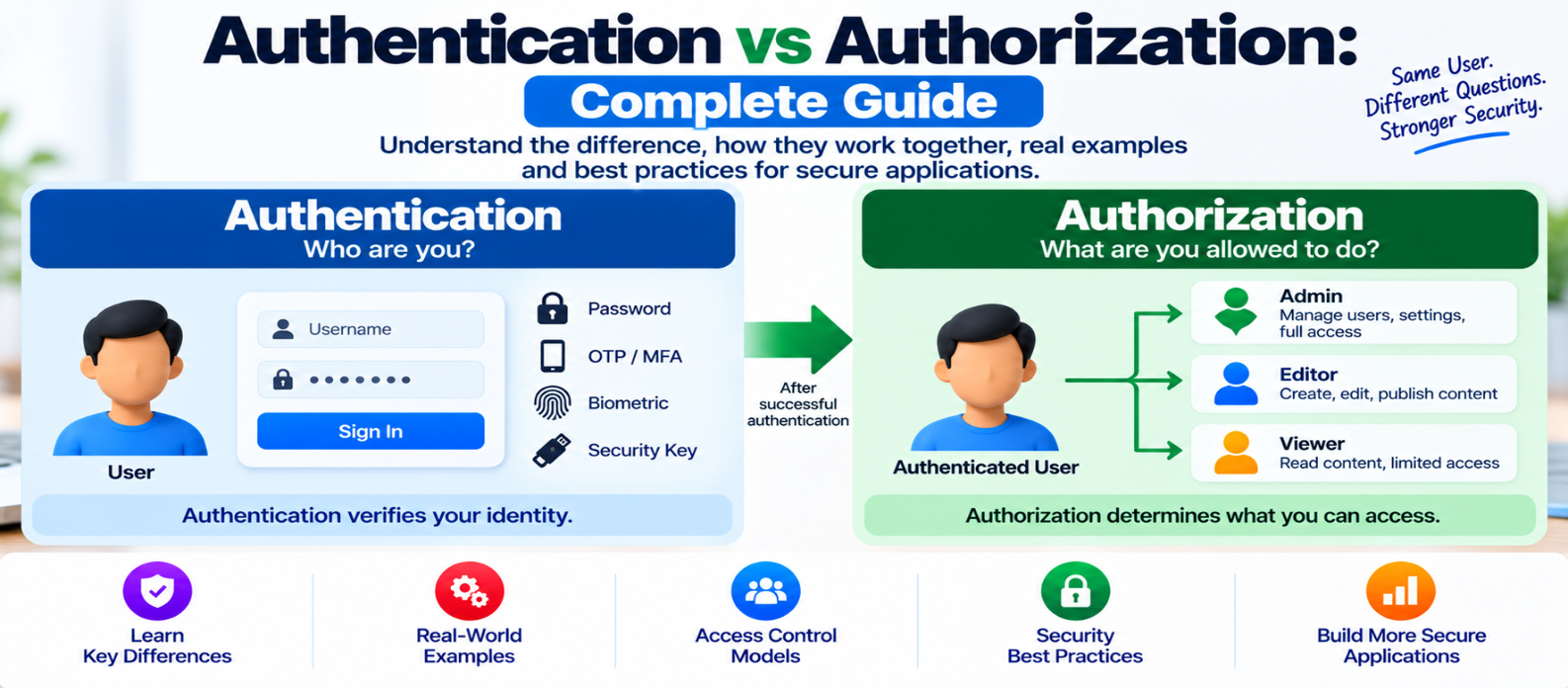
"Learn the difference between authentication and authorization, how login and access control work, common authentication factors and authorization models, and best practices for protecting website and application resources."
Authentication vs Authorization: Complete Guide
Authentication and authorization are two of the most important concepts in website and application security.
They are closely related, so they are often confused. But they answer two completely different questions:
Authentication: Who are you?
Authorization: What are you allowed to do?
A secure application usually needs both.
Authentication vs Authorization at a Glance
Consider an employee entering a secure office building.
First, the employee presents an ID card to prove who they are. That's authentication.
After entering, the employee may have access to the general office but not the server room. That's authorization.
The same concept applies online:
User
  ↓
Authentication
"Who are you?"
  ↓
Authorization
"What can you access?"
  ↓
Protected Resource
Authentication normally happens before authorization decisions can be made for a known user.
What Is Authentication?
Authentication is the process of verifying an identity.
When you sign into a website using an account, the application needs a way to determine whether you really control that account.
Common authentication factors fall into categories such as:
Something You Know
Examples:
- Password
- PIN
Something You Have
Examples:
- Security key
- Authenticator device
- One-time credential delivered through an approved mechanism
Something You Are
Examples can include biometric characteristics used by a device or authentication system.
Using more than one independent factor can provide multi-factor authentication (MFA).
What Happens During Login?
A simplified password-based login might work like this:
User enters credentials
        ↓
Server verifies them
        ↓
Valid?
   ↙          ↘
 Yes          No
  ↓            ↓
Session       Reject
created       login
The website should not store user passwords as readable plain text.
Password-based systems should use an established password-hashing algorithm designed for password storage, along with appropriate configuration.
After successful authentication, the application commonly establishes a session or issues an authentication token.
What Is Authorization?
Authorization determines whether an authenticated identity has permission to perform a particular action or access a particular resource.
Suppose an application has three roles:
Viewer
  ↓
Read articles

Editor
  ↓
Read + Edit articles

Administrator
  ↓
Read + Edit + Manage users
Knowing that someone is logged in doesn't automatically mean they should have administrator privileges.
Every sensitive action needs an appropriate authorization decision.
A Practical Example
Imagine an online store.
A customer signs in successfully.
That proves their identity:
Authentication ✓They request:
/account/orders/1234The application must then determine whether order 1234 actually belongs to that customer or whether they otherwise have permission to view it.
That is:
Authorization ✓ / ✗A serious vulnerability can occur if the server simply assumes:
"The user is logged in, so they can view any order."
Authentication succeeded, but authorization failed.
Authentication vs Authorization Comparison
| Authentication | Authorization |
|---|---|
| Verifies identity | Verifies permission |
| Asks "Who are you?" | Asks "What can you do?" |
| Usually occurs first | Usually follows authentication |
| Uses credentials/factors | Uses permissions and policies |
| Establishes an identity | Controls access to resources |
| Example: login | Example: admin-only page |
The two processes work together but solve different security problems.
Common Authorization Models
Applications can organize permissions in different ways.
Role-Based Access Control
RBAC assigns permissions according to roles.
For example:
Administrator → Manage users
Editor        → Publish content
Viewer        → Read content
This can be easy to understand when responsibilities map naturally to roles.
Attribute-Based Access Control
ABAC makes decisions using attributes and policies.
A decision could consider information about:
- User
- Resource
- Requested action
- Relevant context
This can support more detailed rules than simple roles.
Resource Ownership
Many applications also authorize actions according to ownership.
For example:
Can user edit document?
        ↓
Does user own document
OR have editing permission?
        ↓
Allow / Deny
The best approach depends on the application's requirements.
Authorization Must Happen on the Server
One of the most important rules is:
Don't rely on the interface to enforce permissions.
Suppose non-administrators don't see this button:
Delete UserHiding it improves the interface, but it doesn't provide security.
Someone may still attempt to send the underlying request directly.
The server must independently verify:
Authenticated?
      ↓
Authorized for this action?
      ↓
Allow or Reject
Client-side restrictions should never replace server-side authorization.
Apply Least Privilege
The principle of least privilege means giving users and systems only the access they actually need.
If someone only publishes articles, they may not need permission to:
- Manage administrator accounts
- Change billing information
- Modify server configuration
- Export customer data
Fewer unnecessary privileges mean fewer opportunities for mistakes or compromised accounts to cause widespread damage.
Authentication Security Best Practices
Strengthen authentication by considering:
- Strong password policies
- Secure password hashing
- MFA for sensitive accounts
- Login rate limiting or other abuse protections
- Secure password reset flows
- Protected session cookies
- Session expiration
- Reauthentication for highly sensitive operations
- HTTPS throughout the application
Password reset functionality deserves the same security attention as normal login because it can provide another route into an account.
Authorization Security Best Practices
For authorization:
- Deny access by default
- Verify permissions server-side
- Check resource ownership
- Apply least privilege
- Review administrator privileges
- Don't trust user-supplied role information
- Centralize authorization logic where practical
- Test multiple user roles
- Review permissions when responsibilities change
A secure default is:
No explicit permission?
        ↓
       DENY
rather than assuming access should be allowed.
Common Authentication and Authorization Mistakes
Checking Login but Not Permission
Being authenticated doesn't grant unlimited access.
Trusting Hidden UI Elements
A hidden admin button isn't an authorization control.
Giving Everyone Administrator Access
Convenience shouldn't replace least privilege.
Forgetting Individual Resources
A customer authorized to view their own record shouldn't automatically see another customer's record.
Ignoring API Authorization
API endpoints need the same permission checks as browser pages.
Keeping Old Access Forever
Permissions should change when a user's responsibilities change.
Practical Security Checklist
Before deploying protected features, verify:
-
Users are authenticated securely
-
Passwords are stored using appropriate password hashing
-
MFA is available or required where appropriate
-
Sessions are protected
-
Sensitive actions require authorization
-
Authorization occurs server-side
-
Resource ownership is verified
-
API endpoints enforce permissions
-
Least privilege is applied
-
Access is denied by default
-
Administrator privileges are limited
-
Old accounts and permissions are reviewed
-
Multiple roles are tested
-
Sensitive actions can require reauthentication
Conclusion
Authentication and authorization protect different parts of the access-control process.
Remember the distinction:
Authentication
"Who are you?"
       ↓
Authorization
"What are you allowed to do?"
       ↓
Access
Strong authentication prevents unauthorized people from easily pretending to be legitimate users.
Strong authorization prevents legitimate identities from accessing resources or performing actions they shouldn't.
A secure application needs both.
Verify the identity, verify the permission, and never assume that being logged in means being allowed to do everything.
Get a Free Access To 200+ Free Tools:
|
Home Page |
|
|
Calculator Tools |
|
|
Text & Converter Tools |
|
|
PDF & Image Tools |
|
|
Games & Developer Tools |
|
|
Resume Builder |